 Get Halloween 15% for Limited Time on Lifetime & Bundle Deal

A bus tour website booking engine is the part of your site that turns a visitor into a seat on a coach: it shows departures, holds inventory, collects passenger details, takes payment, and issues a ticket. Unlike a simple point-to-point bus timetable, it has to handle fixed tour departures, multi-day itineraries, optional add-ons, and group bookings. This guide walks through the nine capabilities that decide whether a tour operator’s engine works or leaks bookings, plus the questions to ask before you buy or build one.
- What a Bus Tour Booking Engine Actually Does
- The 9 Features Your Booking Engine Must Have
- Platform Choice: Hosted, WordPress Plugin or Custom Build
- What to Check Before You Buy
- Pricing: What Drives the Cost
- Common Mistakes That Cost Bookings
- Build Versus Configure: A Realistic Timeline
- Frequently Asked Questions
- The Bottom Line
What a Bus Tour Booking Engine Actually Does
It sits between your tour catalogue and your payment gateway and performs five jobs reliably:
- Inventory control — it knows how many seats each departure has and stops selling when they are gone.
- Availability search — a customer picks a route, date, and passenger count and sees matching departures.
- Booking capture — passenger names, ages, pickup points, ID or passport details where required.
- Payment and confirmation — gateway or bank transfer, then a ticket and receipt sent automatically.
- Back-office management — manifests, seat allocation, cancellations and refunds for your staff.
The difference between a bus tour engine and a plain bus ticket engine is the shape of the product being sold. A tour departure is a scheduled event with a fixed route, a guide, and often an itinerary, so the engine must treat departure dates as the inventory unit rather than simple origin-to-destination trips.
The 9 Features Your Booking Engine Must Have
1. Departure-based inventory, not just routes
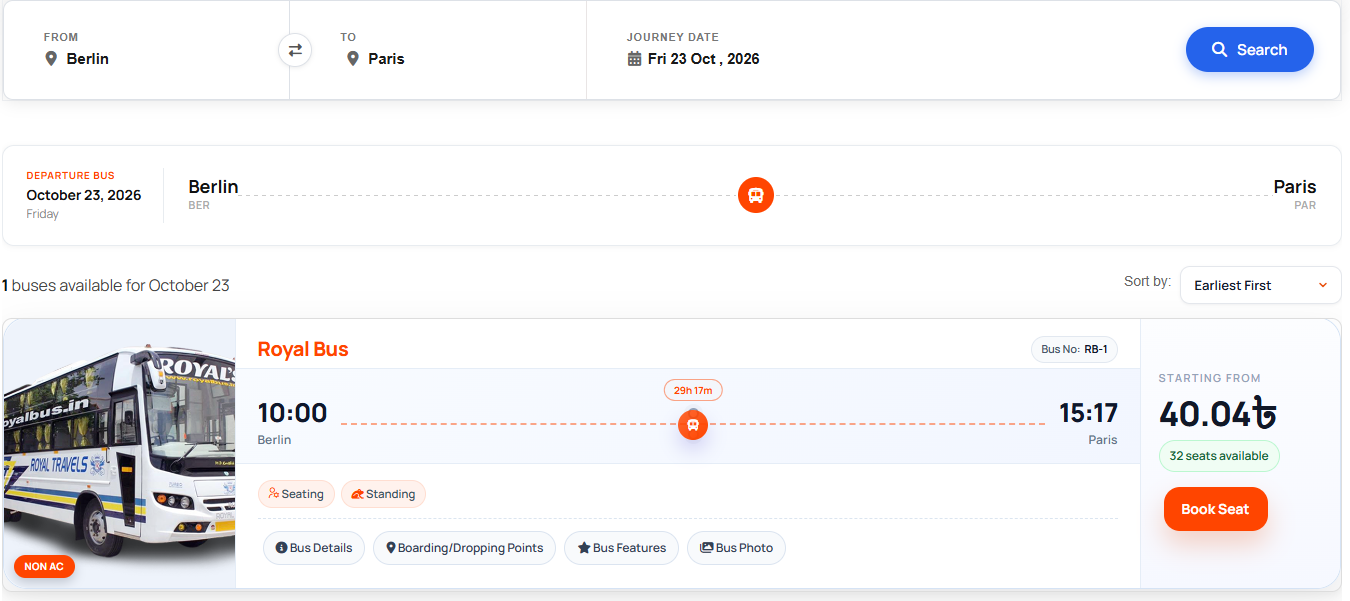
Selling tours means selling dated departures. Your engine should let you create a departure, attach a coach and a seat capacity to it, and close sales at a cut-off time. Many operators stop online sales 24 or 48 hours before departure and switch to phone booking only. Without a per-departure cap, two customers can pay for the same seat within seconds of each other.
2. A visual seat map with real seat states

Coach travellers care where they sit, and a seat map is the single most requested feature in tour checkout flows. The map should show taken, held, and available seats in distinct states, update in near-real time, and reflect the actual layout of the coach you are assigning (2+2, 2+1 sleeper, single-deck or double-decker). If your vehicle types vary across a season, the map must change with the assigned vehicle rather than being hard-coded.
3. Multi-day itinerary and stop picking
Tour passengers want to know where they will be and when. Store the itinerary against the departure so it prints on the ticket and appears in the confirmation email: departure point and time, each stop, overnight halts, meals included, and the return time. If you sell multi-day packages, the engine should also support boarding at intermediate stops with their own pickup times and prices.
4. Add-ons and optional extras

Meals, guide fees, hotel upgrades, entrance tickets, extra luggage, and insurance are all margin. A booking engine that cannot attach an optional extra line item forces your team to invoice outside the system, which breaks reporting and reconciliation. Look for extras that can be priced per passenger, per booking, or per departure. For a deeper look at how modular features extend a booking platform, see how addons extend your WordPress booking system.
5. Pickup and drop-off point management
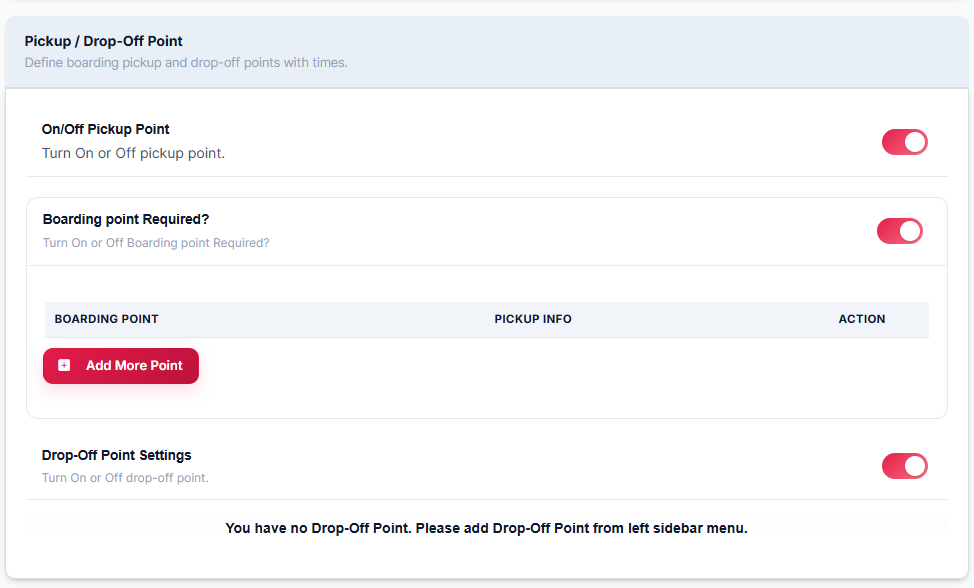
Tour coaches rarely have one boarding point. Define a list of pickup locations per departure with times and, ideally, small capacity limits for each; a hotel pickup can only take eight passengers, not forty. Map links in the confirmation email cut down the “where exactly do I stand?” calls on the morning of departure.
6. Payment options that match how your customers actually pay
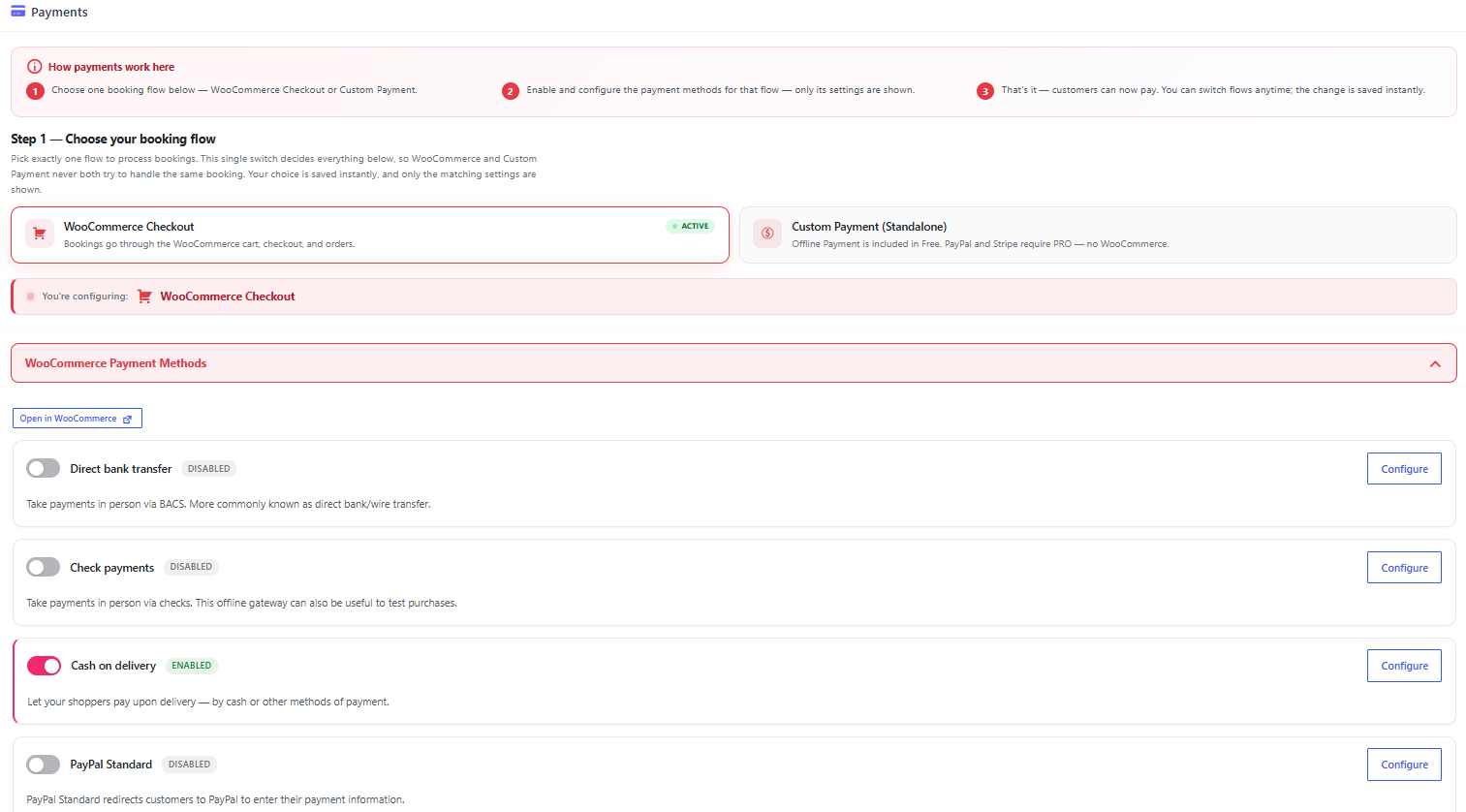
Domestic tour customers expect local wallets, bank transfer, and cash on boarding; international customers expect cards. Your engine should support a gateway, a manual or offline method for advance deposits, and a clear deposit-versus-balance rule for tours booked months ahead. Never invent fee assumptions; check current pricing with each gateway and your host before you promise customers a payment option.
7. Agent and reseller bookings with commission tracking
Many bus tour businesses sell through travel agents, hotels, and corporate desks. The engine needs separate agent accounts, agent-specific pricing or commission rates, and reports showing what each agent sold. Doing this in a spreadsheet alongside an online engine is the fastest way to lose track of who owes whom.
8. Multilingual and multi-currency checkout
Tour operators near borders or in tourist regions routinely sell in more than one language. Language should switch the whole flow search labels, seat map, ticket email, not just the marketing pages. Currency display should follow the same logic, with the gateway doing the actual conversion.
9. Cancellation rules, refunds and no-show handling
Publish a cancellation policy and have the system enforce it. A common structure is full refund before a cut-off date, partial refund inside the window, and no refund for no-shows, but the exact terms are yours. What matters technically is that the engine reverses the seat hold on cancellation so the seat reappears in inventory immediately, and that the refund or credit note is recorded against the original booking.
Platform Choice: Hosted, WordPress Plugin or Custom Build
There are three realistic routes, and they differ mostly in who owns the customer relationship.
| Route | Best for | Trade-off to accept |
|---|---|---|
| Marketplace or hosted ticket platform | Operators with no website and no marketing appetite | Commission per ticket, customers belong to the platform |
| WordPress plugin on your own site | Operators who want their own brand, SEO traffic and data | You manage hosting, updates and payment setup |
| Custom build | Large fleets with unusual workflows | Highest cost and slowest to change |
For most small and mid-sized tour operators, the plugin route gives the best balance: you keep the booking data and the customer list, and the seat-map and departure logic is already built and maintained by someone else. A WordPress engine also lets you publish route and itinerary pages that rank in search, which a marketplace listing will never do for you.
What to Check Before You Buy
- Seat locking behaviour. Ask how long a seat is held during checkout and what happens if the customer abandons payment midway.
- Departure cloning. If a weekly tour requires retyping every detail, your team will stop keeping the calendar accurate.
- Manifest export. Your driver or guide needs a printable or downloadable passenger list with pickup points.
- Email and SMS templates. Confirmation, reminder, and change-of-departure notices should all be editable.
- Ownership of data. Confirm you can export bookings, customers, and reports at any time.
- Support hours. Ask what happens when the engine fails on the morning of a sold-out departure.
Pricing: What Drives the Cost
Cost depends on seat volume, the number of departures, whether you need agent accounts, and how much payment processing you do. Most plugin licences are annual, and gateways charge per transaction, so your running cost scales with sales rather than staying flat. Because these figures change frequently, check current pricing directly with the vendor and your payment provider rather than relying on any number quoted in a blog post.
Common Mistakes That Cost Bookings
- Launching with a hard-coded seat layout that does not match the coaches you actually run.
- Allowing overselling because online seats and walk-in seats are tracked in two different places.
- Hiding the cancellation policy until after payment.
- No pickup point details in the confirmation, which floods your phone line on departure day.
- Ignoring mobile checkout, even though most tour searches happen on a phone.
If your problem is specifically the setup phase rather than feature selection, it is worth reading about the common mistakes when setting up a bus booking plugin, which covers configuration errors rather than the engine’s capabilities.
Build Versus Configure: A Realistic Timeline
A hosted account can be live in a day but limits your branding. A WordPress plugin install, theme setup, payment gateway connection, and a test departure usually takes a few days of focused work, plus content writing for route pages. A custom engine is a project measured in months. If you want the shortest practical path from zero to a working site, a step-by-step build is the sensible starting point; see how to create a bus booking website using a WordPress bus booking plugin. If instead you are comparing licence fees against a commercial platform, our free vs paid bus ticket booking software cost breakdown covers that decision from a budgeting angle rather than a feature one.
Frequently Asked Questions
How is a bus tour engine different from a bus ticket system?
A ticket system sells seats on a repeated route between two points. A tour engine sells dated departures with itineraries, guides, add-ons, and pickup points, so inventory is tied to a specific departure rather than a daily timetable.
Do I need a seat map for tours?
It is strongly recommended. Coach passengers choose seats next to family or by window preference, and a visible seat map reduces both support calls and double bookings. Seat map behaviour also affects how your staff read reservations on the back end.
Can I take a deposit instead of full payment for tours?
Yes, if the engine supports partial payment with a balance due date. This is common for tours booked weeks or months ahead, and it needs the system to flag bookings with an outstanding balance for your follow-up.
Should I sell tours through agents as well as online?
If agents bring you volume, yes, but only if the engine tracks their bookings separately and calculates commission automatically; otherwise, you will be reconciling agent statements by hand every month.
The Bottom Line
Choose a bus tour website booking engine by matching it to how you actually sell: dated departures with real seat maps, itinerary detail passengers can trust, optional extras that carry margin, and agent or multilingual support if your market needs them. Test the booking flow yourself on a phone before you launch, close the overselling gap between online and offline channels, and confirm all pricing, warranty, and support terms directly with the vendor; those numbers move too often to trust a snapshot from any article.