 Get BlackFriday 25% for Limited Time on Lifetime & 35% for Bundle Deal


If you run events on WordPress, “the future of RSVP plugins” probably means something practical to you: which capabilities are becoming standard, what your current setup is missing, and what to prepare for before your next season of events opens. The short answer is that RSVP plugins are moving from simple yes/no counters toward fully self-hosted event operations guest checkout, waitlists, QR check-in, automated reminders, and clean attendee data you own. None of this requires waiting for a new release; most of it can be set up on WordPress today. This guide explains where RSVP tooling is heading, why it matters, and how to get ready without rebuilding your site.
- What "RSVP plugin" means in 2026 and why the definition is widening
- Why self-hosted RSVP is gaining ground
- Seven shifts shaping the next generation of RSVP plugins
- What this means when you are choosing a plugin
- Preparing your WordPress site for where RSVPs are heading
- Honest limitations of the self-hosted RSVP approach
- A practical readiness plan
- Conclusion
What “RSVP plugin” means in 2026 and why the definition is widening
An RSVP plugin started life as a small utility: display an event, show a button, collect a name and an email, count responses. That job still matters. But the events people now register for online have become more complex paid workshops, multi-session conferences, capacity-limited dinners, hybrid meetups with a livestream link, community gatherings that need a headcount rather than a payment.
As a result, the category is splitting into two types of tools:
- Narrow RSVP tools that handle registration, capacity and notifications, and stay deliberately simple.
- Event management plugins that treat RSVP as one mode inside a wider system covering tickets, seating, calendars and attendee communication.
If you are choosing between the two, it helps to see how the tools actually differ feature by feature rather than by category label. Our comparison of WordPress RSVP plugins covers that selection ground. This article takes the next question instead: what capabilities are becoming expected, and how do you prepare for them?
Why self-hosted RSVP is gaining ground
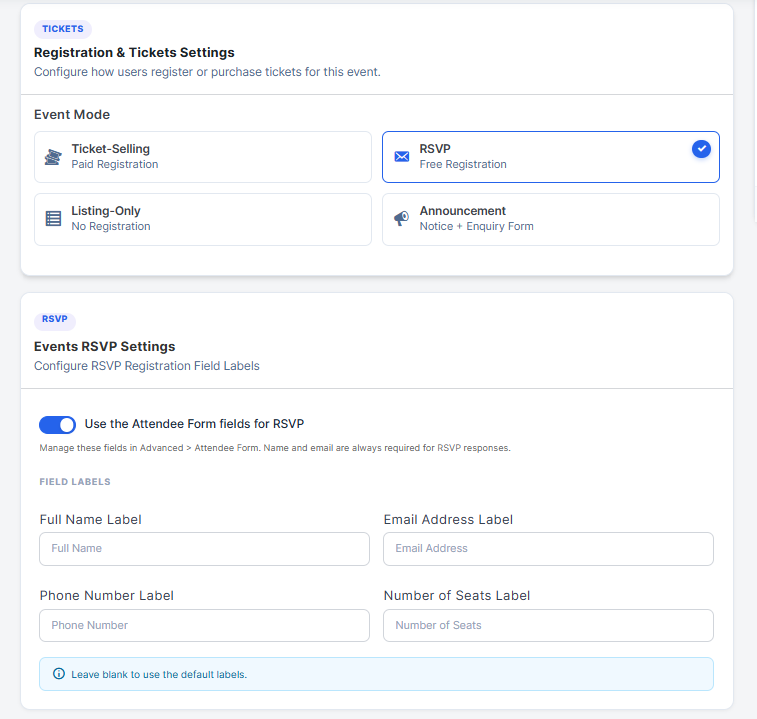
The biggest shift is not a feature; it is where the registration data lives.
For years, the default path was to create an event on a third-party platform and embed a form. That works, but it comes with trade-offs: attendee data lives on someone else’s system, per-ticket or per-registration fees apply, event pages usually inherit the platform’s design rather than yours, and you rely on that platform’s availability on the day your RSVPs open.
Running RSVPs inside WordPress reverses those trade-offs:
- You own the attendee list. Registrations stay in your database and can be exported, segmented, and reused for future events.
- Cost becomes predictable. No per-registration cut; the cost is your plugin licence and hosting.
- The registration funnel stays on one domain. Organisers who are already investing in landing-page and search visibility keep that traffic instead of pushing it to a third party.
- Integrations are native. Email marketing, WooCommerce, CRM, and analytics tools connect through the same stack your site already uses.
The trade-off is real, and worth stating plainly: self-hosted means you are responsible for hosting quality, backups, updates, and testing after WordPress core and plugin upgrades. If small organisers are weighing that decision, our breakdown of self-hosted scheduling versus SaaS alternatives walks through where each model fits.
Seven shifts shaping the next generation of RSVP plugins

Below are the directions that matter most for organisers, described by the practical outcome each one delivers rather than by marketing names. Availability varies by plugin; treat this as a requirements list to check against your own site.
1. Guest RSVP without forced account creation
Every registration form asks for a trade: effort versus data. A forced login before an RSVP adds friction exactly at the moment a person is most likely to abandon. The trend is toward lower-friction guest registration that still captures what you need to run the event.
That usually means email-only identification, optional phone capture for day-of contact, and an option to create a password later if the attendee wants a self-service portal. We cover the mechanics and the privacy trade-offs in guest bookings for WordPress events without a login.
2. Automation replacing manual follow-up
An RSVP is not the end of the job. It is the start of a sequence: confirmation, calendar invite, reminder, joining instructions, thank-you message. Handling that sequence by hand does not scale past the first hundred attendees.
Expect automation to become standard rather than an add-on capability: confirmation sent on registration, reminder scheduled for a configurable interval before the event, distinct messaging for waitlisted and confirmed guests, and a follow-up after the event closes. If you are still sending these manually, our step-by-step walkthrough on automating event confirmation emails and reminders is the most direct fix you can make this month.
3. Waitlists as a capacity-management tool, not an afterthought
A waitlist used to be an apology: the event was full, so here is a form. Forward-looking RSVP systems treat the waitlist as a measurable demand signal. Promoted attendees can be notified automatically in order, release conversions are tracked, and organisers can see how many additional seats a repeat session would fill.
Combined with capacity limits per session or ticket type, this turns a single event into scheduling data. There is a full implementation guide on adding a waitlist to your WordPress events site if you want to set it up now.
4. QR check-in as the default entry flow
Paper lists and name searches at the door are slowing things down. A unique QR code per registration, scanned against a live attendee list, gives fast entry, prevents duplicate check-ins, and produces an accurate attendance record that can be compared with RSVP numbers.
The useful part is not the scan itself; it is the gap it exposes between who said yes and who arrived. That ratio informs how much over-booking is sensible for future events and how hard your reminder sequence needs to work.
5. RSVP on top of your existing content and commerce
Registration increasingly sits inside the tools a site already runs. An RSVP page built inside the same install as WooCommerce means paid and free events can share a customer record, a confirmation-email system, coupon logic and refund policy. For mixed programmes, a free talk on Thursday and a paid workshop on Saturday, that shared layer removes a lot of duplicate admin.
Organisers who already take payments should think of RSVP as the free-tier entry point of the same funnel, rather than a separate feature that needs a separate plugin.
6. Mobile-first registration pages
Most RSVP traffic arrives from a link shared in a chat app or social feed, so the registration page is frequently opened on a phone. Practical expectations now include a single-column form, fast load time, genuine tap-target sizing, and a confirmation state that works as a bare link, no download required.
Test your own page by opening it on a mid-range phone with an average mobile connection. If a form field needs pinch-zooming, it will cost you registrations.
7. Consent and data handling built in
Registration forms collect personal data, so consent, retention, and exportability are becoming product requirements rather than legal footnotes. Look for separate consent for marketing email versus event communication, a clear data-retention option (delete attendee data after X months), and a full export that lets you move if you ever change platforms.
What this means when you are choosing a plugin
You do not need a future-proof plugin in abstract. You need one that covers the capabilities your event programme is likely to need within the next year or two. Use this as a shortlist of questions during a trial.
| Capability to test | What to actually do | Why it matters |
|---|---|---|
| Guest registration | Register for an event while logged out, from a phone | Most first-time registrants abandon a forced login |
| Capacity and waitlist | Fill a session, confirm the waitlist captures the overflow | Protects attendance quality and reveals real demand |
| Reminder automation | Register, then confirm the confirmation and reminder emails arrive as configured | Reminders are the cheapest no-show reduction available |
| Check-in | Scan or search an attendee at the door on a phone | Gives accurate attendance data instead of estimates |
| Data export | Export all attendees with the fields you need | Prevents lock-in and supports future follow-up campaigns |
| Free and paid in one flow | Run a free RSVP and a paid ticket side by side | Avoids managing two separate attendee lists |
Check current pricing for any plugin on your shortlist, including renewal terms and whether add-ons are licensed separately; bundle structures change, so confirm on the vendor’s own page rather than relying on a comparison written months ago. Our broader guide on choosing a WordPress event management plugin covers evaluation criteria beyond the RSVP layer, and there is a separate install-day testing checklist for booking plugins if you want a structured trial.
Preparing your WordPress site for where RSVPs are heading
Feature trends are only useful if your site can support them. These are the technical foundations that make the difference between a plugin that works and one that fails on launch day.
Hosting and email deliverability
Registration traffic is bursty: a newsletter send can put several hundred people on your form within an hour. Shared hosting with tight PHP limits can time out under that load. More importantly, confirmation and reminder emails sent through your web host’s mail service often land in spam.
Use a transactional email service or a properly authenticated SMTP configuration, and verify your sending domain. Test with the major mailbox providers before you open registrations, not after.
Caching that does not break forms
Aggressive page caching is good for speed and bad for nonce-protected forms. Exclude registration and confirmation pages from full-page caching, or configure your cache plugin to handle them correctly. Test the full flow with caching enabled; this is one of the most common launch-day failures.
Backups and a rollback plan
Event data is harder to replace than a blog post. Before you install or upgrade an event plugin, take a full backup including the database. Confirm you can restore it.
A staging site for upgrades
Event plugins touch a lot of the site: shortcodes, templates, checkout, email templates. Testing updates on a staging copy first, especially around a major WordPress release, prevents a broken registration page in the middle of a campaign.
Structure your event content for reuse
If you run recurring events, plan your page structure so venue details, speaker bios, and access instructions live in reusable blocks. It makes future events faster to publish and keeps registration pages consistent.
Honest limitations of the self-hosted RSVP approach
It would be misleading to present this direction as strictly better. A few things to weigh:
- You carry the maintenance load. Plugin updates, PHP version changes, and WordPress core releases all need testing.
- Large-scale discovery is not built in. Third-party platforms bring their own audience; your self-hosted event pages rely on your own marketing. This is why search visibility for event pages becomes a core skill rather than an optional one.
- Payments and refunds are your policy to run. Self-hosted means you decide the process, which is flexible but requires documentation.
- Complex formats need more configuration. Multi-session events with different capacities per session take planning, not a checkbox.
None of these are reasons to avoid the model. They are the responsibilities that come with ownership of the attendee relationship.
A practical readiness plan
- Audit your current RSVP flow. Register for your own event on a phone while logged out. Note every point of friction.
- Fix email deliverability first. It is the cheapest improvement with the largest effect on attendance.
- Add reminders before adding features. A working reminder sequence beats a new integration.
- Enable waitlists on any capacity-limited session. It protects revenue and reveals demand.
- Introduce QR check-in on one event. Compare RSVP numbers to actual attendance, then adjust.
- Document your data policy. Decide what you keep, for how long, and how attendees can be removed.
- Schedule update testing. Put a recurring reminder in your calendar to test registration on staging after plugin updates.
Conclusion
The future of RSVP plugins is less about a new feature list and more about where registration lives. Self-hosted, guest-friendly, automated, and measurable RSVPs are becoming the baseline expectation rather than a premium tier, and you can configure most of that capability on a WordPress site now. Start with the foundations: reliable email, caching that respects forms, backups, and a test flow you have actually completed on a phone. Then add the capabilities in the order your events need them: waitlists, reminders, check-in, and clean attendee data you can export. The plugins will keep changing; a site built to support them will not need to.