 Get Halloween 15% for Limited Time on Lifetime & Bundle Deal

SEO for event websites works differently from standard SEO because events have an expiry date and finite inventory. The core fix is to treat your event as a permanent entity, not a disposable campaign: keep one evergreen URL per event across every edition, mark it up with complete Event schema (so it can appear in Google’s event carousel and AI Overviews), write pages that actually answer attendee questions, and never delete a past event page; turn it into a recap instead. Start this work at least six months before doors open, since a brand-new page typically needs 3–6 months to rank.
Event marketing has a brutal deadline: once the doors open, unsold tickets are worthless. That makes search visibility one of the highest-leverage channels you have. Effective SEO for event websites means capturing people who are already searching for something to attend: “jazz festival in Austin,” “marketing conference 2026,” “kids workshops near me,” and converting that intent into booked seats. This guide covers the technical, content, local, and AI-search tactics that move event pages up the rankings and keep them earning traffic year after year.
- Why Event SEO Works Differently
- 1. Build a Permanent URL Structure
- 2. Target the Keywords Attendees Actually Use
- 3. Implement Event Schema Markup
- 4. Write Pages That Deserve to Rank
- 5. Fix the Technical Basics
- 6. Win Local and Map Visibility
- 7. Earn Links and Press Coverage
- 8. Optimize for AI Overviews and AI Answers, Not Just Google
- Never Delete Your Past Event Pages
- Measure What Fills Seats
- Frequently Asked Questions About SEO for Event Websites
- Final Thoughts
Why Event SEO Works Differently
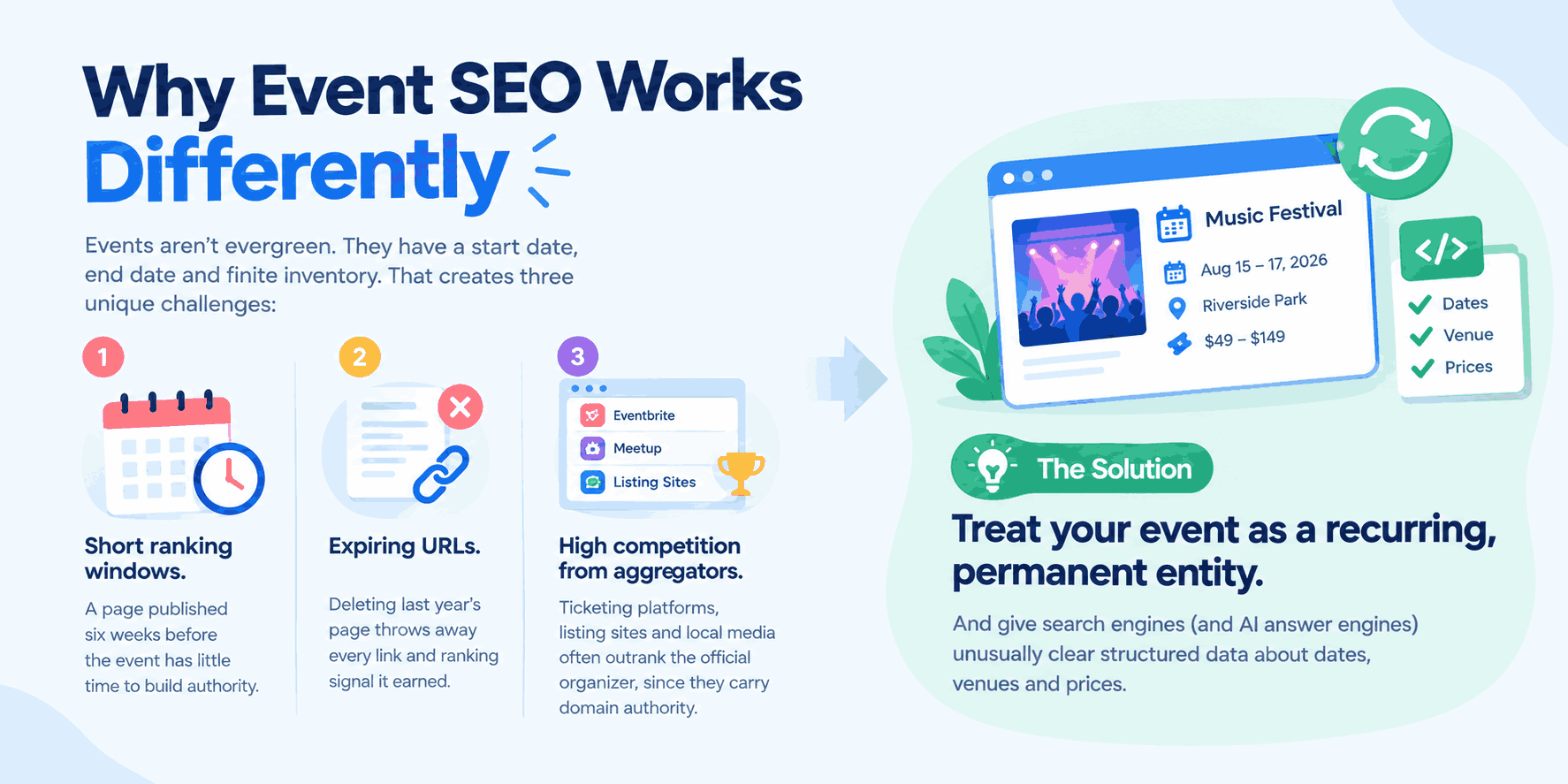
Most SEO advice assumes evergreen pages. Events are the opposite: they have a start date, an end date, and finite inventory. That creates three unique challenges:
- Short ranking windows. A page published six weeks before the event has little time to build authority.
- Expiring URLs. Deleting last year’s page throws away every link and ranking signal it earned.
- High competition from aggregators. Ticketing platforms, listing sites, and local media often outrank the official organizer, since sites like Eventbrite and Meetup carry domain authority no single event brand can match.
The solution is to treat your event as a recurring, permanent entity rather than a disposable campaign and to give search engines (and AI answer engines) unusually clear structured data about dates, venues, and prices.
1. Build a Permanent URL Structure
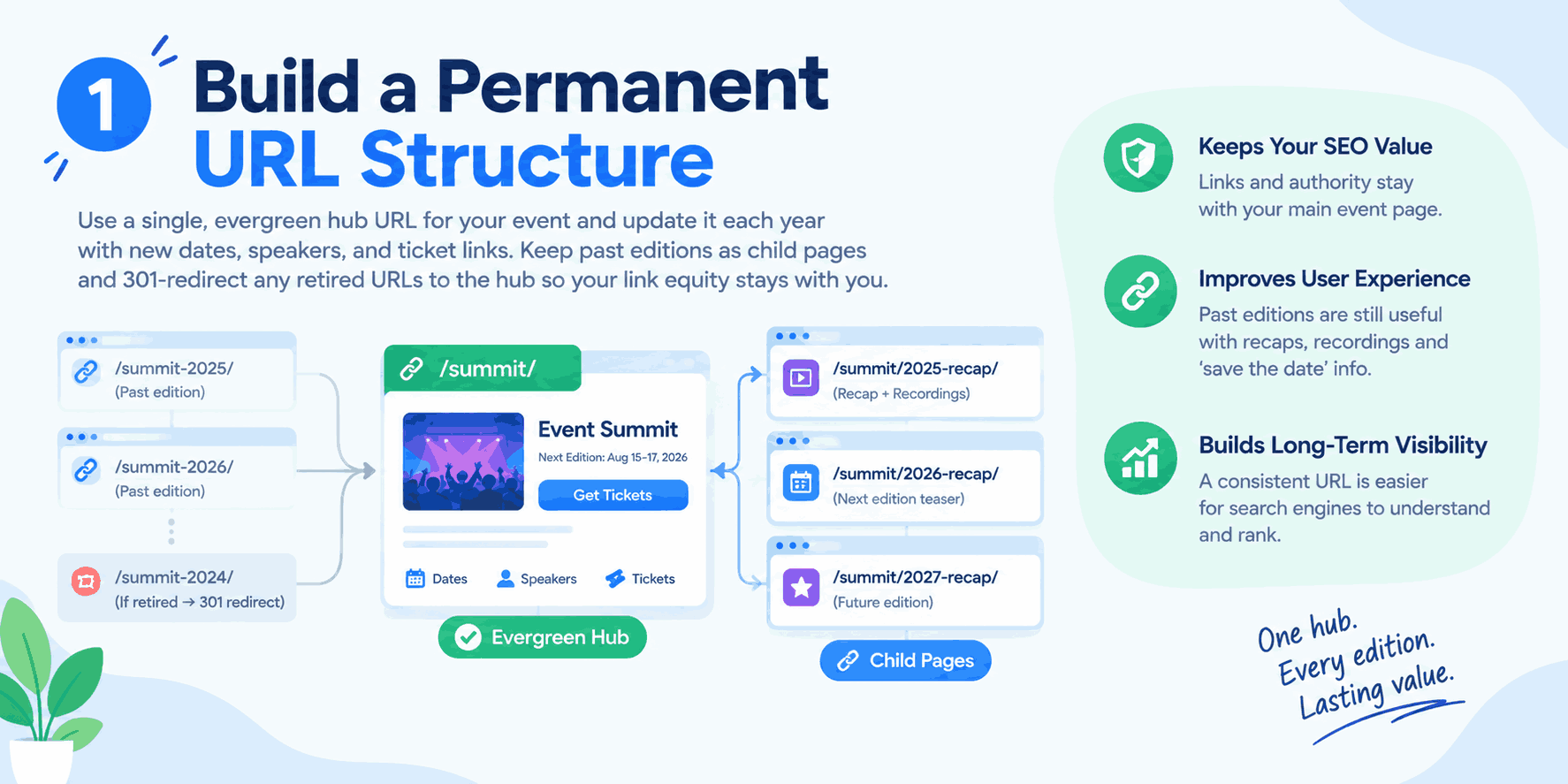
The single biggest mistake organizers make is creating a fresh URL every edition/summit-2025/, then /summit-2026/. Each new page starts from zero, and every sponsor link, press mention, and ranking signal the previous campaign earned disappears with it.
Instead, use an evergreen hub URL like /summit/ and update it annually with new dates, speakers, and ticket links. Move past editions to child pages (/summit/2025-recap/) that link back to the hub, with session recordings and a “save the date” block for the next edition rather than a dead page or a 404. If you must retire a dated URL, 301-redirect it to the hub so link equity carries forward.
Recommended architecture:
- Event hub page — the primary ranking target for your event name plus category keywords.
- Supporting pages — schedule, speakers/line-up, venue and travel, FAQ, pricing, each as real HTML, not a PDF. PDFs are far less crawlable, aren’t mobile-responsive, and can’t carry structured data.
- Category pages — for multi-event organizers: “workshops,” “concerts,” “conferences,” each with internal links to individual events.
- Location pages — if you run the same format in multiple cities, one page per city with genuinely unique content, not a templated swap of the city name.
2. Target the Keywords Attendees Actually Use
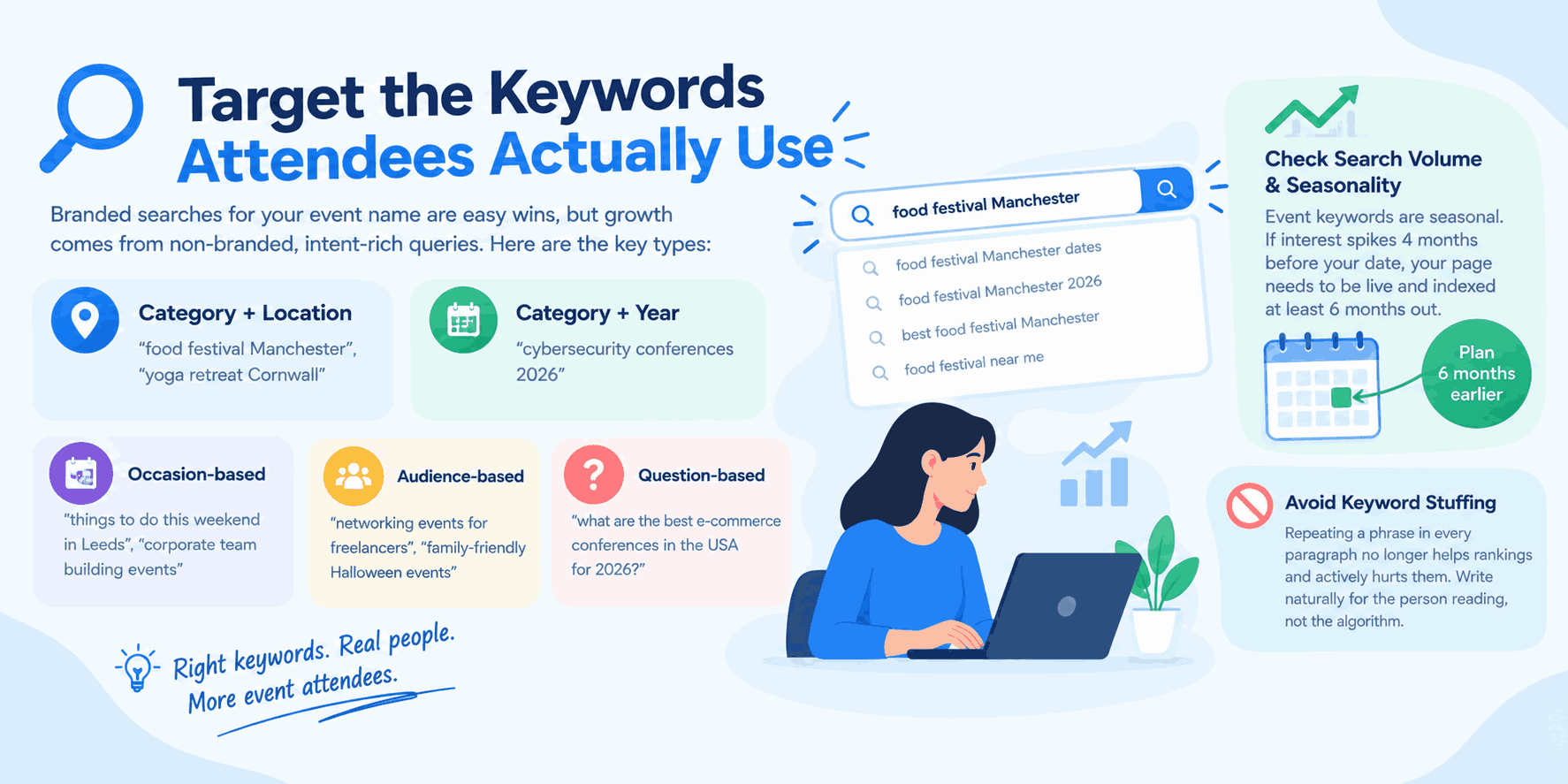
Branded searches for your event name are easy wins, but they only reach people who already know you. Growth comes from non-branded, intent-rich queries:
- Category + location: “food festival Manchester,” “yoga retreat Cornwall”
- Category + year: “cybersecurity conferences 2026”
- Occasion-based: “things to do this weekend in Leeds,” “corporate team building events”
- Audience-based: “networking events for freelancers,” “family-friendly Halloween events”
- Question-based: “what are the best e-commerce conferences in the USA for 2026?” These are increasingly common as people phrase searches as full questions, and structuring content to directly answer them improves your odds of appearing in featured snippets and AI Overviews.
Check search volume trends: event keywords are strongly seasonal. If interest spikes four months before your date, your page needs to be live and indexed at least six months out. Avoid keyword stuffing: repeating a phrase in every paragraph no longer helps rankings and actively hurts them; write naturally for the person reading, not the algorithm.
3. Implement Event Schema Markup
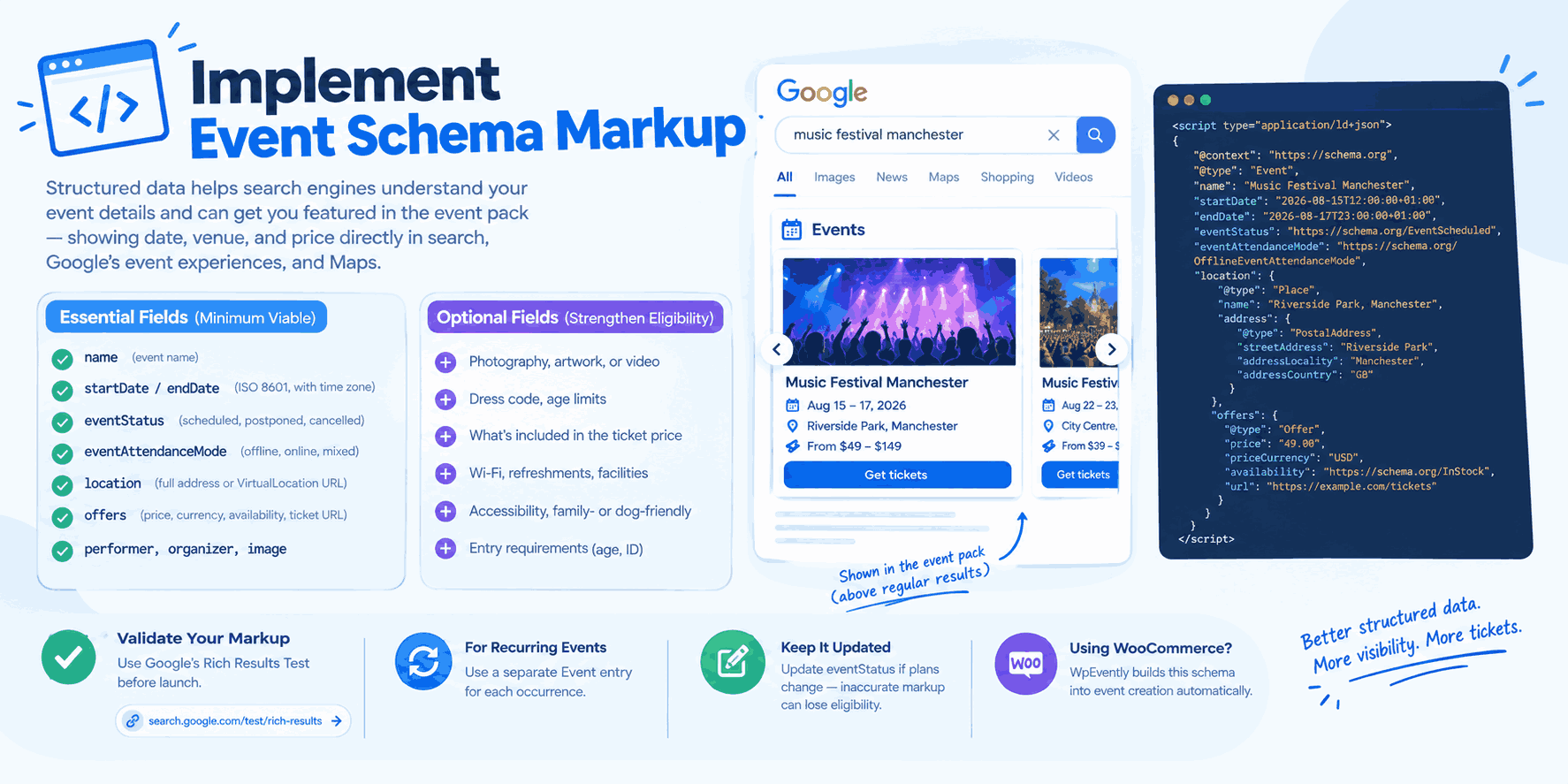
Structured data is non-negotiable for event SEO. Google uses Event schema to power the event pack (also called the event carousel), a SERP feature that shows date, venue, and ticket price directly in search and in Google’s event experiences on mobile and Maps, often above the regular organic results entirely.
| Essential fields (minimum viable) | Optional fields (strengthen eligibility) |
|---|---|
name, startDate, endDate (ISO 8601, with time zone) | Photography, artwork, or video |
eventStatus (scheduled, postponed, cancelled) | Dress code, age limits |
eventAttendanceMode (offline, online, mixed) | What’s included in the ticket price |
location with full postal address, or VirtualLocation with a URL | Wi-Fi, refreshments, facilities |
offers — price, currency, availability, direct ticket URL | Accessibility, family- or dog-friendly status |
performer, organizer, image | Entry requirements (age, ID) |
For recurring series, use a separate Event entry for each occurrence rather than a vague date range. Validate everything in Google’s Rich Results Test before launch, and keep eventStatus updated if plans change — inaccurate markup risks losing rich result eligibility entirely.
If you’re running events on WooCommerce, a plugin like WpEvently builds this schema into event creation automatically, so you’re not hand-coding JSON-LD for every listing. See our roundup of best WooCommerce plugins if you’re still assembling the rest of your stack.
4. Write Pages That Deserve to Rank
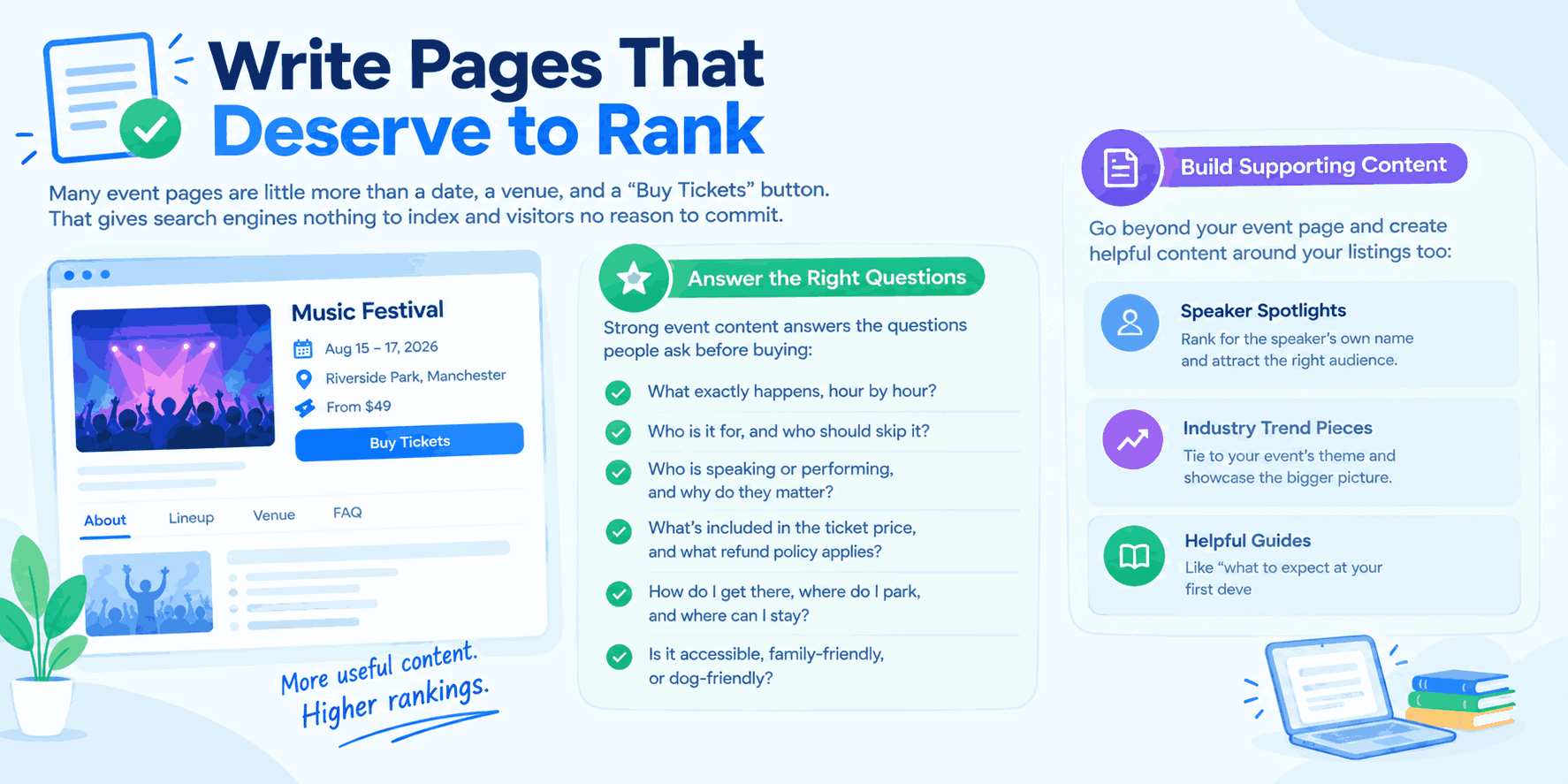
Many event pages are little more than a date, a venue, and a “Buy Tickets” button. That gives search engines nothing to index and visitors no reason to commit.
Strong event content answers the questions people ask before buying:
- What exactly happens, hour by hour?
- Who is it for, and who should skip it?
- Who is speaking or performing, and why do they matter?
- What’s included in the ticket price, and what refund policy applies?
- How do I get there, where do I park, and where can I stay?
- Is it accessible, family-friendly, or dog-friendly?
Build supporting content around your listings too: speaker spotlights (which rank for the speaker’s own name), industry trend pieces tied to your event’s theme, practical guides like “what to expect at your first developer conference,” and location-specific posts like “top venues for corporate events in [city].” Add photos and video from previous editions, attendee testimonials, and a short recap of last year’s highlights. This social proof improves conversion and gives you unique content no aggregator can copy.
5. Fix the Technical Basics
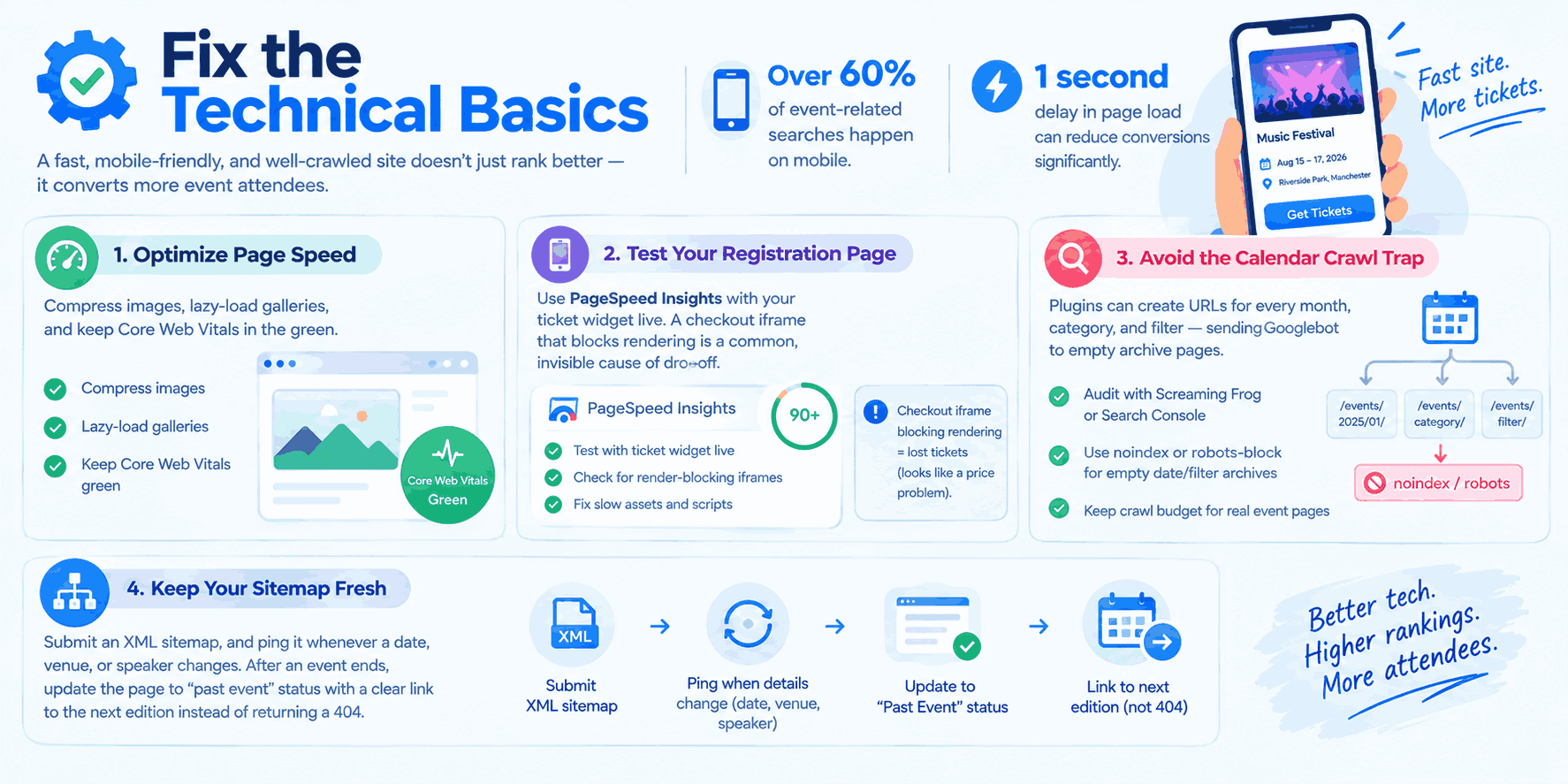
Ticket buyers are overwhelmingly mobile, often on patchy connections; over 60% of event-related searches happen on mobile. A one-second delay in page load can meaningfully reduce conversions, and for event sites where registration often happens on impulse, slow load times hurt both rankings and sign-ups at once. Compress images, lazy-load galleries, and keep Core Web Vitals in the green. Test your registration page specifically with PageSpeed Insights, with the ticket widget live. A checkout iframe that blocks rendering is a common, invisible cause of drop-off that gets blamed on price instead. If tickets are stalling at checkout rather than at the search stage, see how to optimize your event ticket sales funnel in WordPress for the conversion side of this.
Watch for the calendar crawl trap: event plugins that generate a URL for every month, category, and filter combination can send Googlebot down archive pages stretching years into the future while your actual registration page waits to be indexed. Audit with Screaming Frog or Search Console, and noindex or robots-block empty date and filter archives so crawl budget reaches real event pages.
Submit an XML sitemap, ping it whenever a date, venue, or speaker changes, and after an event ends, update the page to “past event” status with a clear link to the next edition instead of returning a 404.
6. Win Local and Map Visibility
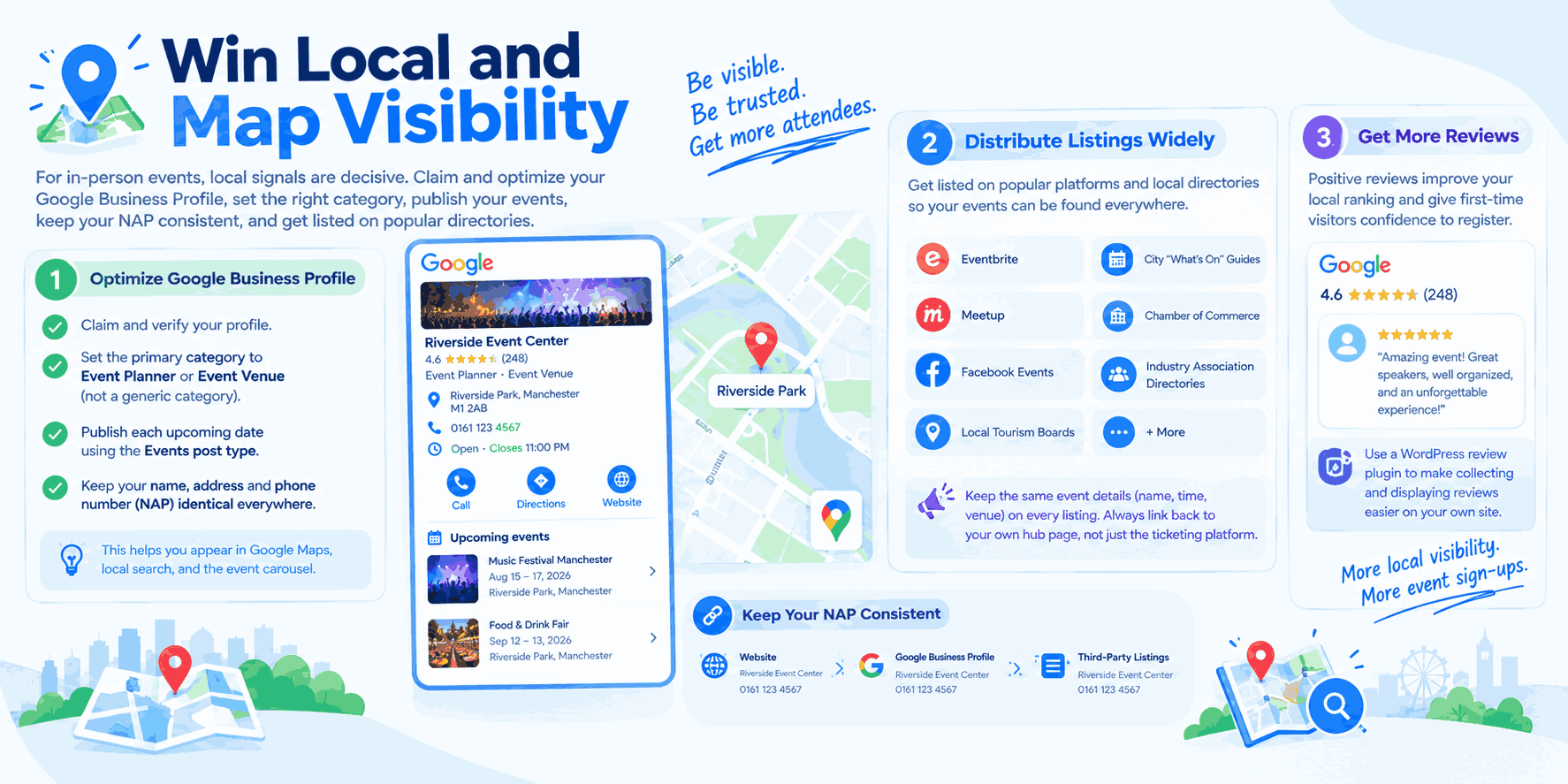
For in-person events, local signals are decisive. Claim and optimize your Google Business Profile, set the primary category to Event Planner or Event Venue rather than something generic, and publish each upcoming date using the Events post type so it surfaces directly in the profile. Keep your name, address, and phone number (NAP) identical everywhere: your website, your Business Profile, and every third-party listing. Inconsistencies confuse search engines and dilute local authority.
Then distribute listings widely: Eventbrite, Meetup, Facebook Events, local tourism boards, city “what’s on” guides, chamber of commerce calendars, and industry association directories. These listings rank in their own right, generate referral traffic, and create the citations that reinforce local relevance, and they’re also what feeds Google’s event carousel. Keep every listing’s name, time, and venue identical to your own site; a stale listing is how Google decides your event feed is unreliable. Always link back to your own hub page rather than only to the ticketing platform.
Encourage past attendees to leave reviews on your Google profile, too; positive reviews improve local ranking and give first-time visitors evidence the event is worth registering for. See best WordPress review plugins for tools that make collecting and displaying them on your own site easier.
7. Earn Links and Press Coverage
Events are naturally linkable. Use that advantage:
- Give speakers, sponsors, and performers a media kit with badges and pre-written link copy; most never link simply because nobody asked.
- Pitch local journalists and niche newsletters with a genuine angle, not a press release.
- Publish original data, an attendee survey or industry report that bloggers cite.
- Offer partner venues and hotels a co-promotion page in exchange for a link.
Quality outweighs quantity here: a single link from a well-regarded industry publication is worth more than dozens from low-authority directories.
8. Optimize for AI Overviews and AI Answers, Not Just Google
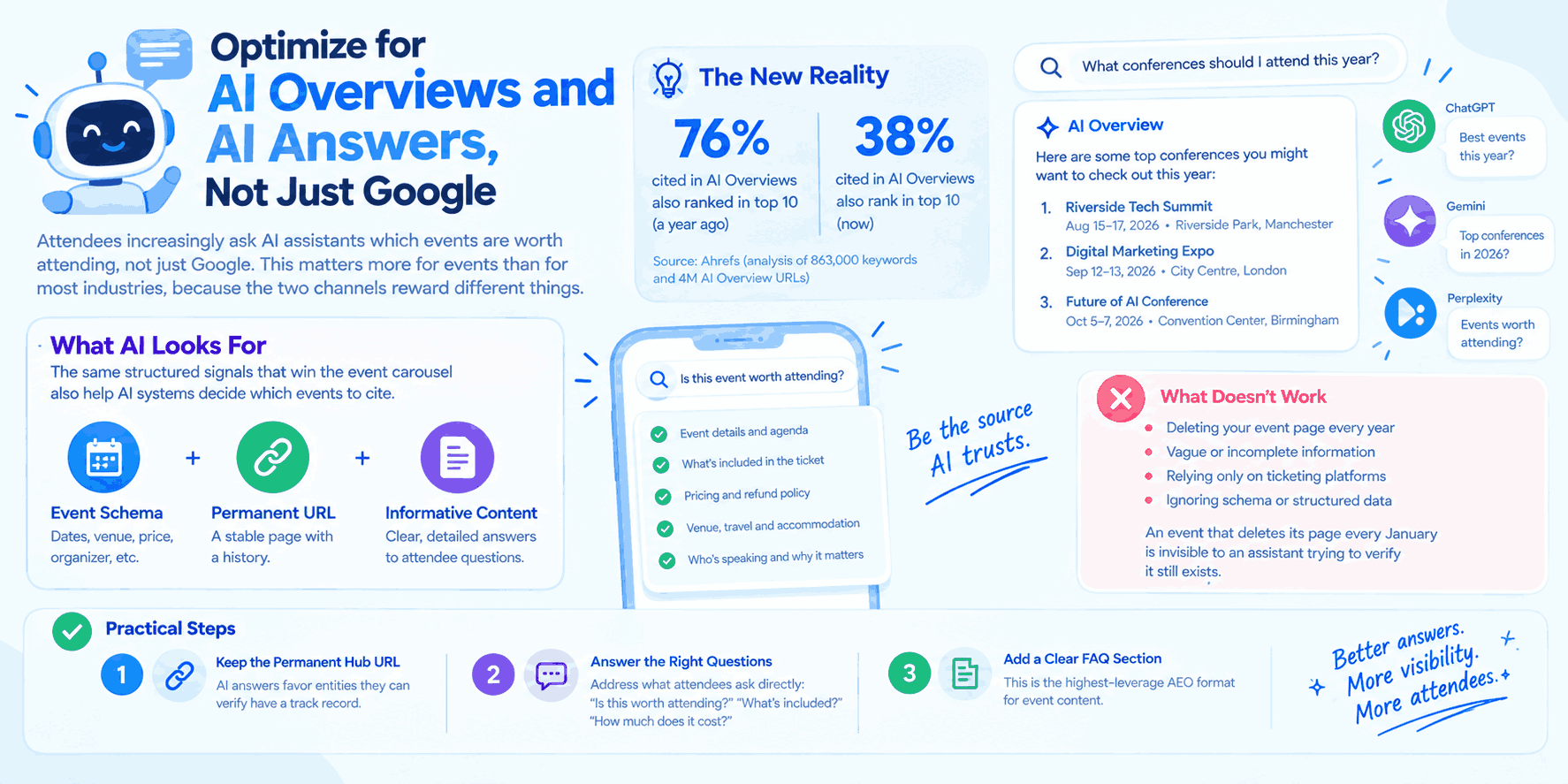
Attendees increasingly ask AI assistants which events are worth attending, not just Google. This matters more for events than for most industries, because the two channels reward different things.
A recent Ahrefs analysis of 863,000 keywords and 4 million AI Overview URLs found that only 38% of pages cited in AI Overviews also rank in the top 10 organic results for the same query, down sharply from 76% a year earlier. Ranking well on Google no longer guarantees you’ll be the answer an AI assistant gives someone asking “what conferences should I attend this year?”
What still works in your favor: the same structured signals that win the event carousel. Accurate Event schema, a stable permanent URL, and genuinely informative pages are exactly what AI systems look for when deciding which event to name as a recognized, stable entity. An event that deletes its page every January is invisible to an assistant trying to verify it still exists.
Practical steps:
- Keep the permanent hub URL (Section 1). AI answers favor entities they can verify have a track record.
- Answer the specific questions attendees ask an AI assistant directly in your content: “is this worth attending,” “what’s included,” “how much does it actually cost” in plain sentences an AI can lift and cite.
- Publish an FAQ section with direct, complete answers (see below). This is the single highest-leverage AEO format for event content.
Never Delete Your Past Event Pages
One of the most common and costly mistakes: taking down event pages once the event concludes. Those pages have accumulated search authority, backlinks, and indexed content that took months to build. Deleting them means starting from zero every year. Instead, update the page with highlights, photo galleries, session recordings, and a “save the date” announcement for the next edition. This preserves SEO equity and gives you a running head start the moment you begin promoting the next edition.
Measure What Fills Seats
Track organic sessions to event pages, keyword rankings for your priority category-plus-location terms, rich result impressions in Search Console, and most importantly assisted ticket revenue from organic search. Compare performance at the same point in the campaign year over year rather than month to month, since event traffic is seasonal by design. Check the Rich Results report periodically to confirm your Event markup is still valid; a single date error can quietly remove you from the carousel. Review performance after every edition and roll the learnings into next year’s page while it still holds its rankings.
Frequently Asked Questions About SEO for Event Websites
How long before an event should SEO work start?
Start at least six months out. A brand-new event page typically needs three to six months to rank for topic and location terms, and the final eight weeks before doors open, when demand peaks, is too late to begin from scratch. Recurring events are different: if you keep the same URL across editions, the second year can rank within weeks, because the authority never left.
What is the Google event pack or event carousel?
It’s a special SERP feature that appears for event-related queries, showing date, venue, and ticket links directly in search results, powered entirely by Event structured data. It’s important because it lets organizers appear above regular results and above ticketing aggregators for searches like “events in [city] this weekend.”
Should I optimize for Google or for AI search tools?
Both. Only 38% of pages cited in AI Overviews also rank in the top 10 organic results for the same query, so ranking well on Google no longer guarantees AI visibility. The overlap comes from the same signals, though: accurate schema, a stable permanent URL, and genuinely informative pages that an AI system can confidently cite as describing a real, ongoing event.
How is SEO for events different from normal local SEO?
Three ways. Your ranking target has a hard deadline, so there’s no waiting a year for authority to build. Google serves the event carousel from structured data rather than from local pack position, so schema does work that citations normally do. And your direct competition, Eventbrite, Meetup, and regional tourism calendars, often list your own event and outrank you with it.
Do I need Event schema if I already list on Eventbrite?
Yes. Third-party listing platforms rank in their own right and feed the event carousel, but they’re not a substitute for schema on your own hub page. If your own site doesn’t carry accurate Event markup, you’re relying entirely on someone else’s page to represent your event in search and AI answers.
What’s the single biggest mistake event organizers make with SEO?
Deleting or letting a URL expire after every edition. It resets search authority, backlinks, and AI-recognized entity status to zero every single year, for an audience you already spent months earning.
Final Thoughts
SEO for event websites rewards organizers who think long-term: permanent URLs, accurate event schema, genuinely informative pages, and steady local, link, and AI-visibility signals compound across editions. Start optimizing six months out rather than six weeks, and search both the Google kind and the AI kind becomes a reliable engine for filling more seats at every event you run.