 Get Halloween 15% for Limited Time on Lifetime & Bundle Deal


If you are searching for the best hotel booking WordPress plugin, the real question is rarely “which plugin is most popular”. It is “which plugin matches how my property actually sells rooms”. A single hotel with 12 rooms, a boutique chain, and a multivendor marketplace where independent owners list their own properties all need different things from the same software. This guide compares the realistic options for a WooCommerce-based hotel booking manager, shows what each one handles well, and explains where a booking plugin stops being enough.
- What a Hotel Booking Plugin Must Do Before You Compare Anything
- The 5 Best Hotel Booking WordPress Plugin Options Compared
- WooCommerce Hotel Booking Manager: What You Get
- Where WooCommerce Hotel Booking Manager Is Not the Right Fit
- How to Choose: A Short Decision Path
- What You Need Before You Install
- Frequently Asked Questions
- Final Thoughts
What a Hotel Booking Plugin Must Do Before You Compare Anything
Hotel inventory is not the same as selling a physical product. A room is a date-bound, shared resource with occupancy limits, seasonal rates, and a hard stop when it sells out. Before comparing plugins, check that a candidate handles these five things:
- Per-night inventory tied to calendar dates, not a simple stock count.
- Room types and quantity, so a “Deluxe Double” can exist more than once and sell out independently.
- Occupancy rules for adults and children per room.
- Rate structures – a base rate, a date-range or seasonal rate, and ideally a rate that varies by day of week.
- A booking record you can manage from the dashboard: status, guest details, and an exportable report.
If a plugin fails on any of these, no amount of extra features will save you later.
The 5 Best Hotel Booking WordPress Plugin Options Compared
The table below summarises the five options worth shortlisting. Prices for third-party plugins change with licensing tiers, so verify the current figures on each vendor’s page before you buy.
| Plugin | Starting Price | Room & Rate Management | Payment / Compatibility | Best For |
|---|---|---|---|---|
| WooCommerce Hotel Booking Manager | Check current pricing | Unlimited hotels, room types, capacity, seasonal and date-wise pricing | Native WooCommerce checkout, multivendor, shortcode-driven | Hotels and multi-property marketplaces on WordPress |
| WooCommerce Bookings | Check current pricing (annual licence) | Date-based booking of a bookable product; room “types” are built as separate products | Native WooCommerce, official extension | Small properties that already run a WooCommerce shop |
| Hotel Booking / Hotel Booking Lite | Free core plugin; paid add-ons | Strong dedicated hotel model: seasons, rate plans, room types, availability calendar | Own booking engine with optional payment gateways; not WooCommerce-native | Single hotels that want a dedicated hotel engine |
| Motopress Hotel Booking | Check current pricing | Accommodation types, seasons, variable pricing, blockable dates | Works alongside WooCommerce for checkout | Independent hotels and guesthouses |
| HBook | Check current pricing | Accommodation and rental units, seasonal rates, availability search | Standalone; payment via supported gateways | Small hotels, B&Bs and mixed rental properties |
WooCommerce Hotel Booking Manager: What You Get
WooCommerce Hotel Booking Manager is the option we build at Mage-people, so read this section knowing it is our own product. It is a WordPress hotel booking plugin that plugs into WooCommerce, which means the checkout, taxes, coupon codes and order emails your WooCommerce store already has keep working for room reservations.
Features and Functionality
- Add unlimited hotels or properties to one booking system.
- Online payment through the WooCommerce checkout you already use.
- Hotel categories such as 2-star, 3-star or 5-star, and per-hotel facilities like a pool, bar, spa or smoking zone.
- Room management with room quantity, room type and guest capacity.
- Pricing control: room price range, global price, seasonal price and date-wise price.
- Email notifications to guests and admins.
- Backend view and export of registered guests and bookings.
- Sales and booking reports in the dashboard.
- A custom registration form for collecting guest information.
- Multilingual support, so the plugin interface and forms can be translated.
- Automatic PDF reservation ticket emailed on booking.
- Hotel location added with Google Maps.
- Responsive design, multiple templates and shortcode-powered output.
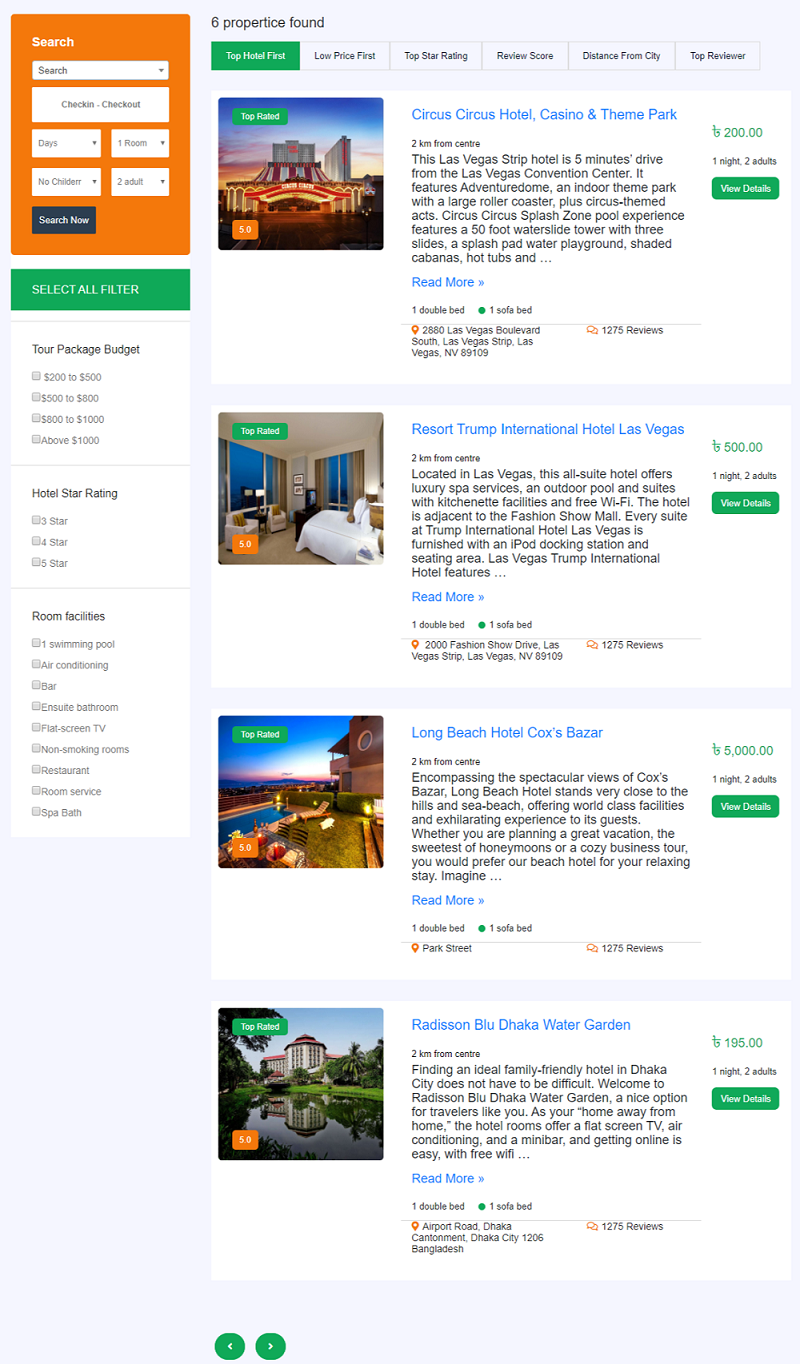
The screenshot above shows a hotel booking flow built with WooCommerce Hotel Booking Manager, from the room listing to the checkout stage.
Add-ons That Extend the Booking System
- Coupon code add-on: guests apply a discount code when booking a room.
- QR-code add-on: a QR code is printed on the reservation PDF and scanned at check-in.
- Backend order add-on: staff can create a reservation from the dashboard, useful for phone and walk-in bookings.
More add-ons are on the roadmap. If a specific one is essential to your workflow, confirm availability with support before you commit.
Multivendor Functionality for Property Marketplaces
The differentiating feature is multivendor support. Hotel owners register on your platform, log in with a username and password, and add their own property, room types and prices from the front end – no WordPress dashboard access required. You keep the marketplace; vendors manage their own inventory. This is the same architectural idea behind multi-seller rental and service systems, and it is what separates a hotel marketplace from a single-property booking site.
If you need a single-property booking tool rather than a marketplace, see our vacation rental booking plugin guide instead – it covers individual property owners rather than vendor networks.
Where WooCommerce Hotel Booking Manager Is Not the Right Fit
Honest positioning matters more than a longer feature list, so here is where you should look elsewhere:
- If you do not want WooCommerce at all. This plugin is built on the WooCommerce stack. Teams specifically avoiding WooCommerce should look at standalone hotel engines, or compare our free booking plugin options for small businesses where no shop layer is involved.
- If you need complex revenue-management logic. Length-of-stay restrictions, dynamic yield pricing driven by external data, or enterprise channel-manager rules go beyond what a general WordPress booking plugin models.
- If you run a pure travel package business. Tours, itineraries and multi-day packages are a different booking shape from per-night rooms – a tour-focused plugin handles that better.
- If your priority is a single service calendar. An appointment-based business such as a salon needs time slots, not room nights.
Check current pricing and the live demo before deciding, and run one real booking end to end – including a refund scenario – so you see how the order flow behaves on your own site.
How to Choose: A Short Decision Path
- Count your properties. One property? A standalone engine is fine. Several owners listing separately? Multivendor is mandatory.
- Decide on WooCommerce. If your payments, invoices and taxes already live there, choose a WooCommerce-native plugin so you do not run two checkout systems.
- List your rate rules. Seasonal, weekend, minimum-night or last-minute rates – match them to the plugin’s pricing model before purchase.
- Check the guest journey on mobile. Most hotel searches start on a phone. Test the search, room selection and payment steps on a small screen.
- Test one booking and one cancellation. Confirm emails arrive, the PDF ticket generates, and inventory returns to the calendar after cancellation.
What You Need Before You Install
- A WordPress install on a host that can handle booking traffic spikes.
- WooCommerce active, with a payment gateway and tax settings configured.
- Real room data: room types, quantities, capacities and photos.
- Your cancellation and deposit policy written down, so it can be reflected in the booking terms.
- Decisions on confirmation emails and check-in documents such as the PDF reservation ticket.
Frequently Asked Questions
Is WooCommerce Hotel Booking Manager free?
No. It is a commercial plugin, and the add-ons that extend it are separate. Because pricing is tiered and subject to change, check current pricing on the product page rather than relying on a figure in this article.
Can I build a hotel booking site without WooCommerce?
Yes. Several hotel plugins ship their own booking engine and payment integration and do not require WooCommerce. The trade-off is that you manage a second payment and tax setup instead of reusing the WooCommerce checkout you may already have configured.
Can multiple hotel owners list properties on one WordPress site?
Yes, if the plugin supports multivendor functionality. With WooCommerce Hotel Booking Manager, vendors register, log in from the front end, and add their own hotels, rooms and prices without needing WordPress dashboard access.
Does a hotel booking plugin handle seasonal and date-wise pricing?
WooCommerce Hotel Booking Manager supports room price ranges, a global price, seasonal prices and date-wise prices. Other plugins model this differently – usually through seasons or rate plans – so map your actual rate calendar against the plugin’s pricing model before buying.
How do guests receive their reservation confirmation?
The plugin sends email notifications on booking and can automatically email a PDF reservation ticket. The optional QR-code add-on places a scannable code on that ticket for check-in.
What room data should I prepare before installation?
Room types, how many of each you have, the maximum adult and child occupancy per room, your rate for each season, and high-quality photos. Having this ready before installation makes setup far faster.
Final Thoughts
WooCommerce Hotel Booking Manager is a strong candidate when you want room inventory, seasonal pricing, WooCommerce payments and multivendor listings in one plugin – and it is our own product, so we know both its strengths and its limits. If your business is a single property or a service calendar rather than a hotel marketplace, the standalone and appointment-focused options in the comparison table above may serve you better. Whichever you choose, test one complete booking, one cancellation and one mobile checkout before you go live: those three tests reveal more than any feature list.
