 Get Halloween 15% for Limited Time on Lifetime & Bundle Deal

A taxi booking plugin rarely costs what the price tag says. The licence fee is only the first line of a budget that also includes driver payouts, map and SMS usage, payment fees, driver app seats and ongoing maintenance. If you are pricing a taxi booking plugin before you commit, this guide walks through the eight cost lines that catch operators out, and explains how to sanity-check each one before you sign up.
This is a cost-planning article, not a feature review or a step-by-step build. If you are still choosing a system, start with the roundup of best taxi booking plugins for WordPress; if you already own one and want the setup order, work through the eCab taxi setup checklist instead.
- Why the Sticker Price Is Never the Whole Cost
- The 8 Cost Lines to Budget For
- 1. Licence or Subscription Fee
- 2. Hosting and Server Resources
- 3. Domain, SSL and Email Deliverability
- 4. Payment Gateway Fees
- 5. Driver Payouts and Commission Logic
- 6. SMS, WhatsApp and Notification Credits
- 7. Maps, Geocoding and Distance APIs
- 8. Maintenance, Updates and Support
- Cost Lines at a Glance
- How to Compare Two Plugins on Total Cost
- Three Cost Mistakes That Catch Operators Out
- Frequently Asked Questions
- Next Steps
Why the Sticker Price Is Never the Whole Cost
Every taxi booking plugin sits on top of infrastructure that someone has to pay for. Some of that infrastructure is bundled into the licence, some is billed directly to you by a third party, and some is an internal cost you only notice when operations scale.
The practical consequence is that two operators can run the same plugin for very different monthly totals. A single-city fleet of eight cars taking card payments will spend far less on third-party services than a multi-city operation running SMS notifications and a driver app in two languages.
So the right question is not “what does the plugin cost?” but “what does running this plugin cost at my current fleet size, and what does it cost at double that?”
The 8 Cost Lines to Budget For
Budget these as separate lines rather than one lump sum. That way, when a number changes, you know exactly which assumption moved.
1. Licence or Subscription Fee
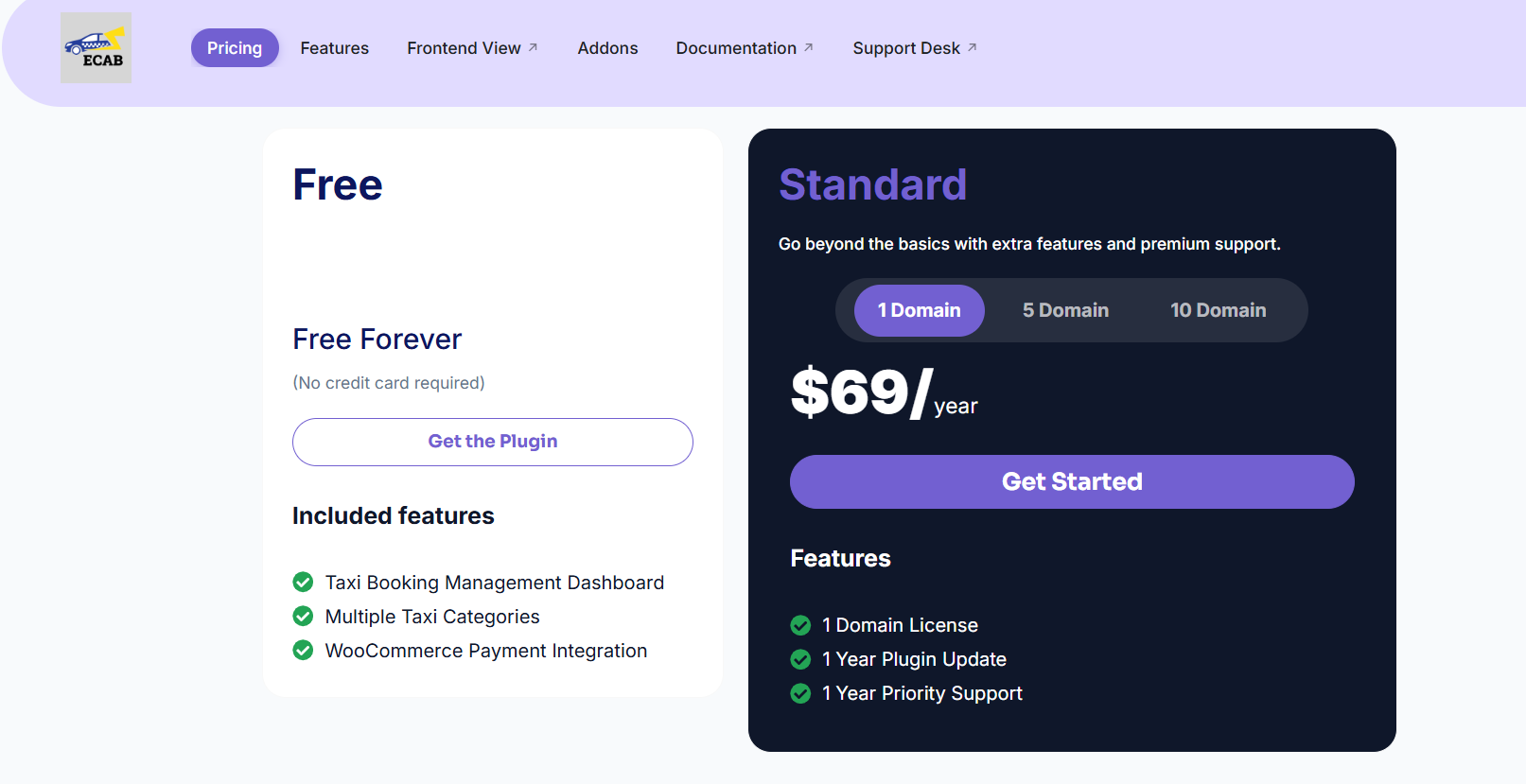
This is the headline figure, and it comes in three common shapes:
- One-off licence with optional annual renewal for updates and support.
- Annual subscription that includes updates, support and sometimes hosted services.
- Freemium core where the base plugin is free and the features you actually need sit in paid add-ons.
Two questions expose most of the hidden difference here. First, does the licence cover one site or several? Second, what stops working if you do not renew – updates only, or the booking engine itself?
Add-on pricing is worth reading carefully too. Extras such as driver apps, wallet systems, or multi-vehicle dispatch are often priced per site or per driver. Check current pricing on the vendor’s site rather than relying on a marketplace listing that may be out of date.
2. Hosting and Server Resources
A booking site is heavier than a brochure site. Live availability checks, map requests and booking records all hit the database, and a shared budget host will usually struggle once your fleet starts taking bookings simultaneously.
- You will likely need a VPS or managed WordPress plan rather than entry-level shared hosting.
- Peak-hour traffic concentrates load: a Friday evening surge is very different from an evenly spread workload.
- Caching plugins need care, because aggressive page caching can conflict with live fare and availability data.
A useful test is to ask your host whether they allow the number of database queries a dispatch-heavy page generates. If the answer is vague, that hosting plan is a false economy.
3. Domain, SSL and Email Deliverability
Small but non-negotiable:
- Domain name registration, renewed annually.
- SSL certificate – often free through your host, sometimes bundled as a paid extra.
- Transactional email or an SMTP relay, so booking confirmations reach the inbox rather than the spam folder.
This last item is the one operators underrate. A confirmation email that lands in spam looks like a broken plugin to the passenger, and support tickets follow.
4. Payment Gateway Fees
If customers pay online, every gateway takes a cut. The variables that move your total are:
- The percentage plus fixed fee per transaction.
- Whether the gateway charges extra for currency conversion, if you accept overseas bookings.
- Chargeback fees, which are painful out of proportion to their frequency.
- Whether the plugin supports the gateway natively or needs a bridge or custom integration – a paid custom bridge is a recurring cost, not a one-off.
Fleet accounts matter here. If drivers collect cash and you settle with them weekly, the gateway fee only applies to the card-paid share of bookings, so model the mix rather than assuming 100% online payment.
5. Driver Payouts and Commission Logic
Not a software fee, but it behaves like one. Commission structures have to be configured, reconciled, and reported, and the more complex the split, the more time it consumes.
- Fixed commission per trip versus percentage of fare.
- Different rates for different vehicle classes or driver categories.
- Airport or fixed-route jobs where the fare is agreed in advance.
- Tips, waiting charges, and cancellation fees that need their own rules.
Cost this in hours as well as money. If reconciliation takes an admin half a day each week, that is a real operating cost of your chosen plugin, no matter how cheap the licence was.
6. SMS, WhatsApp and Notification Credits
Automated messages are one of the most common surprise bills. Booking confirmations, driver-assignment alerts, “your driver is arriving” texts and reminder messages all consume credits from a messaging provider.
Estimate volume from your real numbers: how many texts does one completed trip generate, and how many trips per month? Then multiply. A three-message flow across a few thousand trips a month adds up fast, and international SMS costs considerably more than domestic.
Some plugins also support email-only flows, which changes the economics entirely. Decide which messages genuinely need to be instant before you switch everything to SMS.
7. Maps, Geocoding and Distance APIs

Fare calculation depends on distance and time, which means a mapping or routing service, which means usage-based billing. Watch for:
- Per-request pricing on route calculations.
- Geocoding calls when a passenger types an address rather than picking a point on a map.
- Autocomplete suggestions, which fire as the passenger types and can multiply requests per booking.
- Free monthly credit tiers – genuine, but easy to exceed during a busy month.
Because fare estimates may require more than one API call per booking, budget requests per booking rather than per trip. This is also the cost line most sensitive to growth, so model it at 3x and 5x your current volume.
8. Maintenance, Updates and Support
The ongoing software cost. Decide in advance who owns each of these:
- Plugin and theme updates, and testing after each one.
- WordPress core and PHP version upgrades.
- Compatibility checks after any change to WooCommerce or your payment gateway.
- Backups, security monitoring and recovery.
- Small customisations – new vehicle type, new fare rule, new invoice format.
If you handle this in-house, it is staff time. If you outsource it, it is either a fixed maintenance retainer or hourly work. Either way, it belongs in the budget.
Cost Lines at a Glance
| Cost line | How it is billed | What drives it up |
|---|---|---|
| Licence/subscription | One-off or annual | Number of sites, add-ons, driver seats |
| Hosting | Monthly or annual | Concurrent bookings, peak-hour load |
| Domain, SSL, email | Annual plus usage | Transactional email volume |
| Payment gateway | Per transaction | Share of card-paid bookings, chargebacks |
| Driver payouts | Per trip plus admin time | Commission complexity |
| SMS / messaging | Per message | Messages per trip, international numbers |
| Maps and geocoding | Per API request | Autocomplete, re-quotes, volume growth |
| Maintenance | Retainer or hourly | Customisations, update frequency |
Where a vendor does not publish figures, write “check current pricing” in your spreadsheet and get it in writing before you commit. Never copy a number from an old review, because gateway rates, SMS pricing and API tiers all change.
How to Compare Two Plugins on Total Cost
- Fix your assumptions. Fleet size, trips per month, average fare, percentage paid by card, messages per trip.
- List every line above for each option and mark whether it is included, billed by a third party, or missing entirely.
- Model three scenarios: current volume, double, and peak season. A plugin that looks cheap at 200 trips a month can be expensive at 2,000 if map and SMS usage is unbundled.
- Add the switching cost. Migration, retraining drivers, re-testing fares and re-issuing invoices.
- Get renewal terms in writing so year two does not surprise you.
Check out why eCab is the best Taxi Booking Plugin.
Three Cost Mistakes That Catch Operators Out
- Ignoring usage-based services. The licence is fixed; maps, SMS and gateway fees scale with success, so they grow exactly when you can least afford a shock.
- Buying add-ons twice. A free core plus six paid extensions often costs more than one complete system. Tally the full feature set you need before comparing.
- Treating admin time as free. Manual dispatch, manual reconciliation, and manual rebooking are the most expensive hidden line, because they scale with trips.
Frequently Asked Questions
Is a free taxi booking plugin actually cheaper?
Sometimes, but not automatically. Free cores frequently push the features you need – driver apps, automated dispatch, multi-vehicle booking – into paid add-ons, and you still pay for hosting, maps and messaging. Compare the full stack, not the download price.
Which costs scale fastest as I add vehicles?
Driver seats or app licences, messaging volume and mapping requests usually scale with fleet and trip volume. Hosting scales in steps, and maintenance scales with customisation rather than car count.
Should I self-host or use a hosted SaaS booking platform?
Self-hosting on WordPress means you own the data and control the stack, but you also carry hosting, updates and security. Hosted platforms fold those into one monthly fee at the cost of flexibility. The deciding factor is usually whether you need deep customisation of fares and dispatch rules.
How long before a booking plugin pays for itself?
Measure it against the manual work it removes – phone bookings, dispatch coordination, reconciliation – plus any revenue from card payments and automated reminders. If your admin spends ten hours a week on bookings, the payback is usually quick; if you take a handful of bookings a week, it may not be worth automating yet.
Next Steps
Build the budget before the shortlist. List all eight lines, fill in what you know, mark the rest “check current pricing”, and model them at your current trip volume and at double. That single exercise usually eliminates one or two candidates for reasons a feature comparison never surfaces.
Then move on to configuration, and make sure your peak-hour rules are priced deliberately rather than by default.