 Get Halloween 15% for Limited Time on Lifetime & Bundle Deal


A cinema ticket system is the software a movie theatre uses to sell seats for a specific showtime. Unlike a generic appointment booking tool, it has to understand screens and halls, film run times, seat categories, age-rated films, ticket types such as child or senior, and often concession counters and multiple cinema locations. This guide explains what a cinema ticketing platform actually does, how a seat is sold from browsing to admission, and what to check before you commit to a system for your venue.
- What a Cinema Ticket System Does That a Booking Plugin Does Not
- The Booking Journey From Browsing to Seat Selection
- Features Worth Paying For
- Cinema Ticketing vs Theatre and Event Booking
- Off-the-Shelf Software, WordPress Plugins or Custom Build
- Practical Checks Before You Buy
- Common Questions
- Final Thoughts
What a Cinema Ticket System Does That a Booking Plugin Does Not
A cinema is not a single bookable resource. It is a set of auditoriums, each running a schedule of films, each film showing at set times, and each showtime holding its own inventory of seats. That structure is the reason a dedicated cinema ticketing system exists.
The core differences come down to four things:

- Showtime-based inventory. The same seat in the same hall is sold again for the next screening. Availability resets per showtime, not per day.
- Screen and film scheduling. A screening has a start time, a run time, and a turnover gap for cleaning and the next audience. The system has to keep those slots from overlapping.
- Seat pricing tiers. Recliner, premium, and standard rows usually carry different prices for the same film, and that price varies by showtime, screen, and day.
- Admission control. A PDF or a QR-coded e-ticket that staff can scan at the door, with no re-entry for the same seat.
If you are comparing this to the general mechanics of online reservation software, our breakdown of the core elements of a booking system in WordPress covers the shared building blocks – calendars, availability rules, payments, and notifications – that any ticketing platform sits on top of.
The Booking Journey From Browsing to Seat Selection
A well-built cinema ticket system moves a customer through a short, predictable path. Each step is where most real-world problems appear.
1. Choosing the venue, film, and showtime
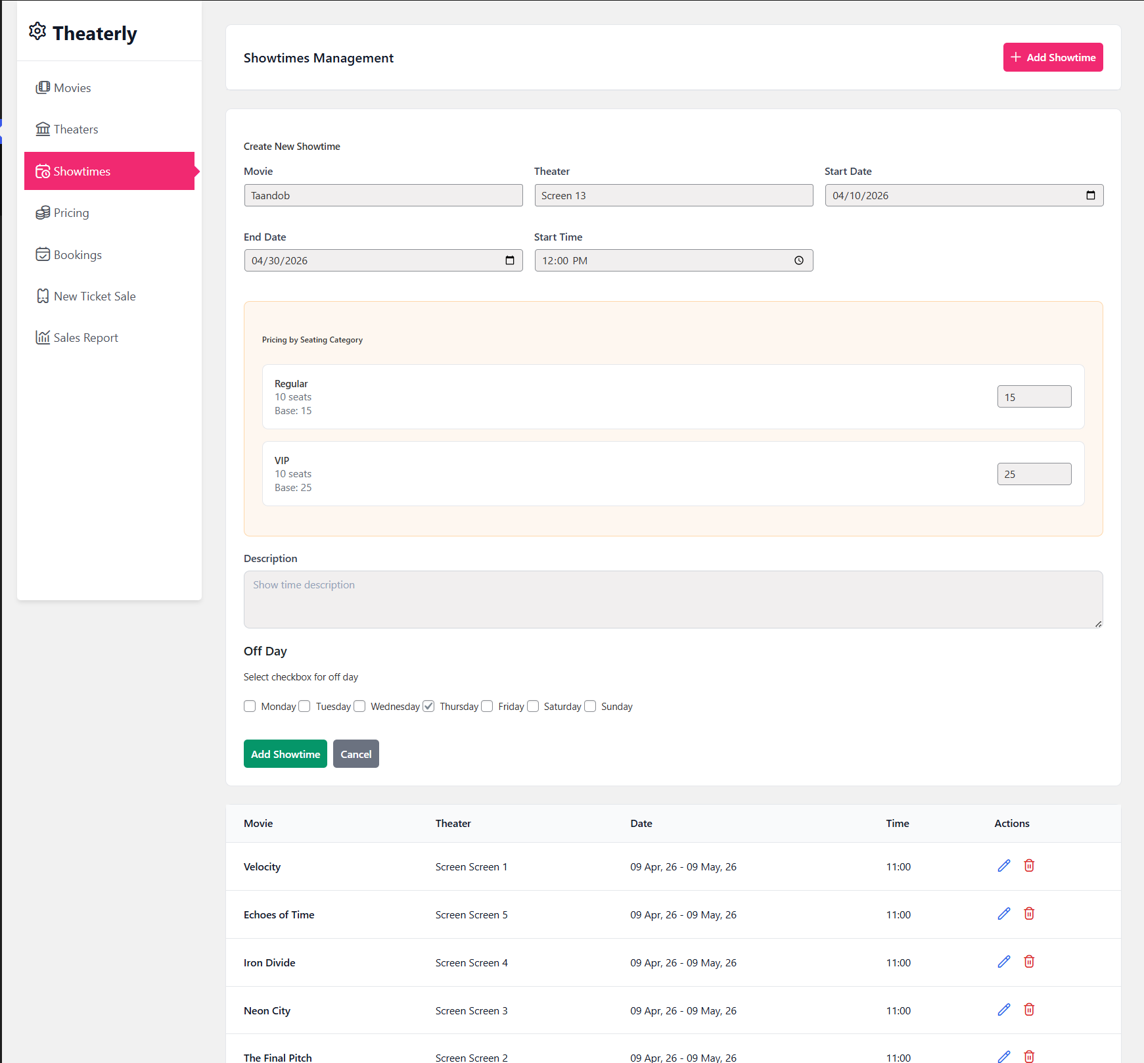
The customer picks a cinema location if the chain has more than one, then a film, then a date, then a time. Filters for language, format, and rating help at this stage. The list should only show showtimes that still have seats available, unless you deliberately want to display sold-out sessions.
2. Reading the seat map
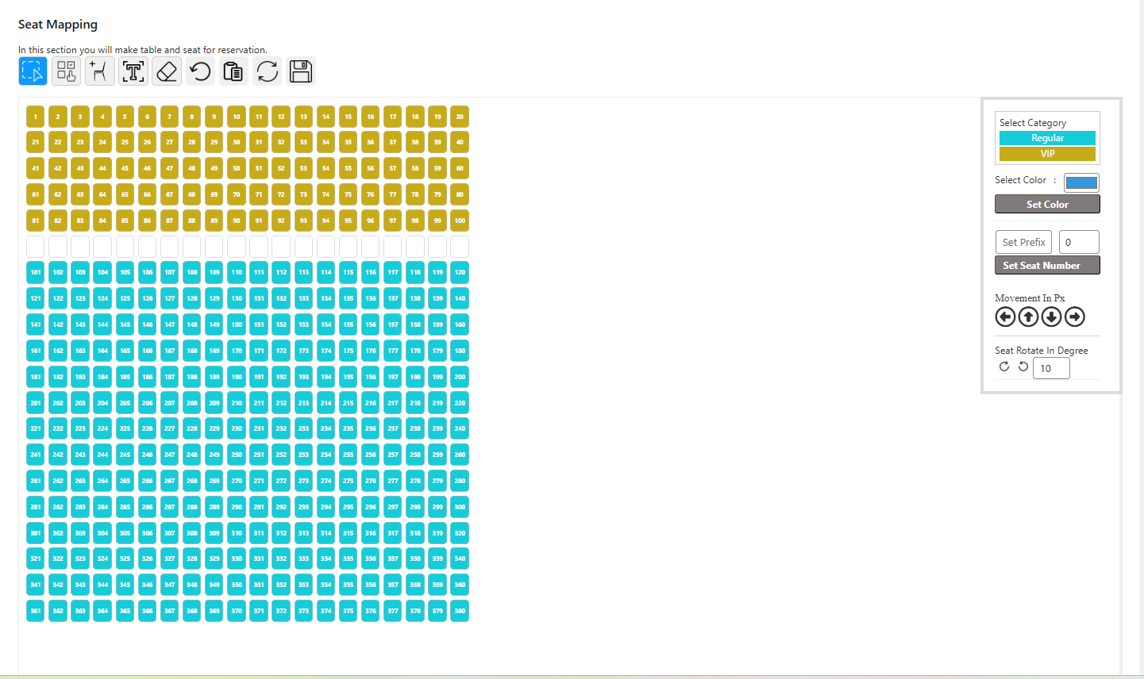
The seat map is where a cinema platform earns its money. It needs to mirror the real hall: rows, aisles, curved layouts, aisle seats, wheelchair-accessible positions, and blocked or broken seats. Sold, held, and available seats must be visually distinct, and the map must refresh quickly so two people do not buy the same seat.
Seat maps are a discipline in their own right, and the layout logic involved is closer to transport ticketing than most people expect. Our guide to reading a seat map in a reservation system shows how rows, categories and blocking rules are usually modelled.
3. Adding ticket types and extras
One booking often contains several ticket categories: two adults, one child, one senior. Some venues add combos – popcorn and a drink attached to a specific seat – or let customers pre-order concessions for pickup at a counter. Gift cards and promo codes are applied at this point.
4. Payment and confirmation
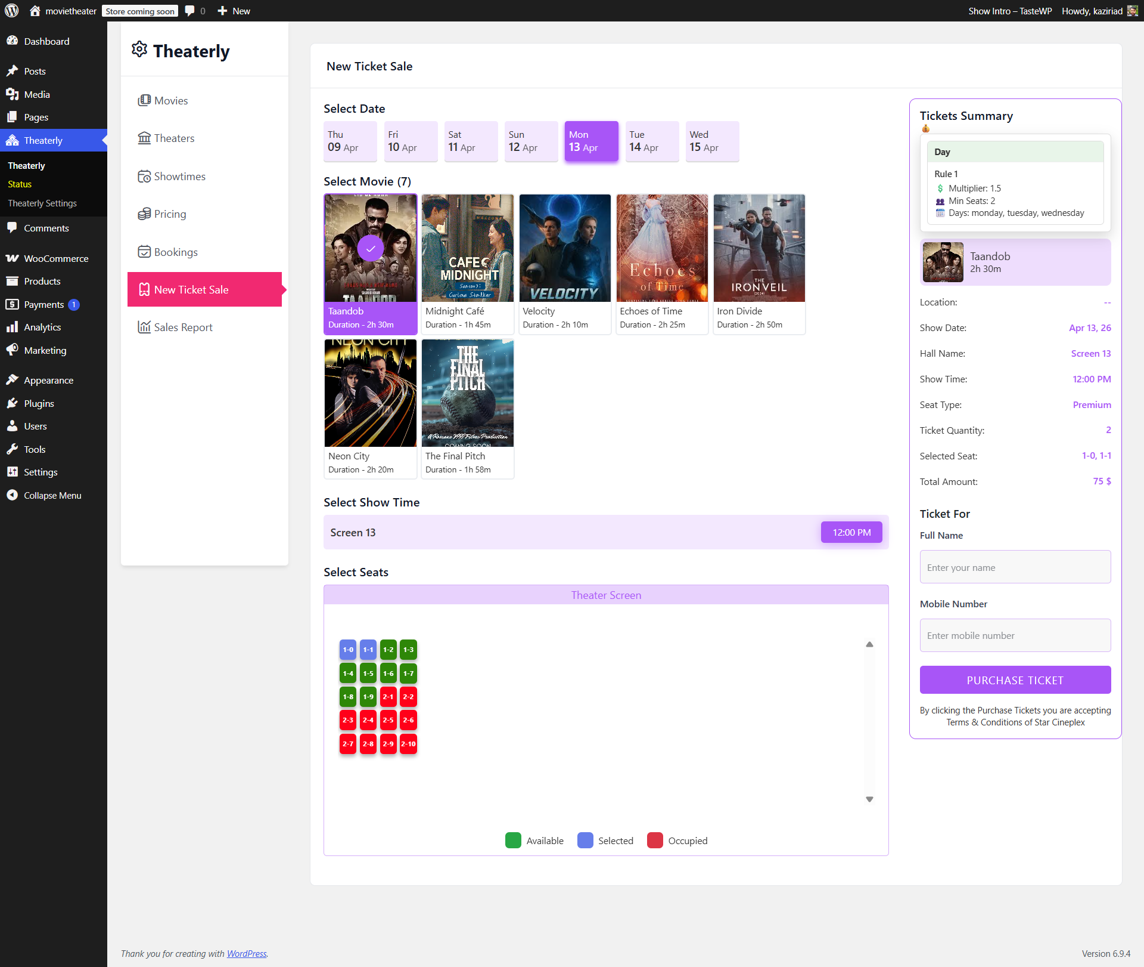
Payment should hold the selected seats for a defined window while the customer completes checkout, then release them if the payment fails or the timer expires. On confirmation, the system issues an e-ticket with a unique code and a QR image, and sends it by email or SMS.
5. Admission and post-show data

Staff scan the QR code at the entrance. The scan marks the ticket as used and blocks duplicate entry. Afterwards, the same records feed attendance reports: which films sold best, which showtimes were weakest, how many seats went unsold per screen.
Features Worth Paying For
Not every feature matters equally, and vendors tend to bundle a long list. These are the ones that change day-to-day operations.
| Feature | Why it matters in a cinema |
|---|---|
| Per-showtime seat locking | Prevents double-selling when traffic spikes a minute before a popular screening |
| Multi-screen scheduling | Stops two films being assigned to the same hall at overlapping times |
| Ticket categories and pricing rules | Handles child, senior, student and member pricing without manual overrides |
| QR e-tickets and scanning | Cuts queue time at the door and removes printed-ticket fraud |
| Partial payment or deposits | Useful for group bookings and corporate screenings booked well in advance |
| Refunds, exchanges and cancellations | Needed when a screening is cancelled or a customer changes showtime |
| Concession or add-on sales | Attaches food and drink revenue to the same transaction |
| Reports and exports | Shows occupancy per showtime, the metric that drives scheduling decisions |
Two of these deserve a closer look. Deposits and staged payments come up constantly for group and corporate bookings; the mechanics are the same as our walkthrough on how to integrate a deposit and partial payment system into an online checkout, and you can apply the same logic to a block of twenty seats. Age verification is the other one – for restricted films, some venues need a check at the point of sale or at the door.
Get your personalized Cinema or Theater Booking from MagePeople Support.
Cinema Ticketing vs Theatre and Event Booking
Cinema ticketing is often lumped in with theatre and live event booking, but the inventory model is not identical. A theatre run usually means one production with a limited number of performances, and pricing often varies by performance date and seat zone. A cinema runs many films a day across several screens, with a schedule that changes weekly.
The overlap is real, though: assigned seating, seat categories, e-tickets and door scanning. If your venue is a single auditorium staging shows rather than a multiplex showing films, the closer reference is our five-step guide to building an online theatre booking and reservation system, which treats a performance run as the bookable unit.
Off-the-Shelf Software, WordPress Plugins or Custom Build
There are three realistic routes, and the right one depends on how many screens you operate and how much control you want over pricing rules.
Dedicated cinema SaaS platforms
Specialist platforms provide point-of-sale integration, box office hardware support, loyalty programmes, and distributor reporting out of the box. They are the standard choice for large multiplexes. Expect per-transaction or per-screen pricing, and check current pricing directly with each vendor, because commercial terms change often and are usually quoted rather than published.
WordPress-based ticketing and booking plugins
For independent cinemas, single-screen venues and film clubs, a WordPress ticketing setup is often cheaper and more flexible. You keep your own domain and content, you control pricing rules, and you can extend the checkout with the same plugin ecosystem you already use for payments and marketing. The trade-off is that you or your developer must configure showtime logic and seat layouts properly.
Custom development
Custom builds make sense only when your model does not fit either option – unusual membership structures, strong integration requirements with existing POS hardware, or a chain with its own analytics stack. Budget for ongoing maintenance, not just the initial build.
Practical Checks Before You Buy
Whatever route you take, run the same short checklist against any candidate system.
- Buy the seat before the payment. Confirm that a seat is held the moment it is selected, and for how long.
- Test a cancellation. Cancel a booking and verify the seats return to the pool immediately for the correct showtime.
- Try a sold-out screening. See how the system communicates it, and whether it offers a waitlist.
- Check mobile checkout. Cinema tickets are bought on phones, usually minutes before a screening.
- Confirm refund rules are configurable. Cut-off times, fees, and non-refundable fees vary by policy and by film.
- Ask about offline scanning. If the network drops at the door, staff still need to admit paid customers.
- Read the data ownership terms. You want your own customer list and sales history, exportable at any time.
Also decide early how you will handle the two most common frictions: a customer who books the wrong showtime and a screening that gets cancelled after tickets are sold. Systems that make bulk refunds and seat exchanges easy save staff hours every week.
Common Questions
Do customers need an account to book?
Guest checkout reduces friction and is generally the better default for single-visit customers. Accounts are worth encouraging only if you run a loyalty programme or sell memberships.
Do customers need an account to book?
Guest checkout reduces friction and is generally the better default for single-visit customers. Accounts are worth encouraging only if you run a loyalty programme or sell memberships.
Can one system handle several cinema locations?
Yes, provided it supports multiple venues, separate screens per venue, and location-specific pricing. Confirm this before purchase rather than after, because retrofitting multi-location support is usually not possible.
How do you prevent double bookings?
By holding a selected seat for a short, fixed window while checkout completes, and by running seat reservations through a single authoritative record rather than cached availability.
Is a cinema ticket system the same as an event booking plugin?
Not quite. Event plugins book attendees to an event; a cinema platform books seats to a showtime, with repeat screenings of the same film in the same hall. If your venue sells one-off events rather than a rolling film schedule, an event-focused approach is more appropriate.
Final Thoughts
Choose a cinema ticket system by matching it to your operating model, not by counting features. A single-screen venue needs fast mobile checkout, a clear seat map, and reliable QR admission. A multiplex needs multi-screen scheduling, complex pricing tiers, and detailed occupancy reporting. Get those fundamentals right, and the rest of the feature list becomes a matter of budget and preference – and always verify current pricing and integration support directly with the vendor before you commit.