 Get 20% to 50% OFF for Lifetime & Bundle Deal on this Happy New Year!


Do you want to know which is the best WooCommerce Partial Payment and Deposits plugins?
Partial payment and Deposit plugins are used to enable the installment payment feature on your WordPress site.
The market share for installment payment software is huge! According to recent industry reports, the installment payment software market was valued at around USD 5.2 billion in 2024 and is projected to reach USD 12.8 billion by 2033 (with continued strong growth into 2026 and beyond). Earlier estimates showed $662 million in 2022, rising to $1.26 billion by 2029—the demand is exploding!
For WordPress, there are so many partial payment and deposit plugins in the WordPress directory. Choosing the right plugin depends on the features that meet your requirements. If your customer gets the flexibility to pay in installments, make partial payments, or secure their orders with deposits, it will help them easily buy your service or products. It can be an effective strategy for increasing sales, particularly for higher-priced items, by making purchases more accessible to a wide range of customers.
When it comes to partial payments on WordPress, your choices generally fall into two camps: WooCommerce extensions (best for physical/digital products) and Form-based plugins (best for services, bookings, or donations).
This detailed guide will examine both free and paid WooCommerce Partial Payment and Deposits Plugins that let you create payment plans, increase sales, and improve the shopping experience. You will learn each plugin’s features and benefits to choose the right plugin. Let’s find out.
| Plugin Name | WordPress Average Rating | Active Installations | Update Status | Support | Pricing |
|---|---|---|---|---|---|
| WpDepositly | 4.5 | 200+ | Frequently updated (last: Feb 2025) | Dedicated support | Free core; Pro $29/year or $69 lifetime |
| Acowebs Partial Payment | 5.0 | 5,000+ | Updates frequently (last: Dec 2025) | Excellent support | Free core; Pro $43/year or $99 lifetime |
| Bayna | 5.0 | 1,000+ | Less frequent (last: Nov 2025) | Minimal support | Free core; Pro $69/year or $179 lifetime |
| Woo Partial.ly | 5.0 | 400+ | Moderate (last: ~2 months ago) | Service-based support | Free plugin; 5% + 30¢ per transaction |
| PH WooCommerce Deposits | 4.8+ | 10,000+ (combined) | Frequent | Good support | Premium from $89/single site |
| YITH WooCommerce Deposits | 4.7 | 20,000+ | Frequent | Premium support | $129.99/year |
- 1.Deposit & Partial Payments for WooCommerce – WpDepositly
- 2.Payment Plans WC
- 3.Deposits & Partial Payments for WooCommerce by Acowebs
- 4. Bayna by Codeixer
- 5. Woo Partial.ly
- 6. PH WooCommerce Deposits Plugin
- 7. YITH WooCommerce Deposits / Down Payments
- Which Partial Plugin is suitable for you?
- FAQ: Common Questions About WooCommerce Partial Payment & Deposits Plugins
1.Deposit & Partial Payments for WooCommerce – WpDepositly

Deposit & Partial Payments for WooCommerce, or WpDepositly, is a powerhouse for activating installment functions. It is designed to be a lightweight, highly flexible solution that allows you to accept partial payments with just a few clicks.
Customers can pay a fixed price or a percentage upfront using its functionality. You can also force a deposit. It is fully compatible with WooCommerce Bookings and lets you collect deposits on bookings and other products.
This ensures a baseline commitment by setting a minimum amount. Customers can pay to secure their bookings. Additionally, you can enable customers to pay any amount directly on the checkout page by streamlining your booking confirmation.
Not only that, you can also set up a custom payment plan for a specific customer base. WpDepositly has both free and paid versions. Its advanced features will surely make your online store a bliss.
WpDepositly Key features
- You can accept or force deposits on products in your store
- Support any payment method supported by WooCommerce
- Enable Checkout mode to see partial payment details only on the checkout page
- Automatic email reminders to pay the remaining amount after a specific number of days
- Select deposit type: Fixed value or percentage.
- Customers can pay the remaining amount later by logging in.
- You can disable or enable deposits with a single click.
- Disable specific payment gateways when there’s a deposit in the cart.
- Display custom messages when the deposit option is chosen.
- Add new deposits from the order editor in the admin back-end.
- You can check the deposit report in the WooCommerce reports panel.
- Customize your frontend from the settings
- Supports multilingual with the WPML plugin.
- Contains POD file for Arabic, Dutch, English, French, German, and Spanish language
Price of WpDepositly
The premium version of WpDepositly costs $29 for a single year and $69 for a lifetime.
Why It Stands Out in 2026
- Custom Minimal Amount: WpDepositly offers a unique feature that allows customers to define their own payment amount at checkout, provided it meets a minimum threshold.
- Term-Based Payments: The Pro version supports gradual repayment schedules, allowing businesses to specify exact timelines and applicable fees for the remaining balance.
- Operational Efficiency: For store owners, it provides a dedicated “Partial Orders” menu and the ability to export all purchase data via CSV for better financial management.
- Broad Compatibility: It is fully integrated with WooCommerce Event Manager and supports major translation plugins like WPML.
- Offers Category-Based Deposits
- User Role-Based Deposits
2.Payment Plans WC

Payment Plans WC stands out for its focus on automatic recurring payments. While many plugins require manual invoicing for the balance, this tool automates the entire lifecycle from the initial deposit to the final installment.
Key Features:
- Automatic Rebilling: Smart auto-rebilling triggers if a card is declined, recovering revenue that might otherwise be lost.
- Gateway Compatibility: Supports 30+ payment processors, including Stripe, PayPal, Square, and Authorize.Net.
- Custom Scheduling: Total control over payment intervals (daily, weekly, monthly) and fixed or percentage-based plans.
- Mixed Product Carts: Allows customers to combine one-time purchases and installment plans in a single checkout session.
Benefit: Perfect for online courses (compatible with LearnDash) or high-ticket services where you want “set and forget” automated billing.
3.Deposits & Partial Payments for WooCommerce by Acowebs

Acowebs offers a highly configurable plugin that is particularly strong for businesses with complex user structures or those needing deep integration with payment gateways like Stripe.
Key Features:
- Stripe Auto Balance Collection: Recent updates (Feb 2026) include automated collection of remaining balances via Stripe, significantly reducing manual follow-ups.
- User Role-Based Deposits: Create specific deposit rules for different user roles (e.g., lower deposits for wholesale clients) or restrict deposit features for guest users.
- Flexible Scheduling: Admin can create custom payment plans in intervals of days, weeks, months, or years.
- Product-Level Control: Set specific rules for individual products or categories, including forcing deposits or disabling them storewide with a single click.
Pricing: Professional features start at $49/year or $119 for a lifetime license for a single site.
Benefits of Acowebs Partial Payment
- Offers Category-Based Deposits
- User Role-Based Deposits
- Comes with sortable Deposit Reports
4. Bayna by Codeixer

Codeixer’s Bayna is a feature-rich “Buy Now, Pay Later” (BNPL) plugin that focuses on reducing abandoned carts through automated communication and flexible gateway controls.
- Payment Gateway Control: Restrict deposit orders to specific, predefined payment gateways to manage transaction fees or security.
- Automated Reminders: Features both automatic and manual email reminders for pending balances, with the ability to trigger them directly from the order dashboard.
- Cart-Based Deposits: Simplifies the checkout experience by allowing deposits to be applied to the entire cart rather than just individual products.
- Safety Net: Automatically cancel orders that remain overdue after a specified number of days to keep your inventory accurate.
Pricing (2026):
Pro (20 Sites): $149/year (Annual) or $499 (Lifetime).
Starter (1 Site): $49/year (Annual) or $149 (Lifetime).
Benefits of Bayna
- Intuitive user interface
- Customizable deposit settings
- Support all WooCommerce payment methods
5. Woo Partial.ly

Partial.ly is a specialized service-based integration used by over 19,000 businesses across 30 countries. Unlike standard plugins, it acts as a comprehensive payment gateway for installments.
Key Features:
- Customizable Plans: Customers can customize their down payment, frequency, and duration within limits set by the merchant.
- Automated Collections: Payments are automatically timed and charged to the customer’s card, though they can also choose to pay early manually.
- No Fixed Fees: There are no monthly or sign-up fees; you only pay a transaction fee.
- Product Widgets: Includes a widget that shows payment plan options directly on product pages to drive early conversion.
Pricing: Simple pay-as-you-go cost of 2% per transaction. Note: Advanced features like per-product offers require a $10/month “Advanced Scripting” subscription.
Benefits of Woo Partial.ly
- Flexible payment options
- Reduce abandoned carts
- Available in over 30 countries around the world
- Convenient merchant portal
- Seamless WooCommerce integration
6. PH WooCommerce Deposits Plugin

PluginHive offers a robust, enterprise-ready solution with deep technical integrations for store owners who need a highly reliable and customizable system.
Key Features:
- High Compatibility: Extensively designed to work with WooCommerce Bookings & Appointments, making it a perfect fit for bookable services.
- Flexible UI Designs: Choose between vertical or horizontal UI layouts for selection boxes to best match your store’s design.
- Automated Invoice Generation: Automatically generates new orders for balance payments, reducing the manual workload for store managers.
- Variation Support: Set up and enable specific deposits for each individual product variation.
Pricing: Professional single-site license is $99/year, backed by a 30-day money-back guarantee.
Benefits of Using This Plugin:
- Offers customers flexibility with deposit and full payment options.
- Enhances customer experience with tailored payment plans.
- Automates balance payment reminders, reducing manual follow-ups.
- Supports a variety of product types and payment schedules, increasing sales potential.
7. YITH WooCommerce Deposits / Down Payments
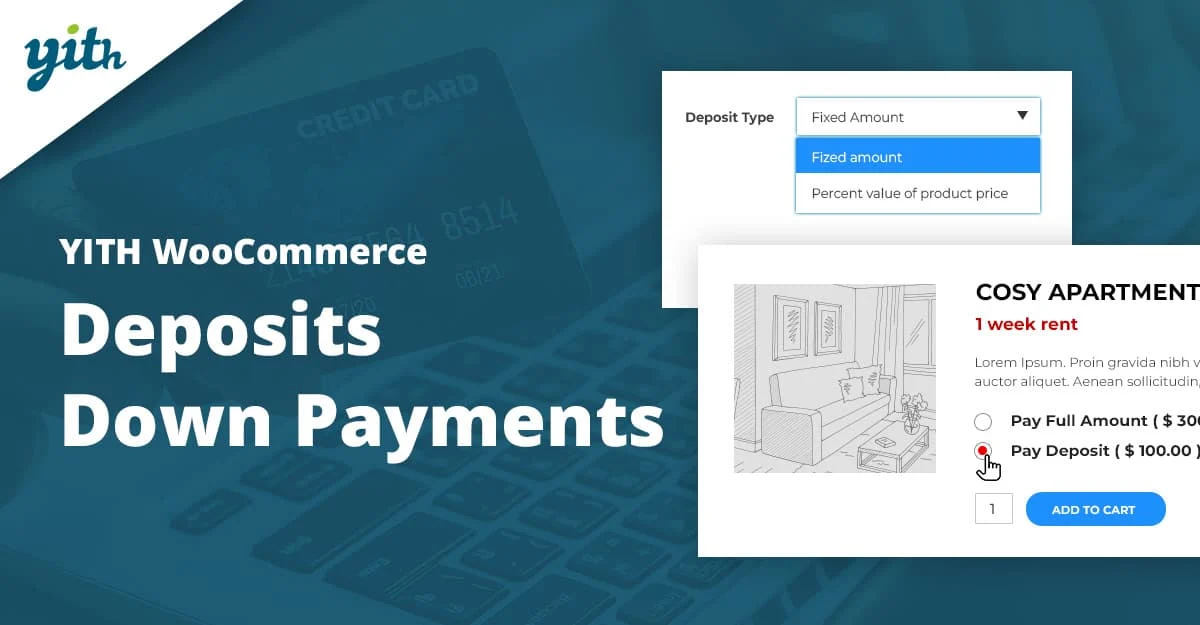
YITH is the industry standard for large-scale operations and complex service-based businesses, used by over 11,200 customers.
Key Features:
- Automatic Stripe Charging: When used with YITH Stripe, the balance can be automatically charged to the same credit card used for the deposit.
- Deep Booking Integration: Perfect for hotels and rentals, allowing you to request balance payments a set number of days before a check-in or appointment.
- Actions on Unpaid Balance: Configure the system to automatically refund the deposit or cancel the order if the balance is not paid by the deadline.
- Rule-Based System: Create advanced rules to override global settings for specific products or user roles.
Pricing: $129.99/year, which includes one year of updates and premium technical support.
Benefits of YITH WooCommerce Deposits Plugin
- Improved Sales Conversions – Reduce cart abandonment by offering deposit options.
- Enhanced Customer Experience – Provides flexibility for customers who do not wish to pay the full price in advance.
- Business Flexibility – Supports various business models with adjustable deposit amounts and payment schedules.
Do you want to use the Partial Payment plugin? Find out how to integrate partial payment in your WordPress site.
Which Partial Plugin is suitable for you?
From the list above, you now know which 7 WooCommerce deposit apps are the best. But there is still one thing that people don’t understand: which plugin to pick. All of the plugins on this list can be used to add a method for accepting partial payments.
WpDepositly plugins seem to offer a good balance of features and affordability for most WooCommerce stores. The free features have some pro options compared to other plugins. Acowebs, on the other hand, is also a reputable plugin developer, but their pricing may be higher with minimal features in their free options, and the price is high compared to WpDepositly. Bayna has some great features, but they are extremely expensive and don’t offer features like WpDepositly and Acowebs.
Woo Partial.ly is an add-on of the Partial.ly service, which needs additional sign-up from their website to use their services. Although the plugin is free, you will be charged based on each transaction.
Lastly, PH Deposits and YITH WooCommerce Deposits Plugin are premium plugins with nifty features for WooCommerce deposits, but there is no free version yet.
If you use WpDepositly, it won’t slow down your website at all because it’s a lightly coded app. Because of this, WpDepositly is suitable for you.
By implementing one of these solutions today, you can thrive in the $12.12 billion installment market while providing the financial flexibility your 2026 customers expect.
Find out what the benefits of a Partial Payment plugin.
FAQ: Common Questions About WooCommerce Partial Payment & Deposits Plugins
1. Can customers choose to pay the full amount instead of a deposit?
Yes, in most plugins (WpDepositly, Acowebs, YITH, PH, etc.), you can set deposits as optional. Customers see both “Pay Full” and “Pay Deposit” options at checkout or product level.
2. Are deposits refundable?
Yes, deposits are fully refundable just like regular payments. Refunds are handled manually from the WooCommerce order dashboard (partial or full). Plugins like Acowebs and YITH support easy refund flows for balances too.
3. Do these plugins work with WooCommerce Bookings or Appointments?
Many do! WpDepositly, YITH, PH WooCommerce Deposits, and Acowebs integrate well with WooCommerce Bookings/Events plugins to collect deposits on reservations/services.
4. Can I set different deposit rules for specific products, categories, or user roles?
Yes—most premium versions (YITH, Acowebs, PH, WpDepositly Pro) allow per-product, category-based, or user-role rules. Free versions are often store-wide or basic.
5. How are balance payments collected?
Customers pay the remaining amount later via their “My Account” page (most plugins), email reminders with direct pay links, or manual admin follow-up. Some (like WpDepositly Pro or PH) support automated schedules/installments.
6. Do partial payment plugins support all WooCommerce payment gateways?
Generally yes (Stripe, PayPal, etc.), but some let you restrict gateways for deposit orders (e.g., disable cash-on-delivery for balances). Test compatibility with your local gateways in your region.
7. What’s the difference between a simple deposit and full payment plans/installments?
Deposits = upfront partial + balance later (often manual/one-time). Installment plans (Pro versions of PH, YITH, or Woo Partial.ly) = scheduled recurring payments over time (weekly/monthly).
8. Can I use these without storing credit cards for future payments?
Yes, most rely on customers re-entering their details or using saved gateways (Stripe/PayPal). No subscription-style auto-charging unless you add a recurring plugin.
9. Is there a free way to test partial payments?
Absolutely, start with free versions of WpDepositly, Acowebs, or Bayna on a staging site. They cover basic fixed/percentage deposits perfectly.
