 Get BlackFriday 25% for Limited Time on Lifetime & 35% for Bundle Deal



If you are weighing up the top features of eCab, the short answer is this: eCab turns a WordPress site into a WooCommerce-powered taxi dispatch business — map-based booking with fare estimation, distance and time pricing, vehicle classes, driver panels, geofenced service zones, and automated PDF invoices. This guide walks through each capability in the order that matters to an operator, explains where each one helps and where it does not, and closes with a comparison table and the questions buyers ask most.
It is written for taxi firms, airport transfer operators, chauffeur services and fleet managers who already run WordPress and want to stop taking bookings by phone, WhatsApp and spreadsheet. If you are still deciding whether to buy the plugin at all, this is a feature-by-feature walkthrough rather than a sales page.
What Is eCab and Who Is It For?
eCab (the plugin is also listed in the WordPress.org directory as the taxi booking plugin for WooCommerce) is a self-hosted booking manager. You install it on your own WordPress site, connect it to WooCommerce, and the checkout, payment gateways, tax rules and order emails you already use become the commercial backbone of your taxi business.
That architecture is the single most important thing to understand before comparing features, because it determines who the plugin suits:
- Good fit: operators who want to own their booking data, keep customers on their own domain, and use WooCommerce payment gateways without paying a per-seat SaaS subscription.
- Good fit: businesses that already sell other travel products — tours, transfers, rentals — and want taxi rides to sit inside the same store.
- Poor fit: teams that want a native mobile app for drivers out of the box, or a multi-vendor marketplace where independent drivers onboard themselves. That is a different product category.
Setup is deliberately simple: after activating the plugin you place a booking shortcode on a page. The documented shortcode takes parameters such as [mptbm_booking map='yes'], so you can render the booking form with or without the map depending on the page layout you want.
The 9 Core Features, Explained
1. Map-Based Booking With Fare Estimation
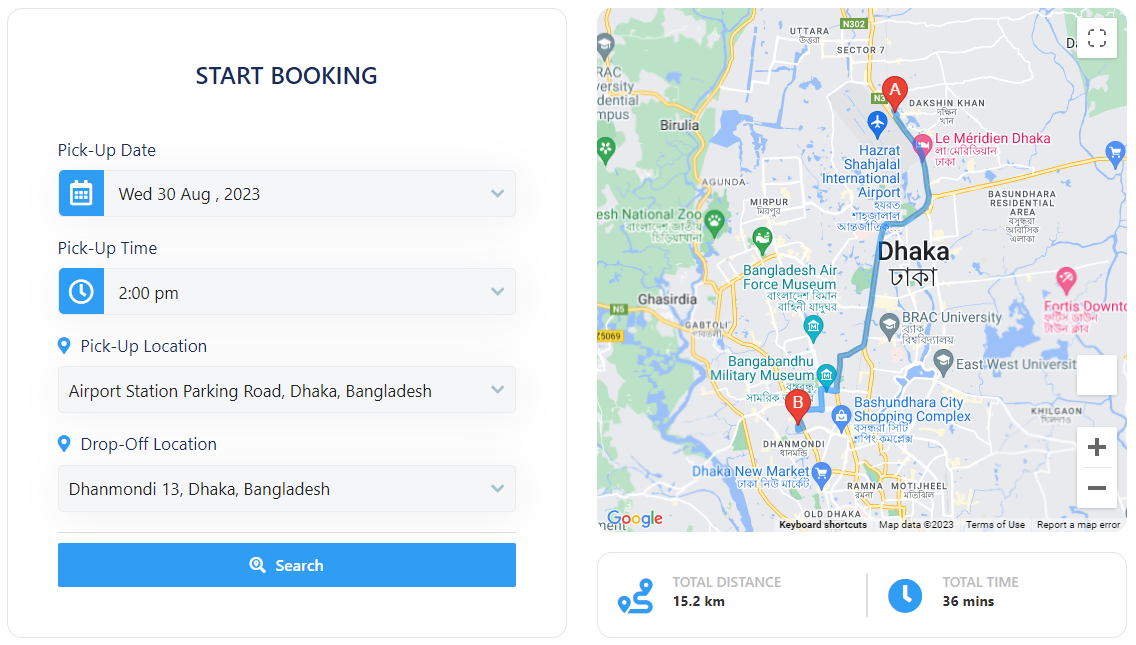
The booking form is built around a map. The rider picks a pickup point and a drop-off point, the plugin calculates the route distance, and the estimated fare appears before checkout. That single interaction replaces the entire “message us your address and we will call you back with a price” workflow.
Two mapping engines are supported. Google Maps gives you the familiar search experience, live traffic context and address autocomplete. OpenStreetMap is available as a no-key alternative, which matters if you do not want to register a Google Cloud billing account or pay for Maps API calls. In practice, many operators start on OpenStreetMap with a small budget and move to Google once volume justifies the API spend — you can read more about the OpenStreetMap option in eCab Taxi in the plugin documentation.
2. Geofencing and Service Zone Control
Geofencing lets you draw the areas you actually serve, directly on the map. Riders outside a zone cannot book, which removes the awkward phone call where you have to explain that a booking from three counties away is not possible.
Zones also give you a natural way to price differently: airport runs, city centre, suburbs and out-of-area allowances can each be treated separately. If you need the mechanics, our walkthrough on how to add geofencing in eCab covers drawing and testing zones, and the eCab setup checklist covers single-operation-area configuration for fleets that work one region only.
3. Multiple Fare Calculation Models
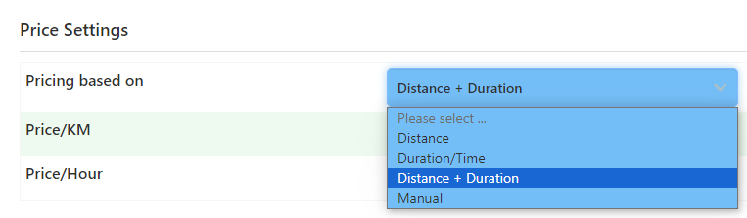
A taxi business is rarely priced one way, and eCab reflects that. Depending on the module you enable, you can charge by distance, by time in the vehicle, as a flat route price, or include waiting time as a billable component. That flexibility is what separates a usable taxi booking system from a generic appointment form — journeys are not fixed-length appointments.
For pricing strategy rather than configuration, see our broader cab booking system guide to core features, costs and choices, which frames these models against the type of operation that suits each one.
4. Peak Hour and Distance-Tier Pricing Add-ons
Two add-ons extend the base fare engine, and they are the features most cited in operator reviews:
- Taxi Peak Hour Pricing Addon: applies a different rate during defined windows — rush hour, late night, weekends — so surge is a rule you set, not a manual adjustment.
- Distance-Based Tier Pricing for eCab: charges a lower per-kilometre rate once a journey passes a threshold, which makes long-haul and intercity trips price attractively without eroding margin on short ones.
Our guide to adding peak hour pricing to your taxi booking website steps through the configuration and the policy decisions behind it. Check current pricing on each product page before you budget, since add-on prices change.
5. Vehicle Categories and Extra Services
Riders select a vehicle class rather than a specific car: economy, sedan, SUV, van or a premium tier. Each class carries its own capacity and fare rules, so a seven-seater airport transfer with luggage is never priced like a two-passenger city hop.
Optional extras — child seats, extra luggage, meet-and-greet — can be offered as chargeable items, which lifts the average booking value without raising the base fare. If you are targeting corporate accounts or airport pickups, these extras are often the deciding factor for a customer choosing between operators.
6. Fleet and Driver Management
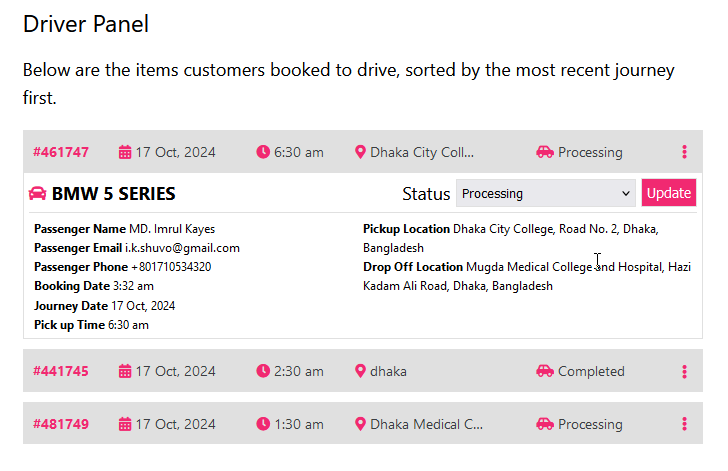
Behind the front-end form sits an operations layer. You create driver records, attach them to vehicles, and manage who is available. Drivers see their assigned trips rather than a shared spreadsheet, and the admin sees the whole board.
Be realistic about what this is: a WordPress-based operations dashboard, not a native ride-hailing driver app. Most small and mid-size operators run it perfectly well from a phone browser. If dispatch staff need offline-first native tooling, test that requirement carefully before committing.
7. WooCommerce Checkout, Payments and PDF Invoicing
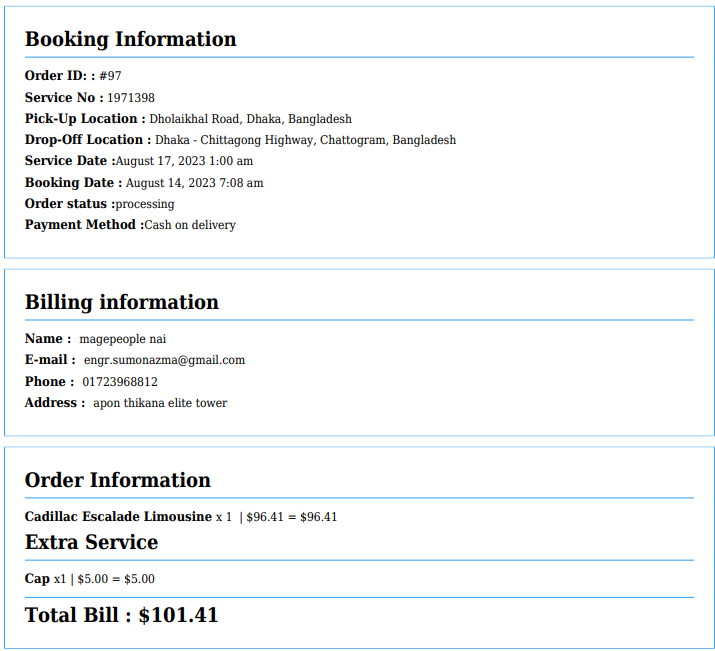
Because payment runs through WooCommerce, you inherit whatever gateways your store already supports, plus WooCommerce tax handling and order statuses. eCab then generates a PDF for the booking — a document a corporate customer can expense and a driver can carry.
That invoice trail is quietly one of the strongest features for business accounts and for firms that need tidy records for accounting or regulatory reasons. It also means no separate payment integration to maintain when your gateway updates.
8. Notifications, Booking Emails and Calendar Sync
Booking confirmations, status changes and driver assignment notices are driven through email and the WooCommerce order flow, so the customer receives the details without staff involvement. Connecting the flow to a calendar keeps scheduled rides visible alongside other commitments — useful for chauffeur and airport-transfer work, where a missed pickup is expensive.
9. Analytics, Reporting and Data Ownership
Bookings, revenue and driver activity are visible in the admin area, and order data can be exported for your own reporting. The less obvious benefit is ownership: the data lives in your WordPress database, not in a vendor’s dashboard that changes tiers or pricing on its own schedule.
Feature Comparison at a Glance
The table below summarises what each capability area gives you, so you can compare eCab against whatever else you are evaluating. Prices and version numbers change frequently — check current pricing on the vendor product page before you plan a budget.
| Capability | What You Get in eCab | Compatibility / Considerations | Pricing |
|---|---|---|---|
| Map-based booking | Pickup/drop-off selection with fare estimate on a map | Google Maps (API key and billing) or OpenStreetMap (no key) | Check current pricing |
| Service area control | Geofenced zones; out-of-zone bookings blocked | Requires correctly drawn zones; test boundaries before launch | Check current pricing |
| Fare models | Distance, time, flat route and waiting-time components | Configured per vehicle class and route | Check current pricing |
| Peak hour surge | Time-window rate rules | Separate add-on | Check current pricing |
| Distance-tier pricing | Discounted per-km rate beyond a threshold | Separate add-on | Check current pricing |
| Vehicle classes | Economy, sedan, SUV, van, premium tiers | Each class needs its own fare settings | Check current pricing |
| Driver management | Driver records, vehicle assignment, trip visibility | Browser-based; not a native mobile app | Check current pricing |
| Payments | WooCommerce gateways, tax rules, order statuses | Requires WooCommerce; gateway availability depends on your region | Check current pricing |
| Invoicing | Automated PDF booking documents | Generated through the plugin’s PDF feature | Check current pricing |
| Data ownership | Bookings stored in your own WordPress database | You are responsible for backups and updates | Included |
Where eCab Is Not the Right Fit
No plugin suits every operation, and being clear about the gaps saves more money than a feature list ever will.
- You need a native driver app on day one. If your model depends on a branded iOS/Android driver app with background GPS tracking, a WordPress plugin is the wrong layer to start from.
- You want a multi-vendor marketplace. eCab is built for one operator managing its own fleet. Independent drivers registering and receiving payouts through your platform is a different architecture.
- You need in-cab metering or hardware integration. The plugin prices journeys from map routes and rules; it is not a taximeter system.
- You have no WordPress or WooCommerce experience and no one to maintain the site. Self-hosting is cheaper in licence fees but has real upkeep: updates, backups, security and plugin conflicts are your responsibility.
- You need a verified install-count benchmark or definitive rating figure. Directory statistics change month to month — check the live plugin listing rather than relying on any number quoted in an article.
If you want the reverse view — where the plugin genuinely wins against SaaS alternatives — our review of why eCab works as a taxi booking system argues the case from an operator’s perspective.
How to Roll the Features Out Without Breaking Your Operation
Feature lists do not launch a business; sequencing does. A practical order of work looks like this:
- Draw your zones first. Decide the areas you serve before touching fares — pricing is meaningless outside a defined service area.
- Set one vehicle class and one fare model. Get a single class working end to end, including a test payment and a PDF, before adding premium tiers.
- Add a second class, then extras. Confirm each addition on mobile, where most riders will book.
- Introduce surge and tier pricing last. These add-ons change prices customers see, so add them once the base flow is stable — and tell repeat customers what to expect.
- Connect driver records and notifications. Only after bookings are flowing correctly, so you can tell whether a notification problem is new or pre-existing.
- Test a full refund and cancellation path. Order-level changes are handled in WooCommerce, and you want to have rehearsed that before a customer needs it.
If you would rather follow a numbered sequence, the 12-step pre-launch checklist in our eCab Taxi setup checklist pairs well with this feature overview: this article explains what each part does, that one tells you the order to switch it on.
Costs and Practical Considerations Before You Buy
Two costs are easy to overlook. First, Google Maps API usage is billed by Google, not by the plugin developer, and a busy booking page makes many map and route calls. Second, someone has to maintain the WordPress install. For a full budget breakdown beyond the licence itself, including the fees that surprise first-time buyers, see our guide to taxi booking WordPress plugin pricing, fees and setup costs.
Two operational considerations also deserve a decision before launch: what happens when a driver cancels an assigned ride, and whether you accept bookings on account for corporate clients. Both are workflow questions rather than plugin questions, but both affect which features you lean on.
Frequently Asked Questions
Do I need the Google Maps API to use eCab?
No. Google Maps gives autocomplete and richer routing, but OpenStreetMap is supported as a no-key alternative, so you can run the booking form without a Google billing account. Many operators launch on OpenStreetMap and switch to Google later.
Does eCab work without WooCommerce?
eCab is built around WooCommerce: checkout, payments, tax handling and PDF invoicing run through it. If you need a booking plugin that operates without WooCommerce, that is a different category of plugin and worth evaluating separately.
Can eCab handle airport transfers and long intercity trips?
Yes. Flat route pricing suits fixed airport runs, while the distance-based tier add-on lets you apply a lower per-kilometre rate once a journey passes a set threshold. Vehicle classes let you price a large-luggage transfer differently from a city hop.
How do I stop bookings from areas I do not serve?
Use geofencing. You draw the service zones on the map and bookings outside those zones are blocked, so riders in unprofitable areas cannot complete a trip request.
Is eCab suitable for a fleet with several drivers?
Yes, for a single operator managing its own fleet. You create driver and vehicle records and assign trips from the admin side. It is not designed as a multi-vendor marketplace where independent drivers onboard themselves and take payouts.
Where does eCab store my booking data?
In your own WordPress database, because the plugin is self-hosted. That gives you control over exports and reporting, but it also means backups, security updates and uptime are your responsibility rather than the vendor’s.
Next Steps
The strongest features in eCab are the ones that remove manual work: map-based fare estimation, geofenced service zones, rule-based peak and distance pricing, and WooCommerce checkout with automatic PDF documents. The trade-off is the usual self-hosted one — lower licence costs in exchange for maintaining your own site.
Before you commit, decide your zones and fare models, test one vehicle class end to end on mobile, and confirm current add-on pricing. Then work through a setup checklist rather than toggling every feature at once. If you are comparing eCab with per-ride SaaS platforms instead, read our breakdown of the booking module features a taxi site needs to see which capabilities you can genuinely live without.
