 Get Halloween 15% for Limited Time on Lifetime & Bundle Deal

The MagePeople Yacht Booking System is a WordPress plugin that gives yacht brokers, boat charter companies, catamaran rentals, water taxi operators, and sailing clubs a complete booking and fleet management system with fleet listings, flexible charter pricing, online payments with deposits, and a quayside operations dashboard without needing a developer or a separate booking platform. It works standalone with its own Stripe, PayPal, and offline checkout, or through WooCommerce if you already run a store.
If you run a yacht charter, boat rental, or marine tour business, your booking process is more complicated than a standard reservation form can handle. A private sunset charter prices differently from a shared snorkeling tour. A luxury yacht needs turnaround time between bookings to clean and restock. Guests want to see the exact marina pier on a map before they pay a deposit. The MagePeople Yacht Booking System is built around exactly that reality, rather than a generic appointment or event plugin adapted to fit.
What Is the MagePeople Yacht Booking System?
It’s a WordPress plugin that turns your site into a full marine charter booking portal: showcase your fleet, accept online payments, manage guest manifests, and coordinate departures, all from one dashboard. Setup runs through a 4-step vessel wizard, so you can get a vessel published with accurate pricing, capacity, and embarkation details without writing any code.
It’s built for:
- Yacht brokers and private charter operators
- Boat and catamaran rental companies
- Water taxi operators
- Sailing clubs and marine tour businesses
Whether you rent out a single luxury yacht for exclusive private events or sell shared tickets on a tour boat, the plugin is designed to handle both booking models, including letting the same vessel offer both, side by side.
Get your Yacht Booking plugin now for free from the WordPress directory and start your Yacht Booking business.
How It Helps Yacht Business Owners: The Core Pieces
1. List Your Entire Fleet Without a Developer
The 4-step vessel setup wizard walks you through everything a listing needs:

- Basic Info — vessel name, a full rich-text description, build year, marina/pier name, and an interactive map where you search for your dock address or drag a pin to set the exact embarkation point guests will see.
- Specs & Capacity — guest capacity, cabin count, crew size, vessel length, and an itemized list of what’s included in every charter (captain and crew, DJ sound system, bar service, towels, safety equipment, and anything else you provide as standard).
- Pricing & Availability — your charter mode and rate structure (covered below).
- Review & Publish — a full checklist of everything you’ve configured before the listing goes live, plus the option to override confirmation emails and the booking call-to-action specifically for that vessel.
Each listing also supports vessel-specific FAQ accordions and a “Related Yachts” cross-sell selector, so a visitor looking at one boat sees other options from your fleet without leaving the page.
2. Let Guests Book the Way Your Business Actually Sells
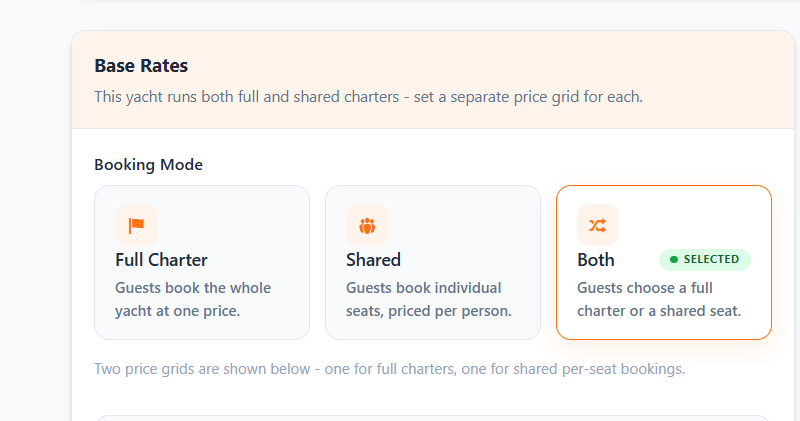
Not every charter business sells the same way, so the plugin supports three booking modes per vessel:
- Full Charter — the guest books the entire vessel privately at a flat price.
- Shared — guests book individual passenger seats or tickets, like a shared snorkeling or sunset tour.
- Both — you offer either option on the same listing, and the guest chooses at booking time.
3. Price Every Charter Type Correctly
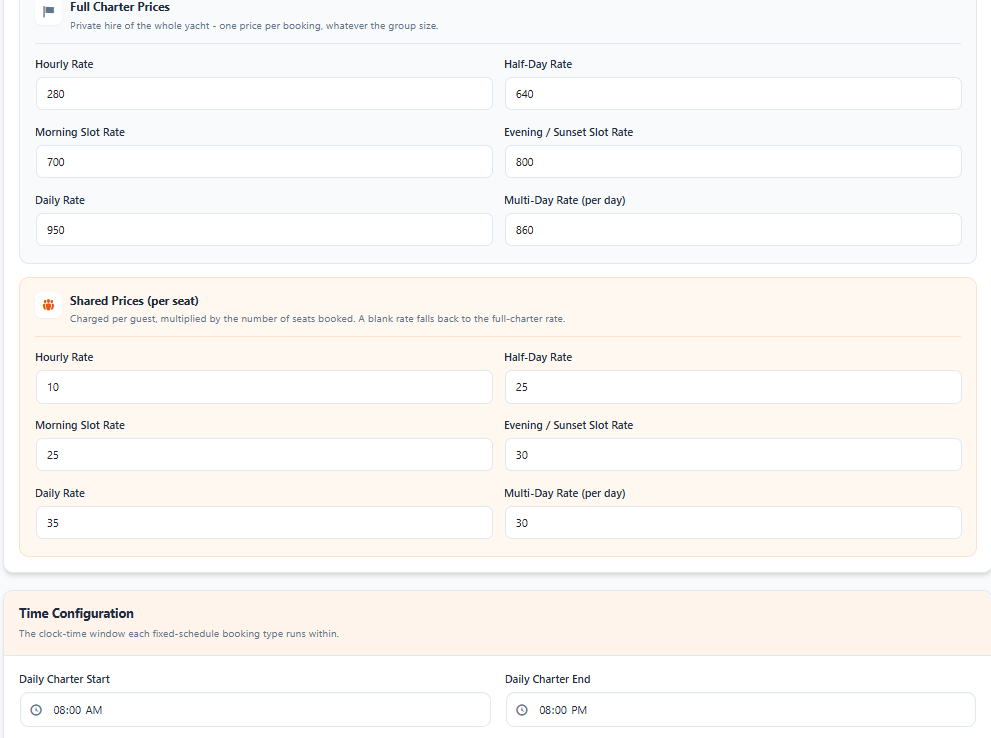
Charter pricing isn’t one-size-fits-all, and the plugin’s pricing grid reflects that with six separate rate types available for both full-charter and shared bookings: hourly, half-day (fixed 4-hour blocks), morning slot, evening/sunset slot, daily, and a discounted multi-day rate for extended rentals. Each rate type has its own configurable start and end time window, so a half-day charter and a sunset cruise can run on completely different schedules without conflicting.
4. Protect Your Turnaround Time and Avoid Overbooking
Yachts need prep time between charters cleaning, restocking, crew changeover and the plugin builds that in rather than leaving you to manage it manually:
- Turnaround buffers enforce a cleaning/prep window between back-to-back charters.
- Minimum notice periods require guests to book a set number of hours in advance, preventing last-minute bookings you can’t realistically staff.
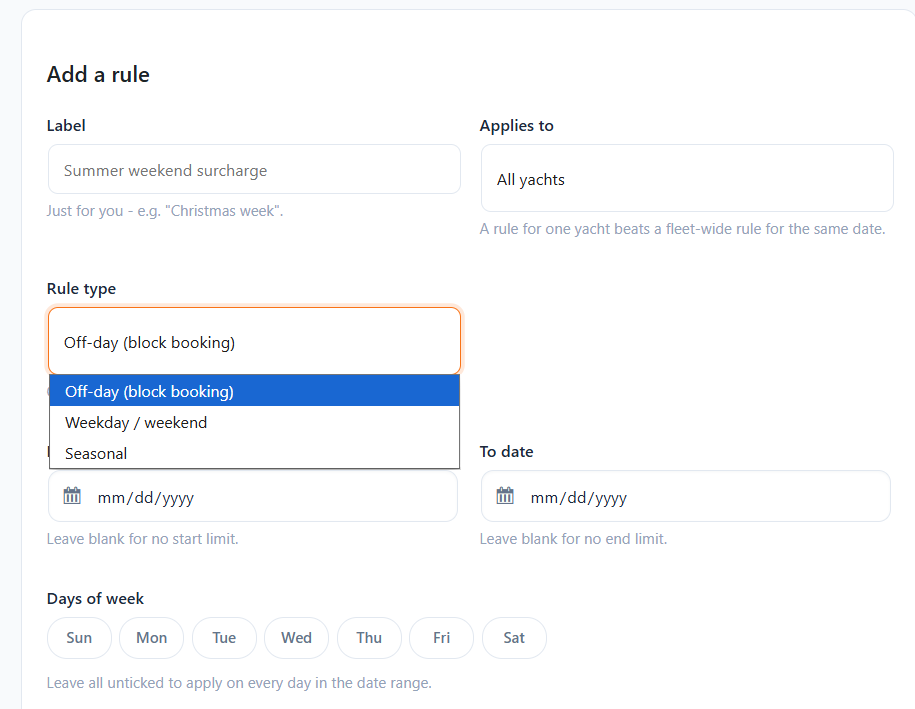
- Seasonal rules and blackout dates let you set surcharges for peak season or weekends, or block specific vessels (or your whole fleet) from booking entirely on dates they’re out of service. Vessel-specific rules always override fleet-wide ones when the two conflict, so an individual yacht’s exceptions take priority automatically.
5. Get Paid Your Way — With or Without WooCommerce
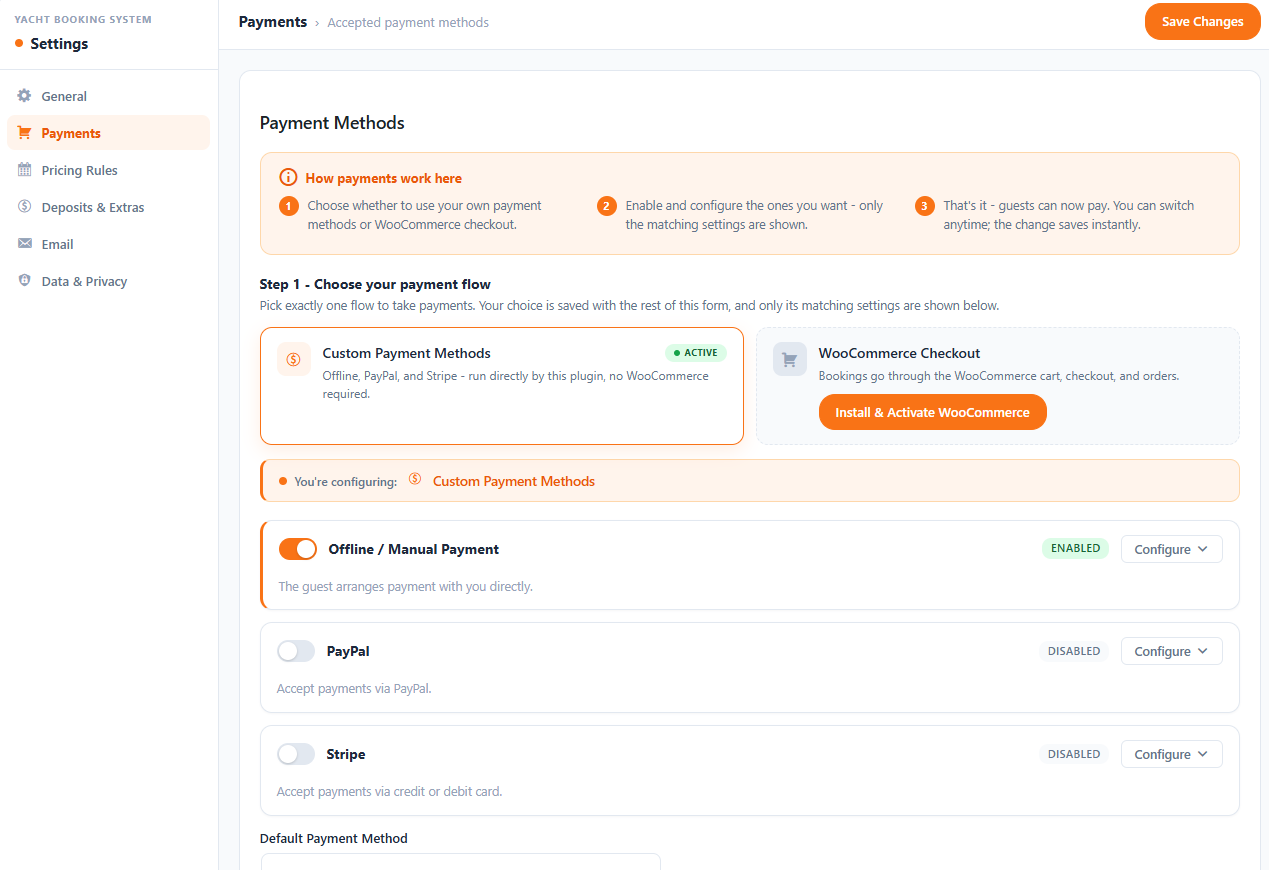
This is one of the more genuinely useful design choices in the plugin: you are not required to run WooCommerce at all. Under Settings → Payments, you choose between:
- Custom Payment Methods — built-in, standalone checkout support for Stripe, PayPal, and offline/manual payments, with no WooCommerce installation needed.
- WooCommerce Checkout — if you already run a WooCommerce store, route reservations through your existing cart, checkout, tax rules, and payment gateways instead.
Either way, you can enable split deposit payments — charge a percentage of the total upfront at checkout while the system records the full charter total and tracks the remaining balance due on boarding. Both the guest’s email receipt and their web confirmation page itemize what’s been paid and what’s still owed, so there’s no ambiguity at the dock. You can also attach add-ons (watersports equipment, catering, beverage packages) either fleet-wide or to specific vessels, and create percentage-based coupons with usage limits, minimum spend rules, expiry dates, and optional vessel restrictions.
6. Run the Quayside Like a Command Center
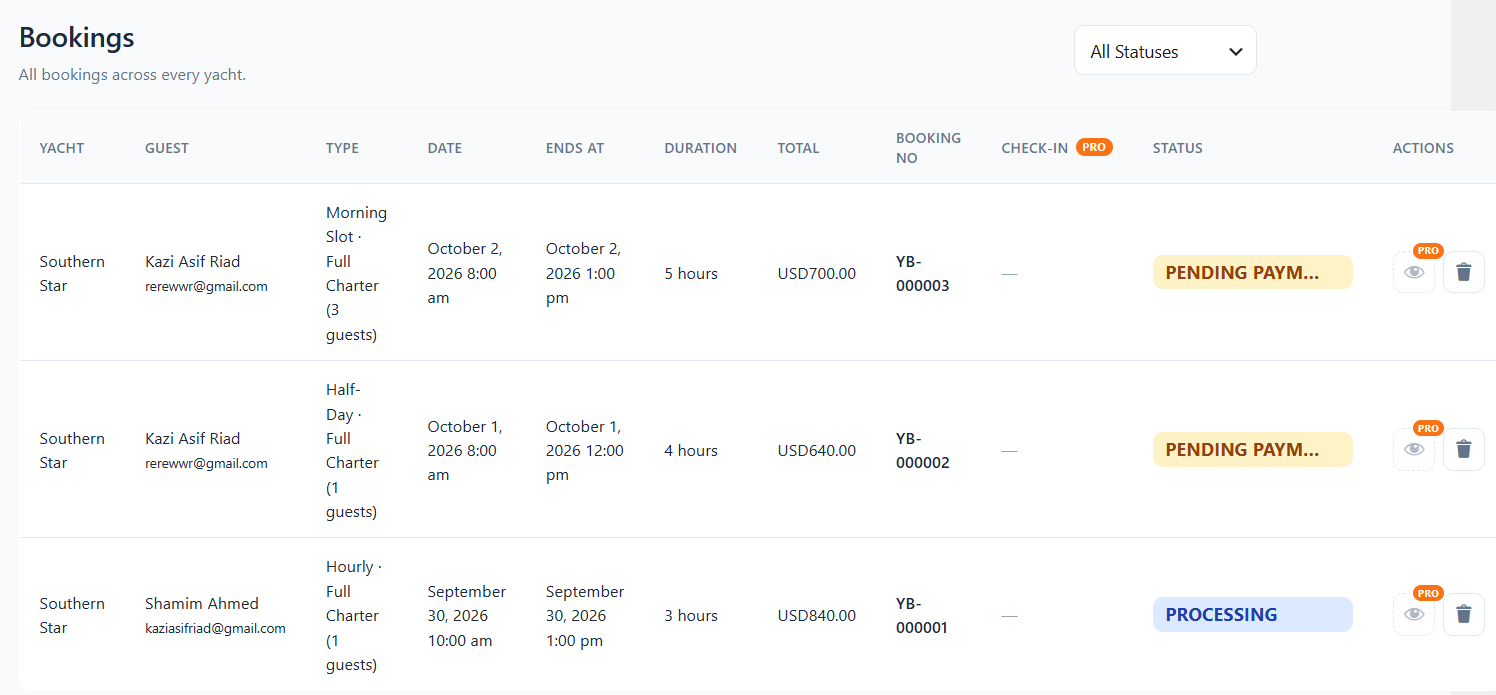
The admin dashboard is built around the questions a charter operator actually asks every morning:
- Business snapshot metrics — today’s bookings, upcoming bookings, active yachts, and revenue this month, all at a glance.
- Upcoming Charters Board — a chronological departure roster showing vessel, time window, customer, party size, price, and status.
- Booking Health Breakdown — a real-time view of where every booking sits: Pending Payment, Processing, On Hold, Completed, or Cancelled.
- Visual Availability Calendar — a monthly grid with color-coded reservation pills; hover or click any booking to see guest contact details, scheduled hours, and total price without leaving the calendar.
- Quayside Passenger Manifest — a real-time guest roster built for marina crew, auto-populated once a booking moves to Processing or Completed, showing passenger details, party size, and departure schedule for every charter.
7. Give Guests a Modern, Confidence-Building Checkout
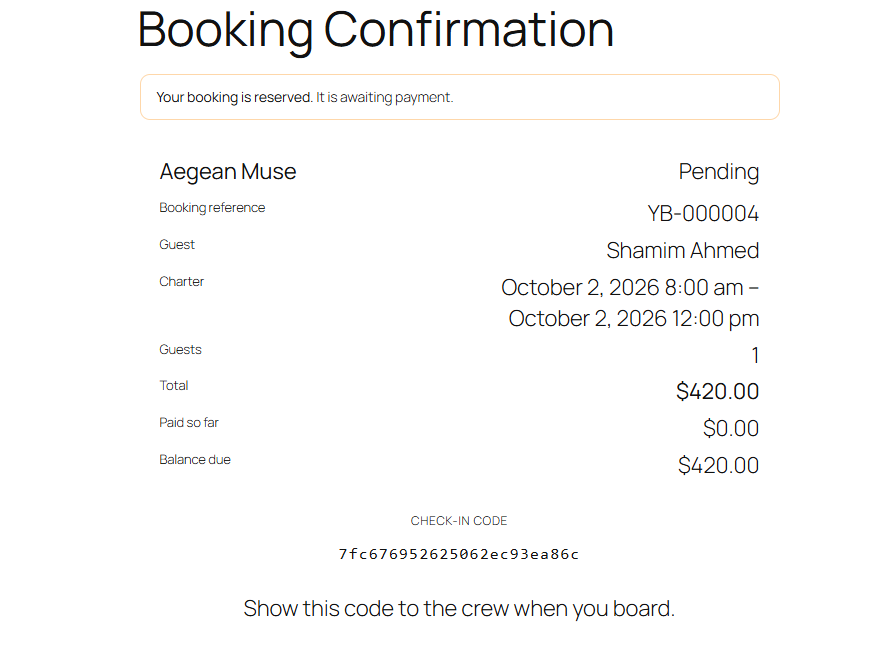
The frontend booking flow is a 3-step slide-out drawer: guests select their date, mode, time slot, and guest count, review a Summary with schedule, location, and price breakdown, enter contact info and apply a coupon at Checkout, then land on an instant Confirmation screen with their reference code. From there, every guest gets a digital booking voucher showing real-time status, the paid/unpaid balance breakdown, charter times, and a unique boarding check-in code, along with an automated confirmation email using customizable merge tags like {guest_name}, {yacht_name}, {booking_id}, {start_time}, and {total_price}.
8. Stay Compliant Without Extra Work
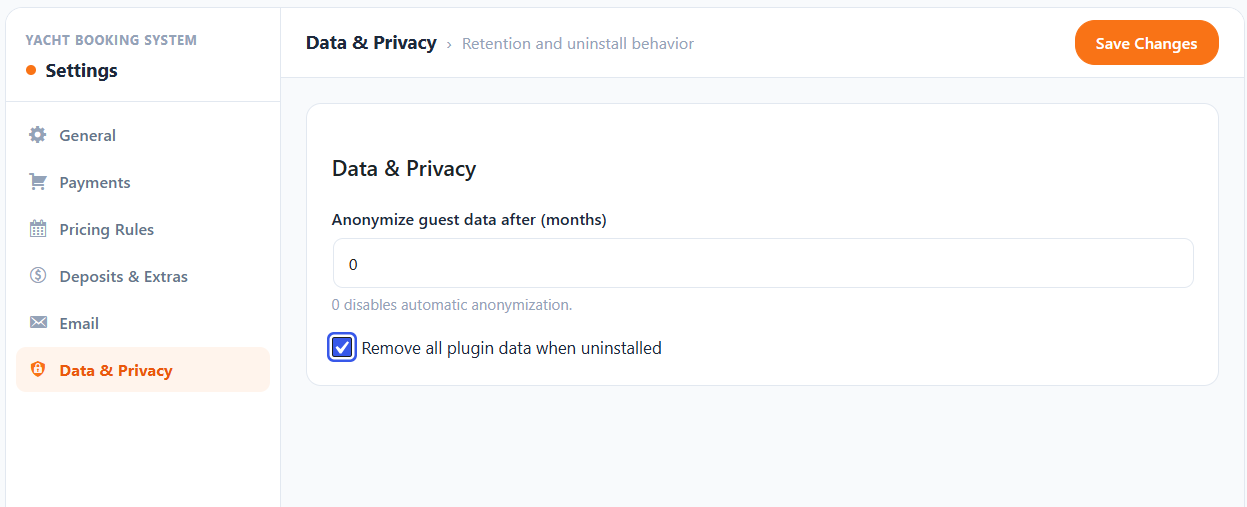
Built-in GDPR and privacy settings let you set guest data to anonymize automatically after a configurable number of months (or disable that entirely), plus a toggle to fully remove plugin data if you ever uninstall it useful for operators handling EU customers or anyone who wants a clean data retention policy without a separate compliance plugin.
What’s in the Pro Add-On
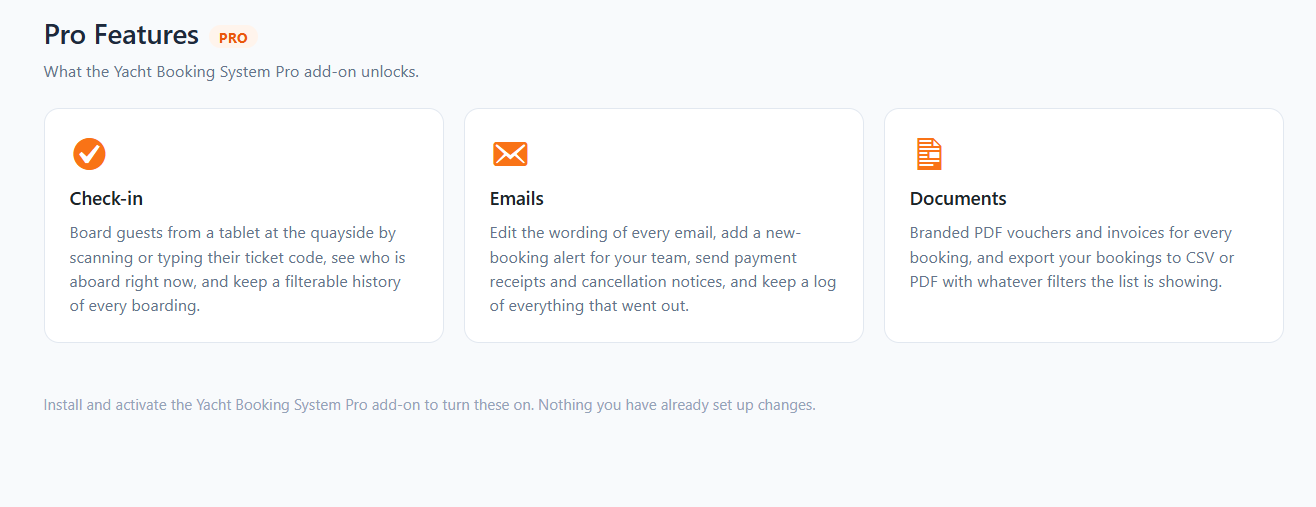
The core plugin covers the full booking and fleet management workflow above. The Pro add-on layers on operational tools for businesses running daily departures at scale:
- Quayside Check-in — a mobile-friendly boarding interface where crew scan or enter guest check-in codes dockside, with a filterable, real-time boarding log.
- Advanced Email Customization — full control over wording for every notification type, including cancellation notices and crew alerts, plus a complete outgoing email delivery audit log.
- Documents & Reporting — branded PDF booking vouchers and tax invoices, plus CSV or PDF export of filtered booking lists and passenger manifests.
Also check out how you can create a multipurpose ticket booking for boat, bus, and other transport.
Frequently Asked Questions
Do I need WooCommerce to use the Yacht Booking System?
No. The plugin includes its own standalone checkout with Stripe, PayPal, and offline/manual payment support, so it works as a complete booking system without WooCommerce installed. If you already run a WooCommerce store, you can route bookings through that checkout instead.
Can I charge a deposit instead of full payment upfront?
Yes. Enable split deposit payments in Settings → Deposits & Extras, and set what percentage of the total is charged at checkout. The system tracks the full charter price alongside the amount paid and the balance due, and shows both clearly to the guest on their confirmation page and in their email receipt.
Can the same yacht be booked as both a private charter and shared seats?
Yes. Each vessel’s booking mode can be set to Full Charter only, Shared only, or Both, letting guests choose whether to book the entire boat privately or an individual seat on a shared trip.
How does the plugin handle a yacht that needs to be taken out of service?
You can set blackout dates for an individual vessel or across your entire fleet. Vessel-specific pricing and availability rules always take priority over fleet-wide rules, so you can block or adjust one yacht without affecting the rest of your listings.
Does the plugin handle turnaround time between bookings?
Yes. You can configure turnaround buffer windows that block new bookings for a set period after a charter ends, which prevents back-to-back reservations that don’t leave time for cleaning, restocking, or crew changeover.
What do crew or marina staff see on the day of a charter?
The Quayside Passenger Manifest shows a real-time roster of passenger contacts, party sizes, and departure schedules for every confirmed charter, auto-populated as bookings move to Processing or Completed, built specifically for marina managers and boarding crew rather than office administrators.
Final Thoughts
Most WordPress booking plugins are built around appointments or events, then stretched to fit a charter business. The MagePeople Yacht Booking System starts from the other direction full charter versus shared seating, turnaround buffers, deposits, marina embarkation points, and a quayside manifest because those are the actual mechanics of running a boat charter, not an appointment slot with a different label. For an operator going from a spreadsheet-and-email booking process to a real online system, that difference shows up in the first week: fewer scheduling conflicts, clearer deposits, and a crew that knows exactly who’s boarding before the guest even arrives at the dock.
