 Get Halloween 15% for Limited Time on Lifetime & Bundle Deal

Distance tier pricing lets you charge different rates for different parts of a trip, so short fares stay profitable and long fares stay competitive. In the eCab taxi booking WordPress plugin, this is handled by the Distance Based Tier Pricing addon, which supports single tier and progressive (also called mixed) tier pricing, with optional duration, waiting time and return-trip rules.
This guide walks through how to use distance tier pricing in the eCab taxi booking WordPress plugin end to end: the concepts, installation, the pricing modes it works with, and worked fare examples for a 24.4 km, 43-minute return trip so you can see exactly what your customers will be quoted.
- Understanding Distance Tier Pricing in the Taxi Sector
- Setting Up the Distance Tier Pricing Addon
- Understanding Pricing Logics
- Example Scenarios: Fare Calculations
- Comparison: Which Pricing Logic Fits Which Business
- Where Distance Tier Pricing Is Not the Right Fit
- Tips for Optimising Your Pricing Strategy
- Frequently Asked Questions
- Conclusion
Understanding Distance Tier Pricing in the Taxi Sector
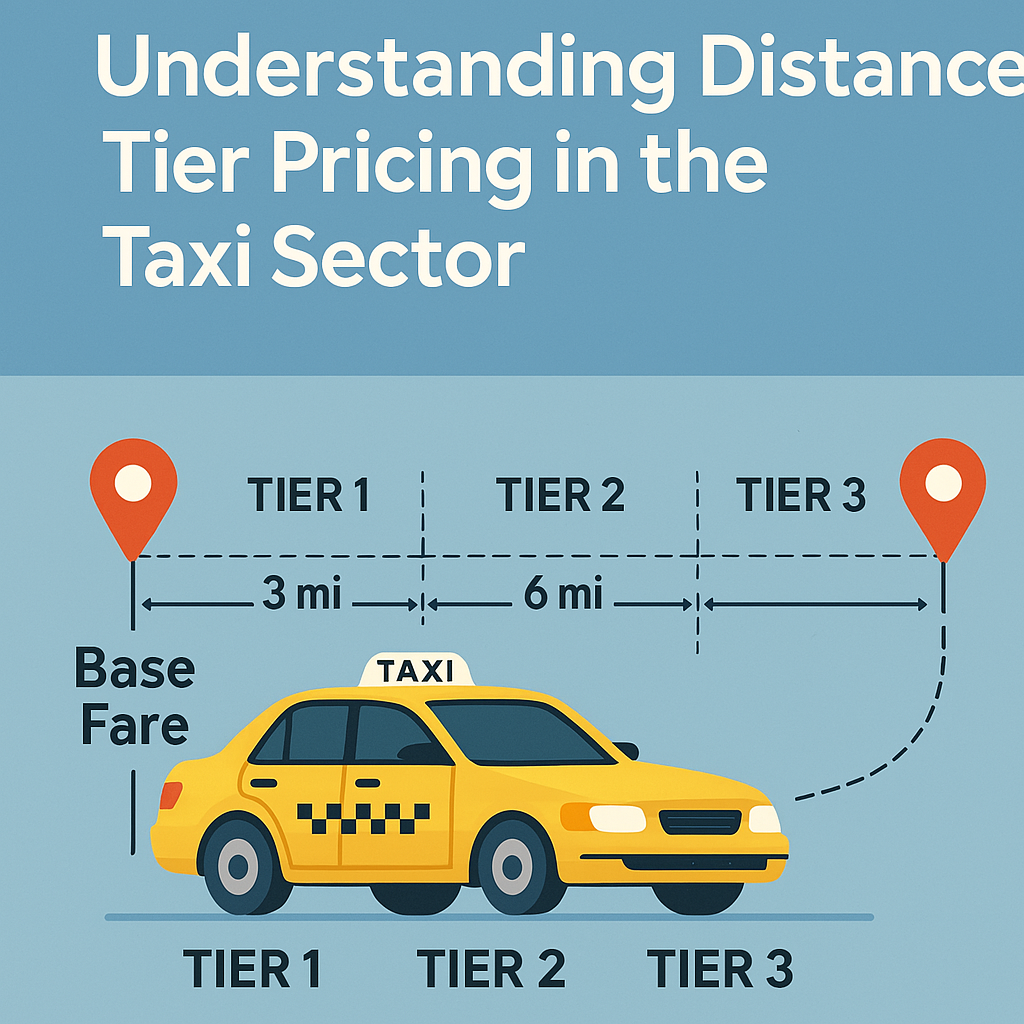
Distance tier pricing is a fare structure where the price per kilometre changes as the trip gets longer. Instead of one flat rate for the whole journey, you split the distance into ranges – a short-trip tier, a mid-distance tier and a long-trip tier – and each range carries its own rate rule.
Most operators combine it with time-based charges (duration or waiting time) and, occasionally, demand-based surcharges. The value of tiers is that they let you cover the fixed cost of starting a journey without making long journeys unaffordable: the first few kilometres carry a higher effective rate, and the rate eases off as the trip gets longer.
You can use distance tiers on their own, or alongside other eCab pricing models. Surcharges for busy periods are a separate mechanism – if you need surge rather than distance tiers, see how to add peak hour pricing to your taxi booking website, and if you want flat rates between named zones instead of per-kilometre tiers, see the guide to single operation areas and fixed zone pricing.
How Distance Tier Pricing Works
- Distance measurement: the booking engine reads the route distance between pickup and drop-off, typically from Google Maps, so the tier is applied to real journey length rather than an estimate.
- Tiered rates: each tier is defined by a start distance, an end distance and a pricing type – either price per kilometre or a fixed rate.
- Calculation: the engine applies your chosen pricing logic (single tier or progressive) and then adds any initial price, duration cost, waiting time and return-trip adjustments.
Example of Fare Calculation
For a 10-mile trip under a simple three-tier structure:
- Base fare: $3.00
- 0-3 miles at $2.50/mile = $7.50
- 3-8 miles at $2.00/mile = $10.00
- 8-10 miles at $1.50/mile = $3.00
- Total: $23.50
Examples of Tiers
- Short trip (0-3 miles): the highest per-mile rate, because a large share of the cost is in starting the journey at all.
- Medium trip (3-8 miles): a moderate rate that balances profitability against what competitors charge for similar distances.
- Long trip (8+ miles): the lowest per-mile rate, so long journeys stay attractive and the vehicle keeps earning.
Advantages of Tiered Distance Fares
- Transparency: customers can see how the fare grows with distance rather than being quoted an unexplained number.
- Fairness: the price tracks the actual journey, which flat-rate structures often fail to do over mixed trip lengths.
- Profitability: you recover start-up costs on short runs while keeping long runs competitive.
Factors That Influence Your Tier Rates
- Operating costs: fuel, maintenance, insurance and driver pay set the floor for every tier.
- Location: dense urban routes with heavy traffic may need higher tiers than rural routes of the same length.
- Competition: ride-hailing and other taxi services in your city set the ceiling customers will accept.
- Demand: peak windows and events may justify separate surcharges rather than changing your tier structure.
- Trip duration: in congested areas, time-based charges matter more than distance, which is why eCab supports distance plus duration.
- Flat fares: fixed airport and hotel transfers are usually better handled by zone pricing than by tiers.
Setting Up the Distance Tier Pricing Addon
The addon is a separate extension for the eCab Taxi Booking Manager plugin, so you configure it on top of an existing taxi booking setup. If you have not built the site yet, start with how to make a taxi booking website in WordPress and return here once bookings are running.
Disclosure: the Distance Based Tier Pricing addon is a MagePeople product – this guide is written by the team that builds it.
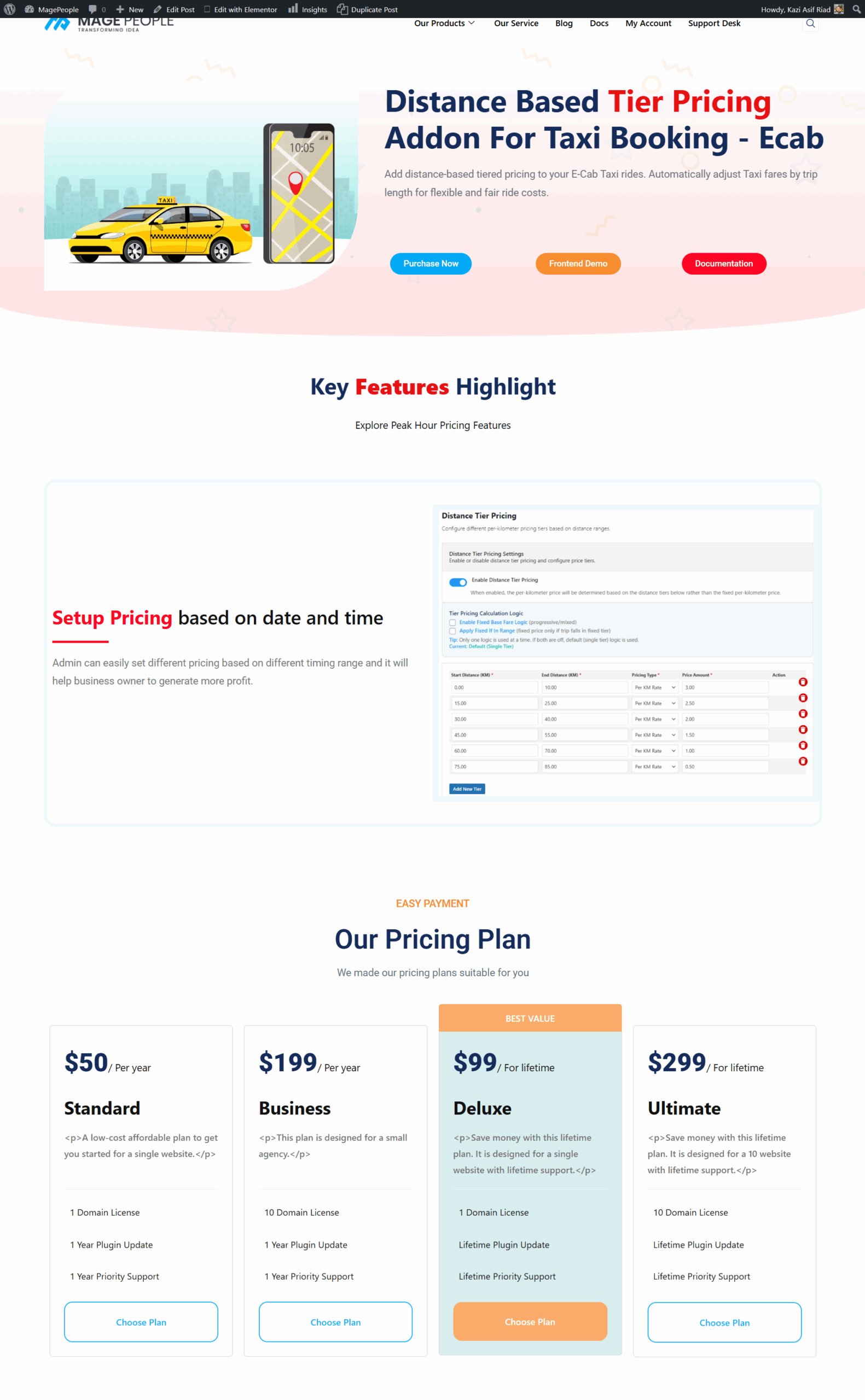
You can purchase the addon from the Distance Based Tier Pricing for eCab product page. Check current pricing on that page, as bundle and licence terms can change.
Step 1: Install and Activate the Addon
- Log in to your WordPress admin dashboard.
- Confirm that the latest version of the eCab Taxi Booking Manager plugin is installed – the addon depends on it.
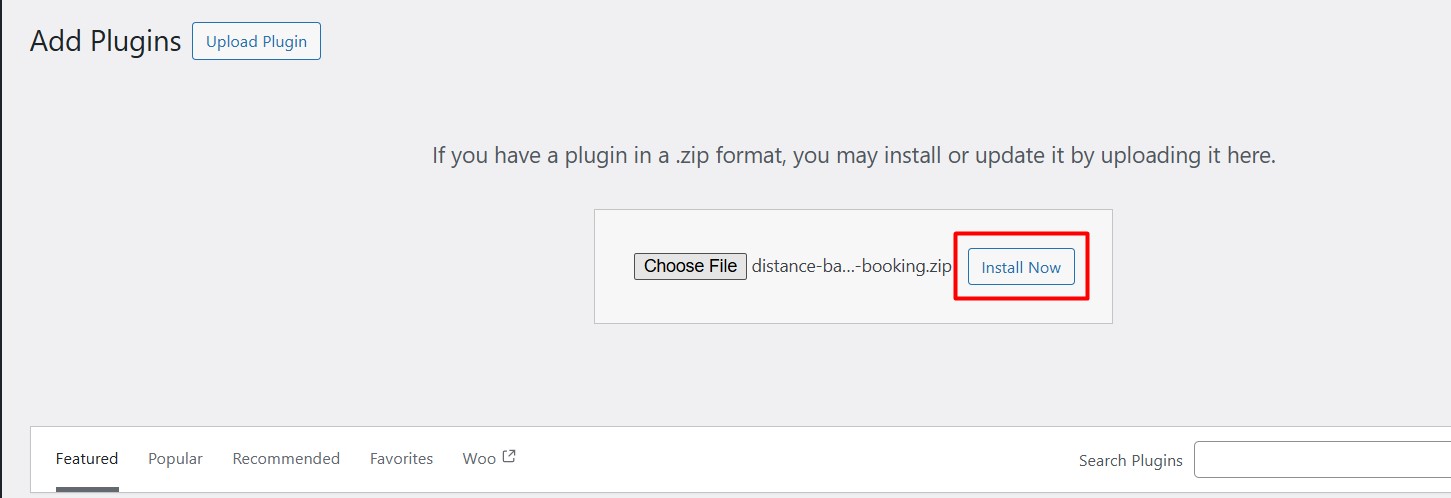
- Go to Plugins > Add New.
- Upload the Distance Based Tier Pricing addon ZIP file.
- Click Install Now, then Activate.
Step 2: Configure Pricing Settings
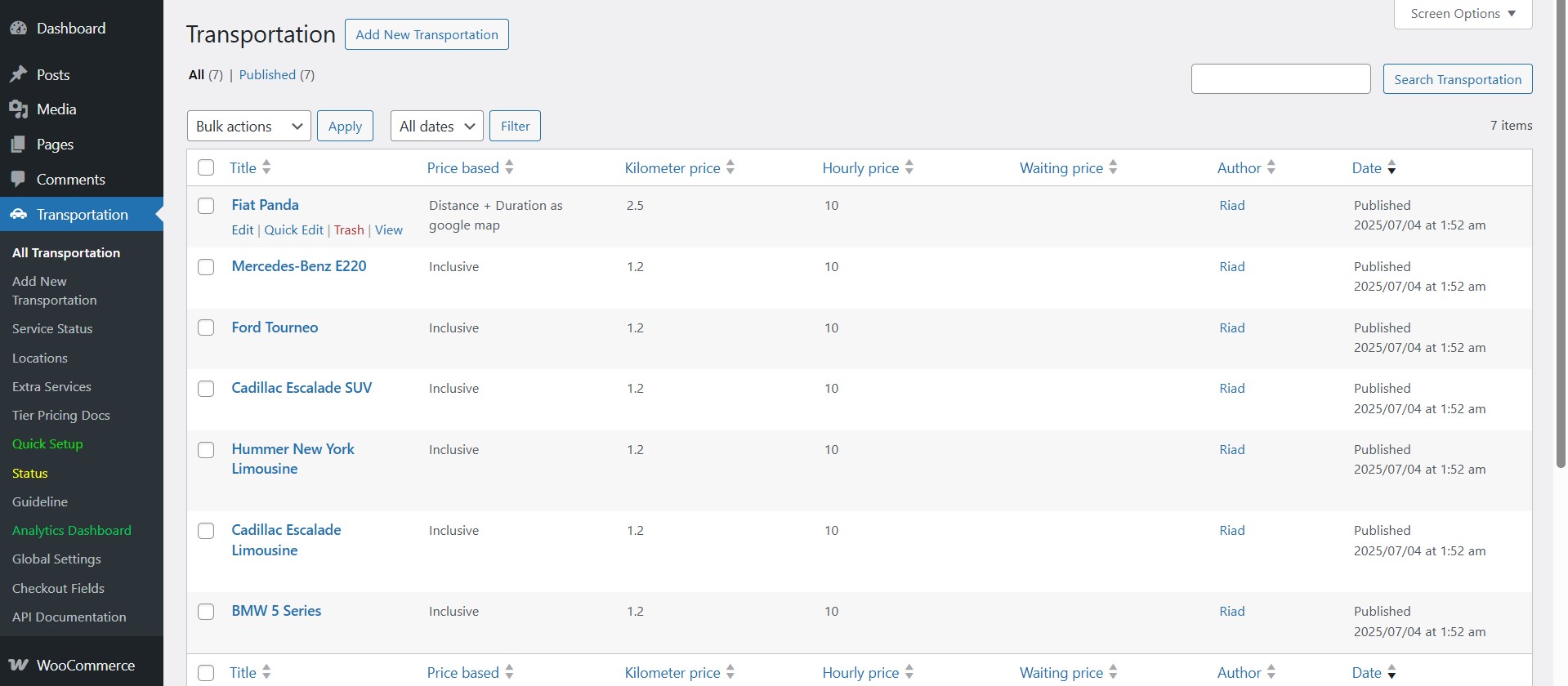
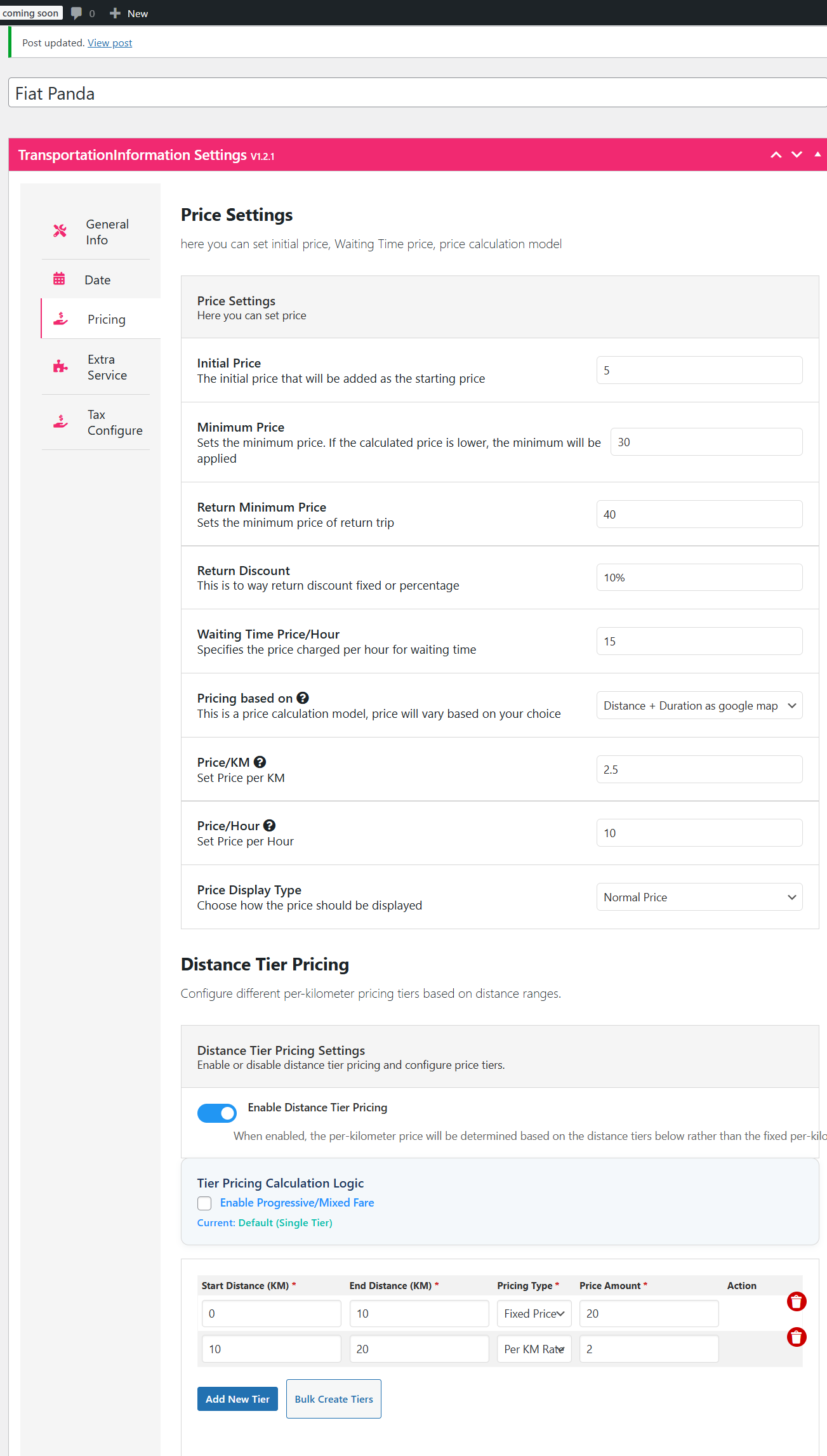
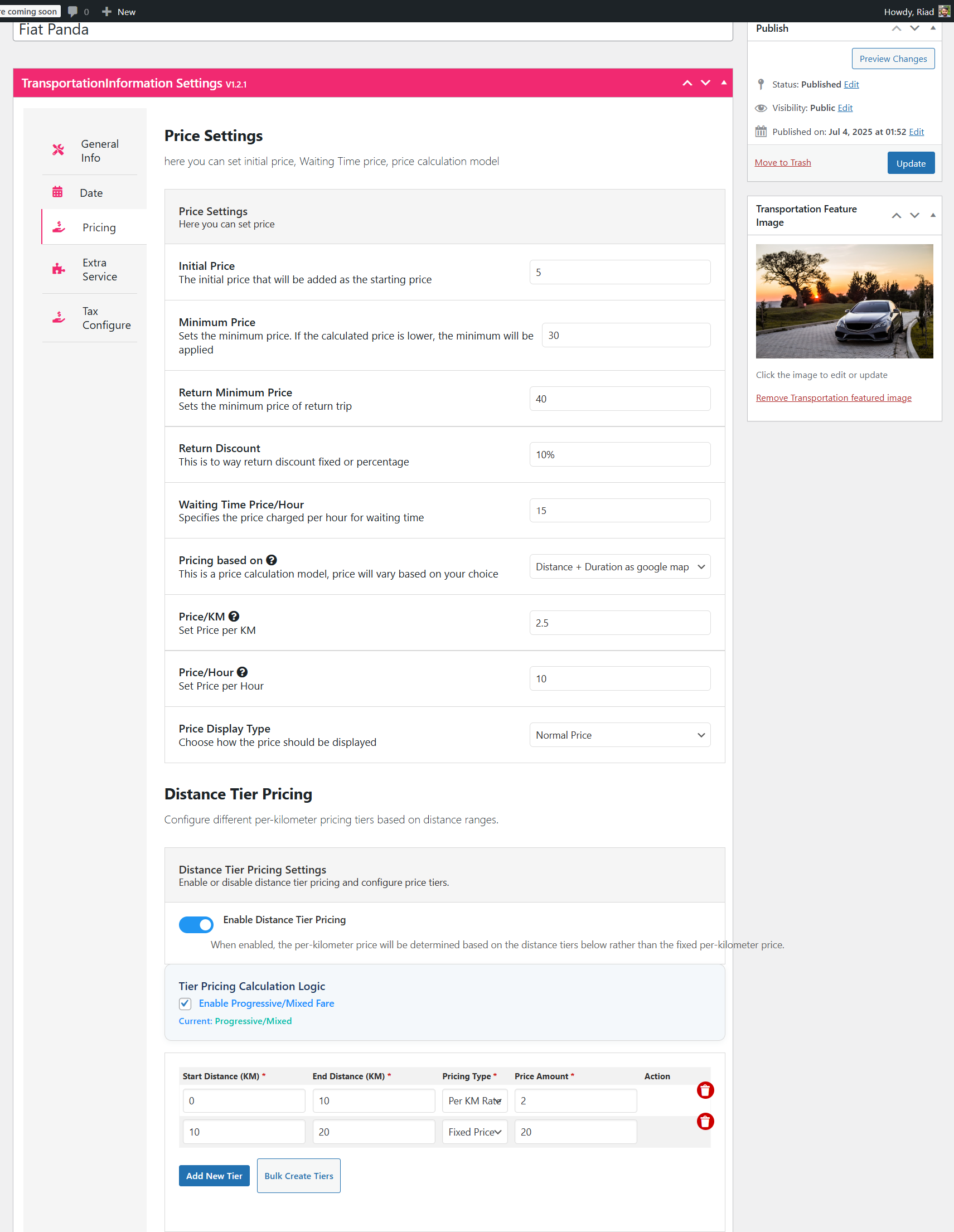
- Go to Transportation and select a vehicle – for example, a Fiat Panda.
- Click Edit on that vehicle to open its settings.
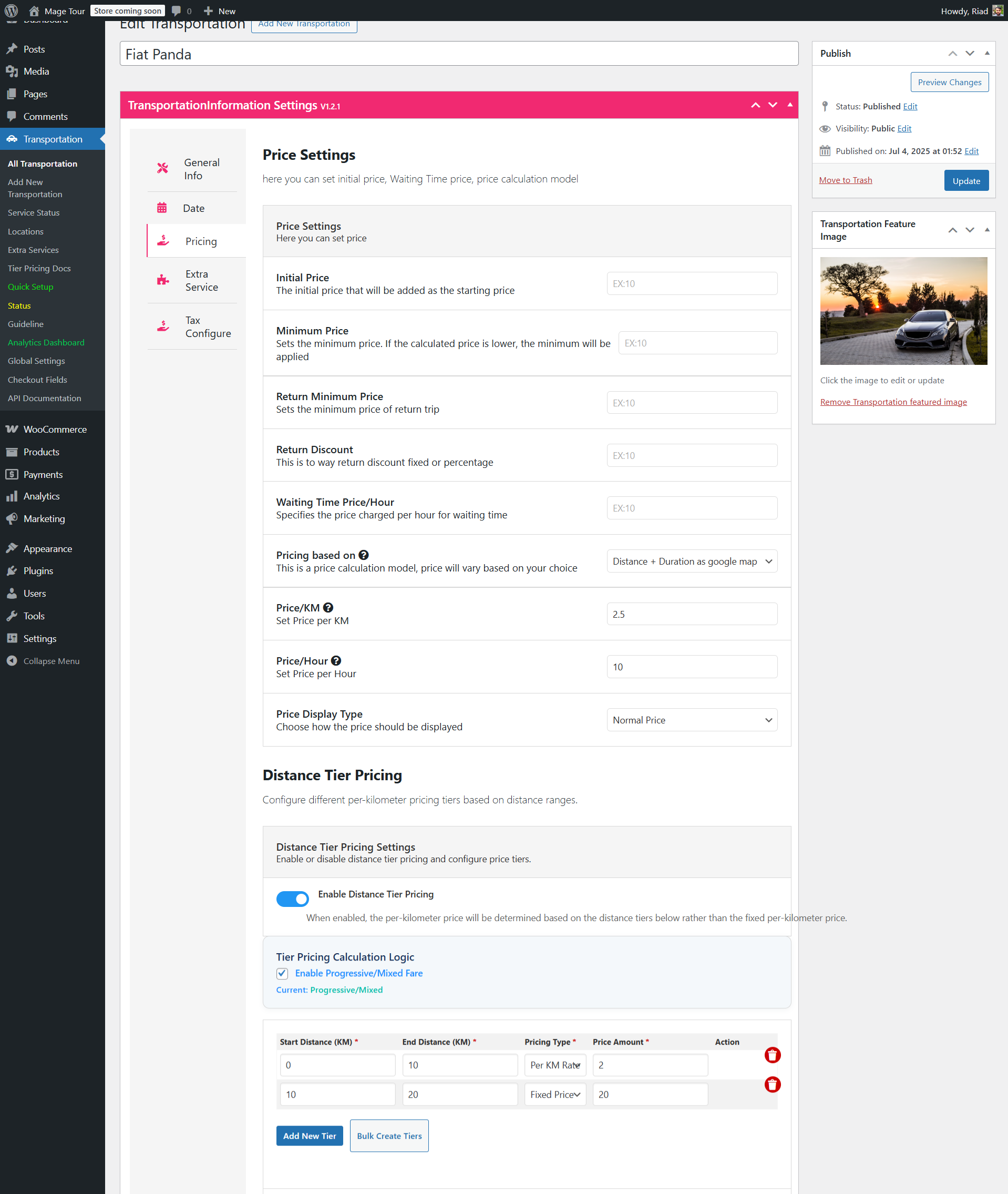
- Open the Pricing tab and scroll to the Distance Tier Pricing section.
- Turn on Distance Tier Pricing with the toggle.
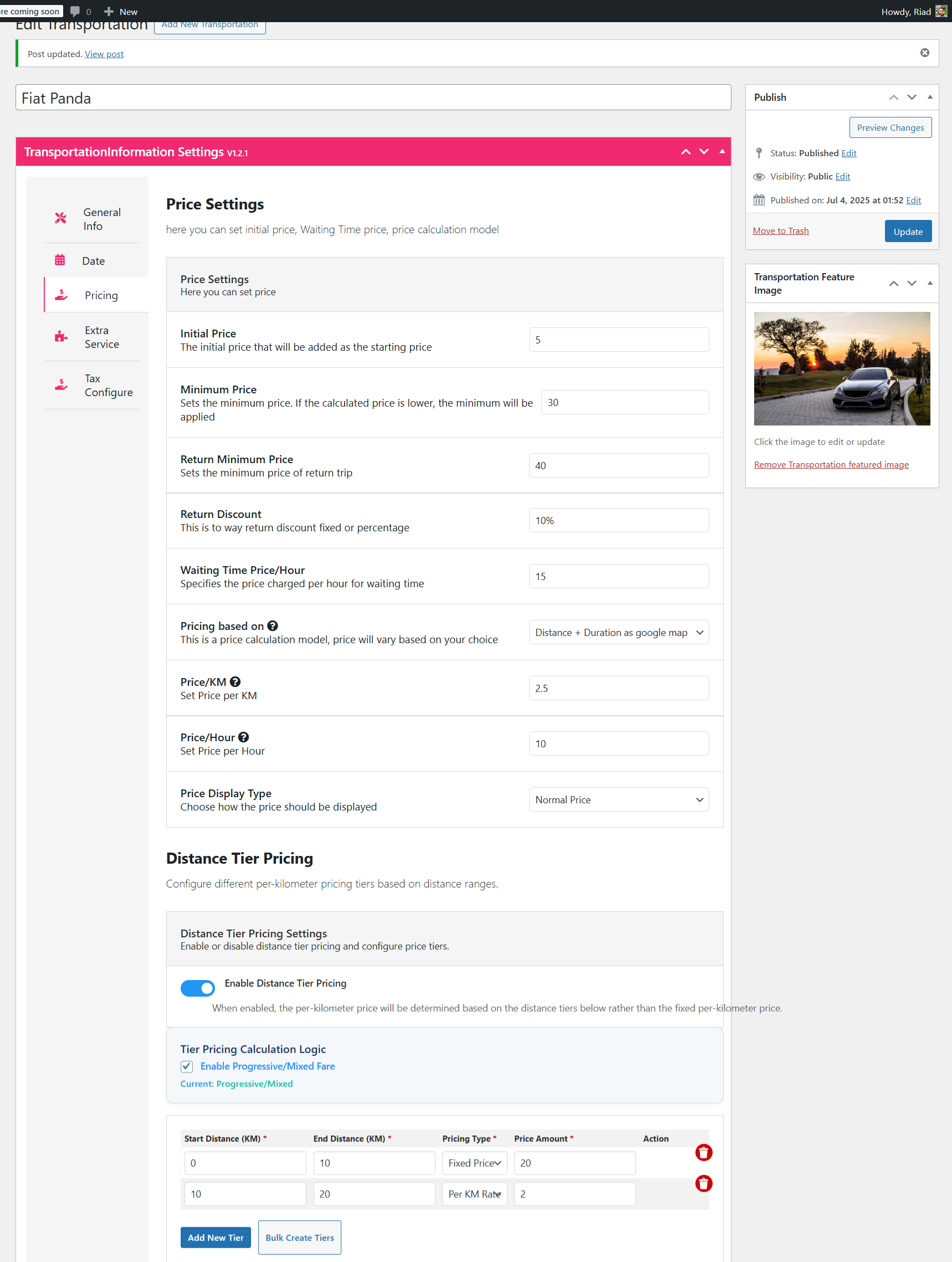
- Pick a pricing mode. Distance Tier Pricing works with Distance as Google Maps, Distance + Duration as Google Maps, or Inclusive Pricing. It does not apply to flat or zone-based modes.
- Set your default pricing, which is used for any distance outside your tier ranges: price per kilometre (for example, a rate applied beyond the last tier) and price per hour for duration-based calculation.
- Optionally define the additional parameters below, which are added on top of the tier calculation.
Additional Fare Parameters
- Initial price: a fixed amount added to every fare, similar to a base or flag-fall charge.
- Minimum price: the floor for a one-way fare, so a very short journey never prices below your cost.
- Return discount: a fixed amount or percentage taken off return journeys.
- Waiting time price per hour: charged for time the driver waits during the trip, covering downtime.
- Return minimum price: the floor for a return journey after the discount is applied.
Understanding Pricing Logics
Before you type in tier values, decide which logic matches the way you actually want to bill. The addon supports two:
- Single tier pricing: the trip is placed into one tier based on its total distance – or the last tier if the distance exceeds the highest range – and that single tier’s rule is applied to the entire distance. Simple to explain to customers, and predictable to quote.
- Progressive / mixed tier pricing: each tier’s rule is applied only to its own distance range, with the default price per kilometre covering anything beyond the last tier. This is the structure most people picture when they hear “tiered pricing”.
To set the tiers themselves, open Distance Based Tier Pricing in the vehicle’s pricing tab and add rows with a start distance, an end distance and a pricing type (price per kilometre or fixed rate). A two-tier example:
- First tier: 0-10 km, price per kilometre
- Second tier: 10-20 km, fixed rate
Example Scenarios: Fare Calculations
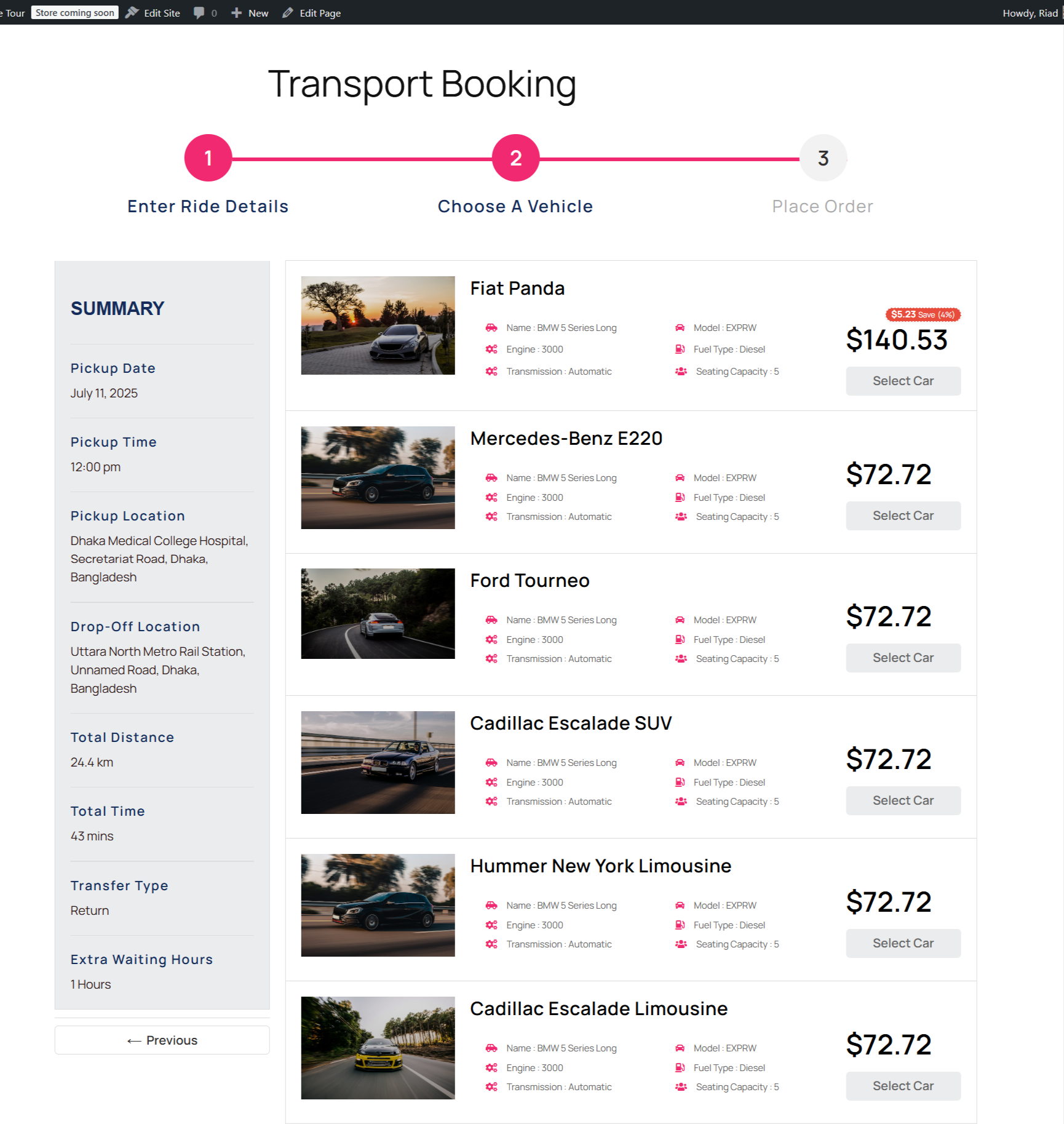
The examples below price a 24.4 km, 43-minute return trip (0.709 hours at the plugin’s rounding) under two different tier configurations, starting from the same base parameters:
- Default pricing: a per-kilometre rate and a per-hour rate
- Additional parameters: initial price $5, minimum price $30, return discount 10%, waiting time $15/hour with no waiting recorded, return minimum price $40
Those figures are illustrative – substitute your own rates. Note that in every scenario below, the return minimum price of $40 is never triggered because the calculated fares are far above it; that parameter only matters for very short return trips.
Scenario Set 1: First Tier Fixed Rate, Second Tier Per Kilometre
Tiers: first tier (0-10 km) at a fixed rate of $20; second tier (10-20 km) at $2/km. Multiplied by the journey length, that gives an effective whole-trip rate of $2/km for a 24.4 km trip.
Single Tier Pricing
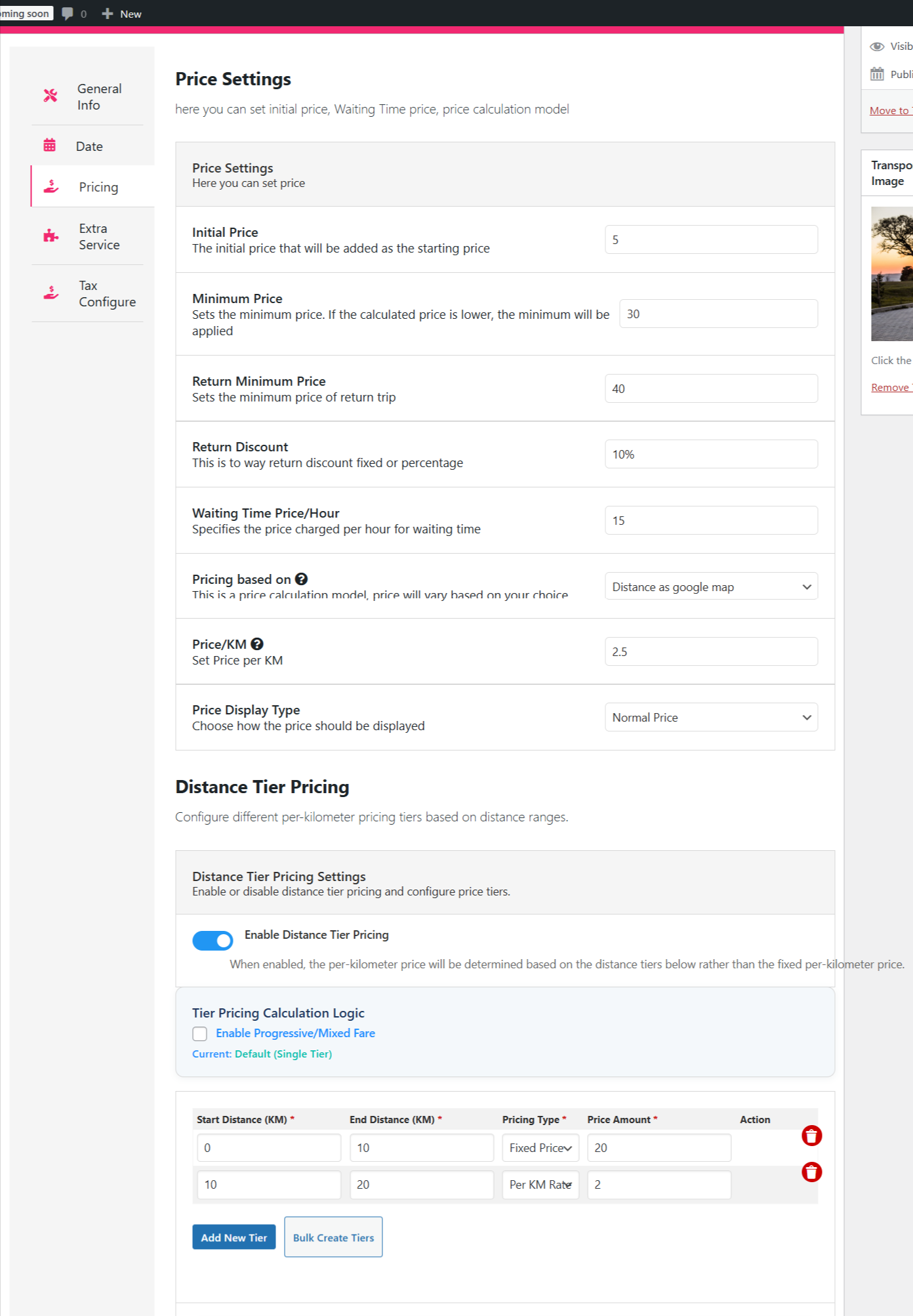
Distance as Google Maps
- Distance cost: 24.4 km x $2/km = $48.80 (single tier uses the last applicable tier’s pricing type)
- Initial price: +$5 = $53.80
- Waiting time: +$15 = $68.80
If return is selected
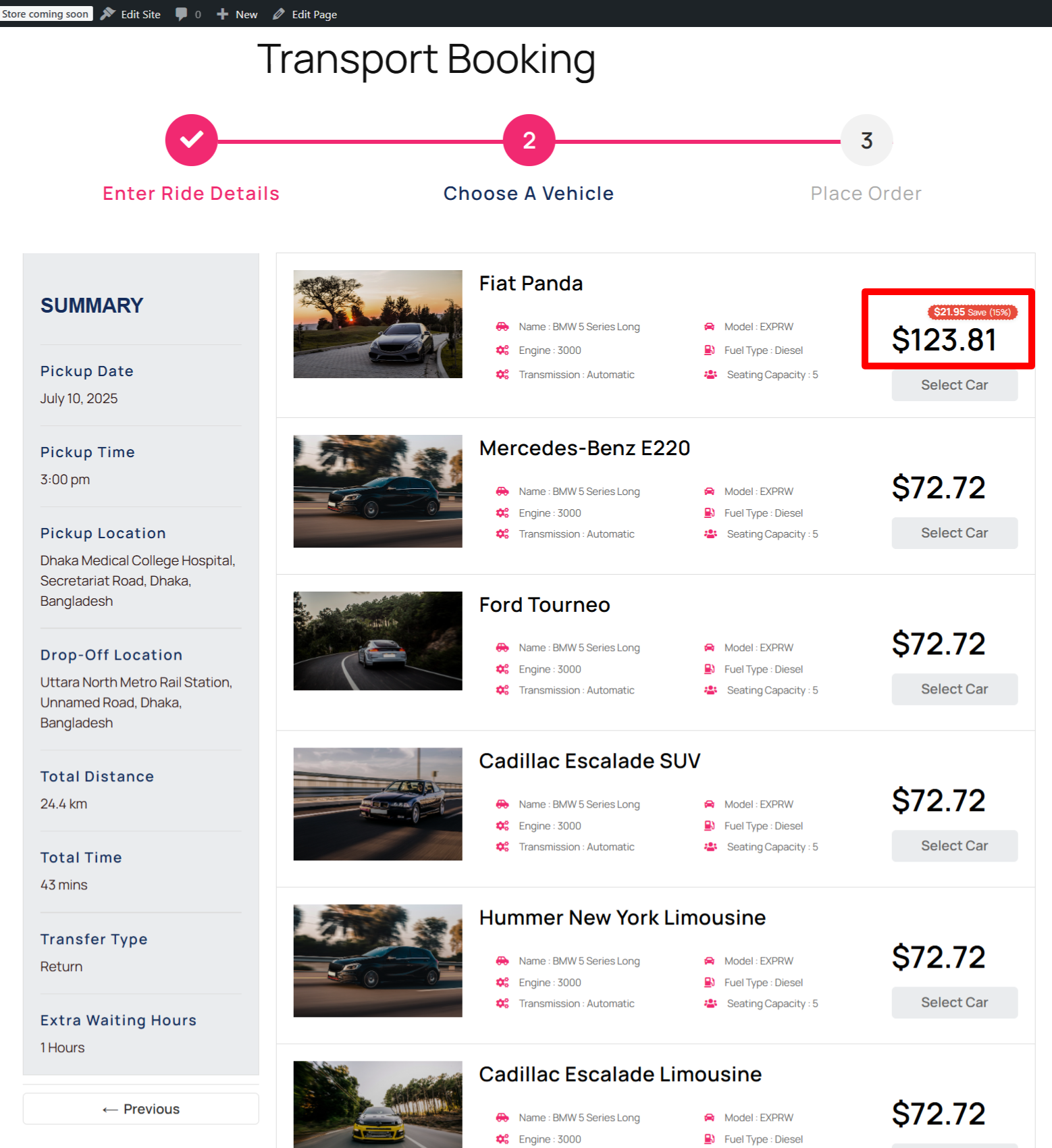
- Return fare: $68.80 x 2 = $137.60
- Return discount: $137.60 x 10% = $13.76
- Total: $137.60 – $13.76 = $123.84
- Return minimum price: $123.84 is above $40, so no adjustment
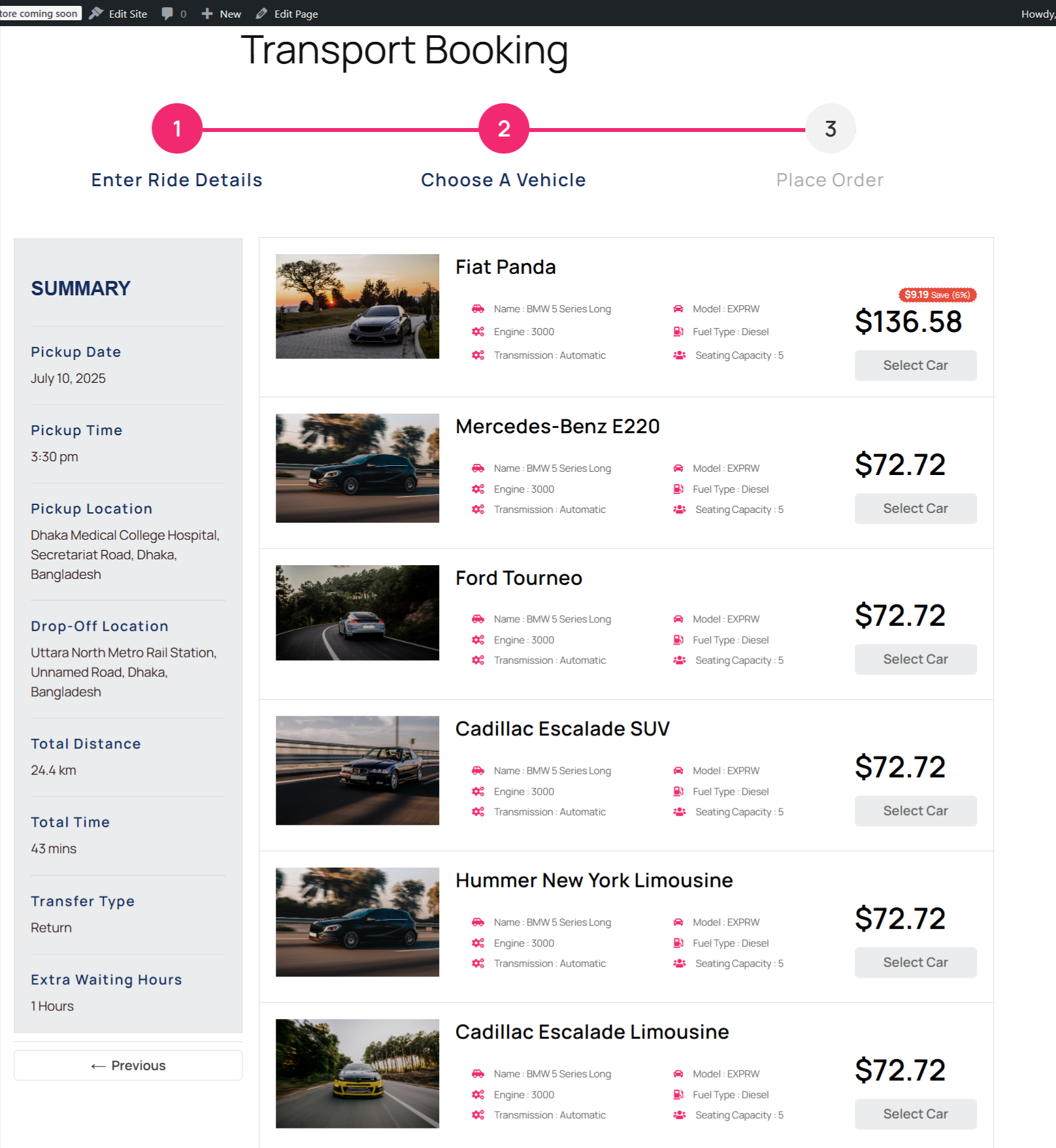
Distance + Duration as Google Maps
- Distance cost: $48.80
- Duration cost: 0.709 hours x $10/hour = $7.09
- Initial price: +$5 = $60.89
- Waiting time: +$15 = $75.88
- Return fare: $75.88 x 2 = $151.76
- Return discount: $151.76 x 10% = $15.18
- Total: $151.76 – $15.18 = $136.58 (rounded from $136.584)
Progressive / Mixed Tier Pricing
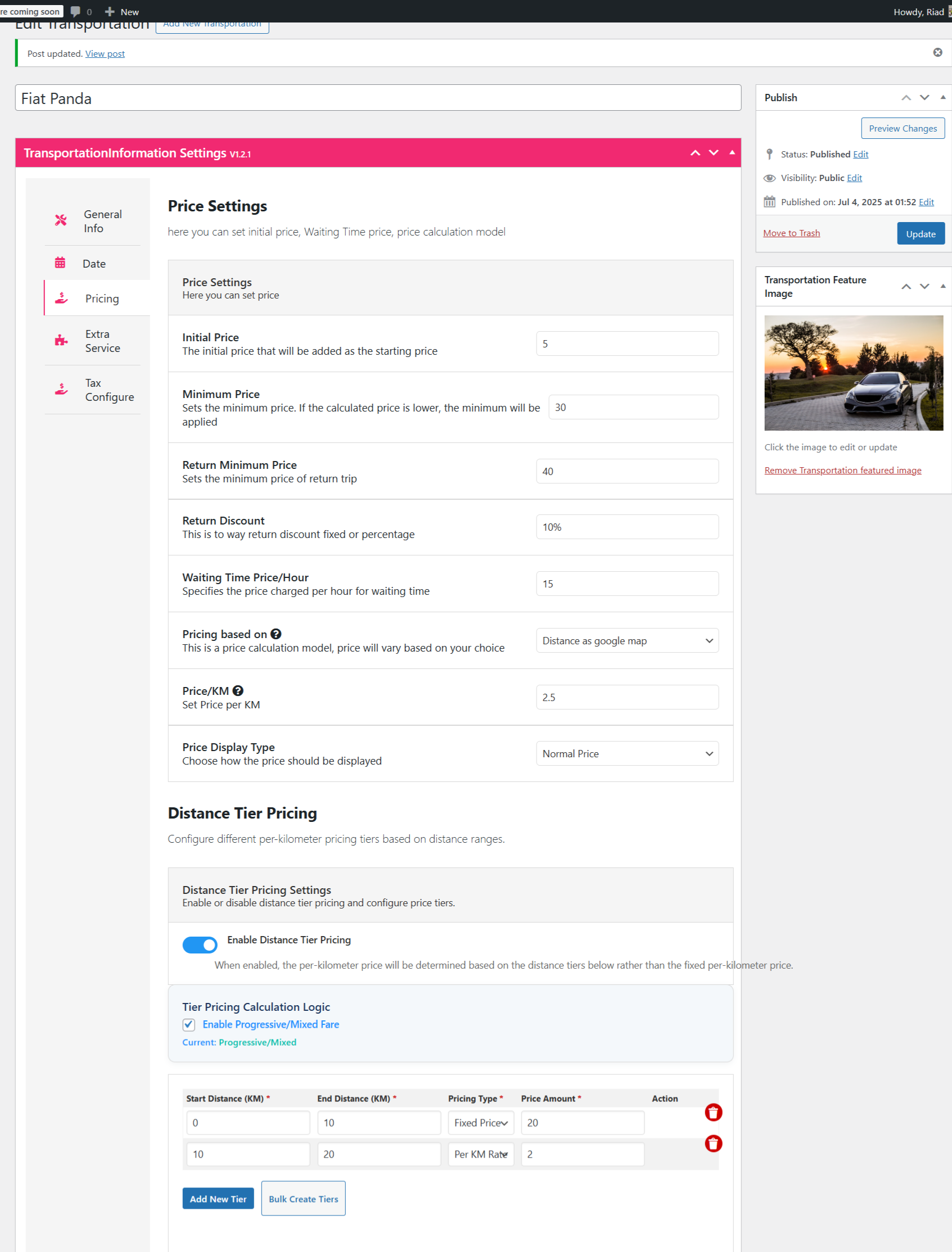
- First tier (0-10 km): $20 fixed
- Second tier (10-20 km): 10 km x $2/km = $20
- Remaining (20-24.4 km): 4.4 km x $2/km = $8.80
- Distance cost: $20 + $20 + $8.80 = $48.80
- Initial price: +$5 = $53.80
- Waiting time: +$15 = $68.80
- Return fare: $68.80 x 2 = $137.60; return discount $13.76; total $123.84
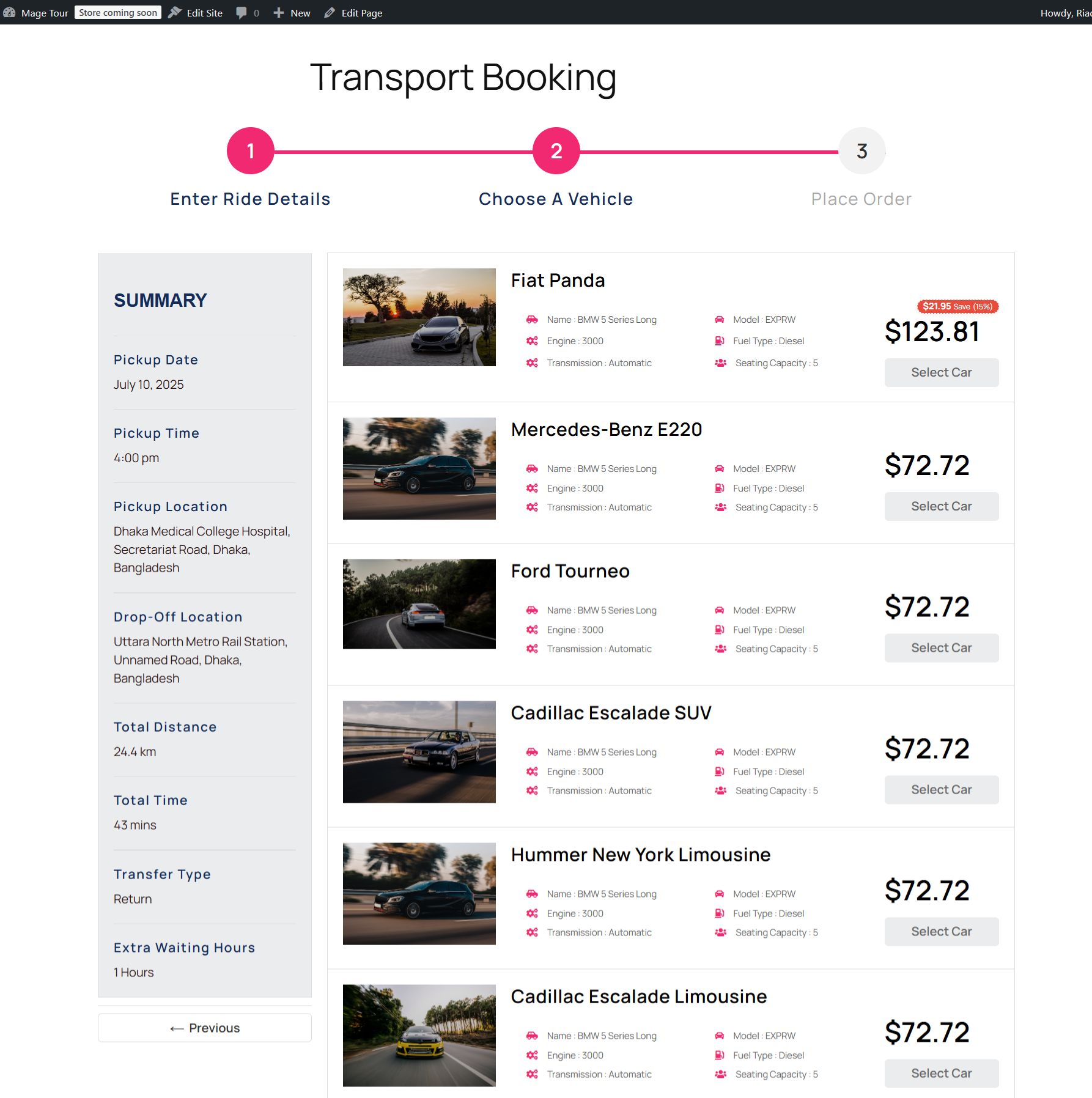
Distance + Duration as Google Maps
- Distance cost: $20 + ($2 x 14.4 km) = $48.80
- Duration cost: 43/60 x $10 = $7.16
- Initial price: +$5 = $60.96
- Waiting time: +$15 = $75.96
- Return fare: $75.96 x 2 = $151.92; return discount $15.19; total $136.73
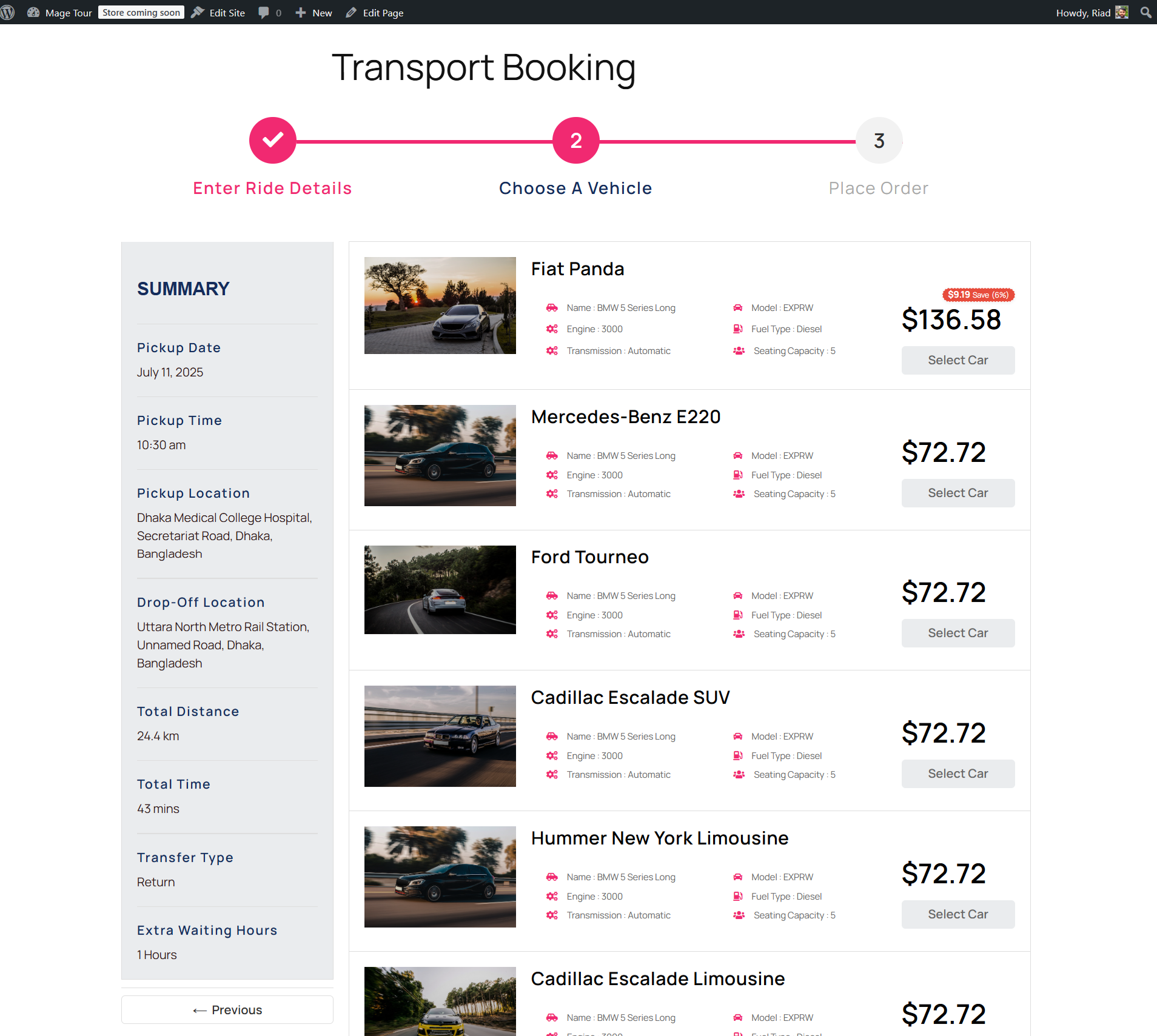
Small differences between the two duration figures come from rounding the trip length; the plugin rounds duration rather than carrying full decimals.
Scenario Set 2: First Tier Per Kilometre, Second Tier Fixed Rate
Tiers: first tier (0-10 km) at $2/km; second tier (10-20 km) at a fixed rate of $20. Because a 24.4 km trip runs past the last tier, single tier pricing and progressive pricing diverge sharply here – and this is the configuration where the choice of logic matters most.
Single Tier Pricing
Distance as Google Maps
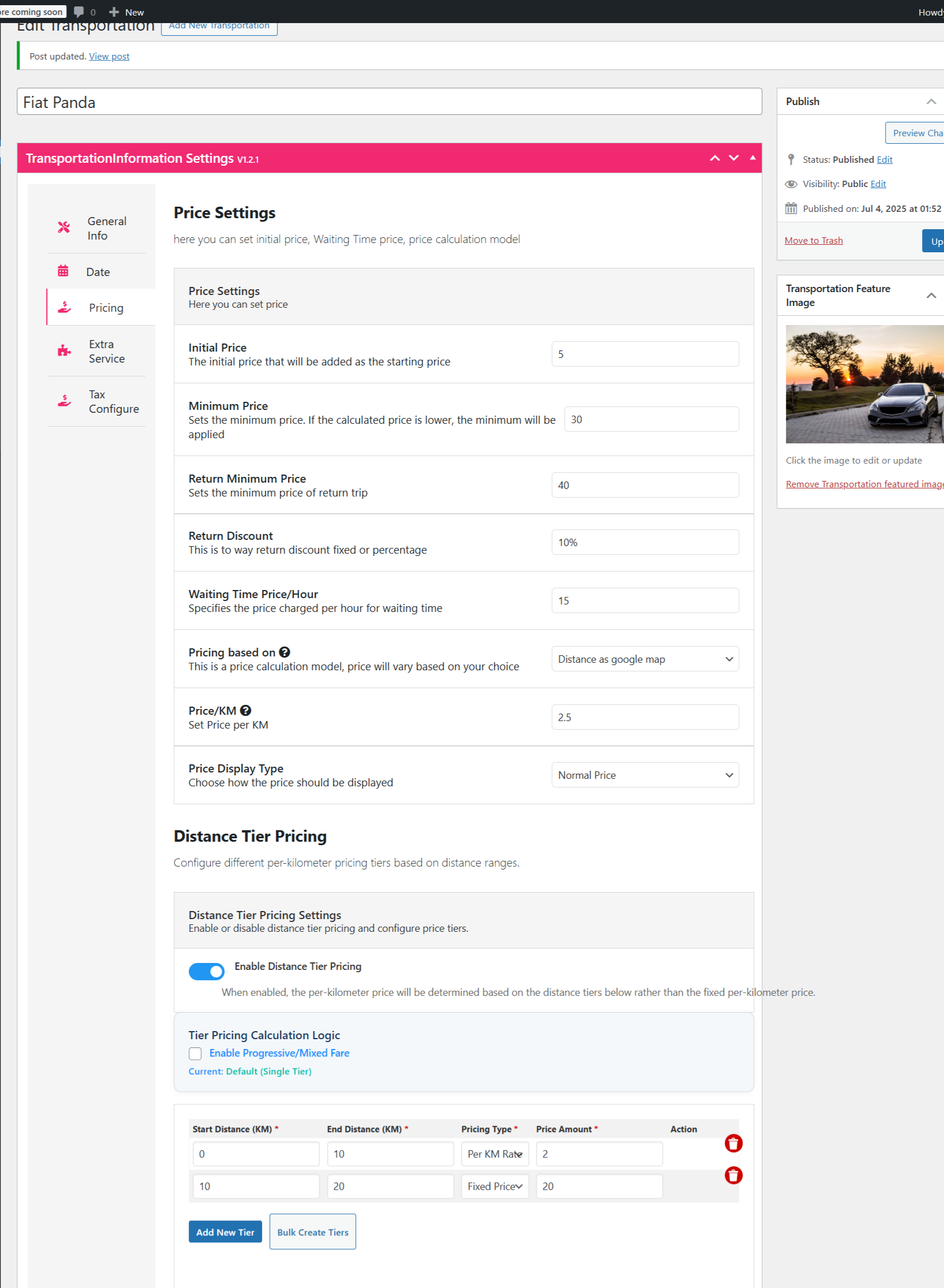
- Distance cost: $20 (in single tier mode the last tier’s rule is applied to the whole trip; when that rule is a fixed rate, the fixed amount is used)
- Initial price: +$5 = $25.00
- Waiting time: +$15 = $40.00
- Return fare: $40 x 2 = $80; return discount $8; total $72.00
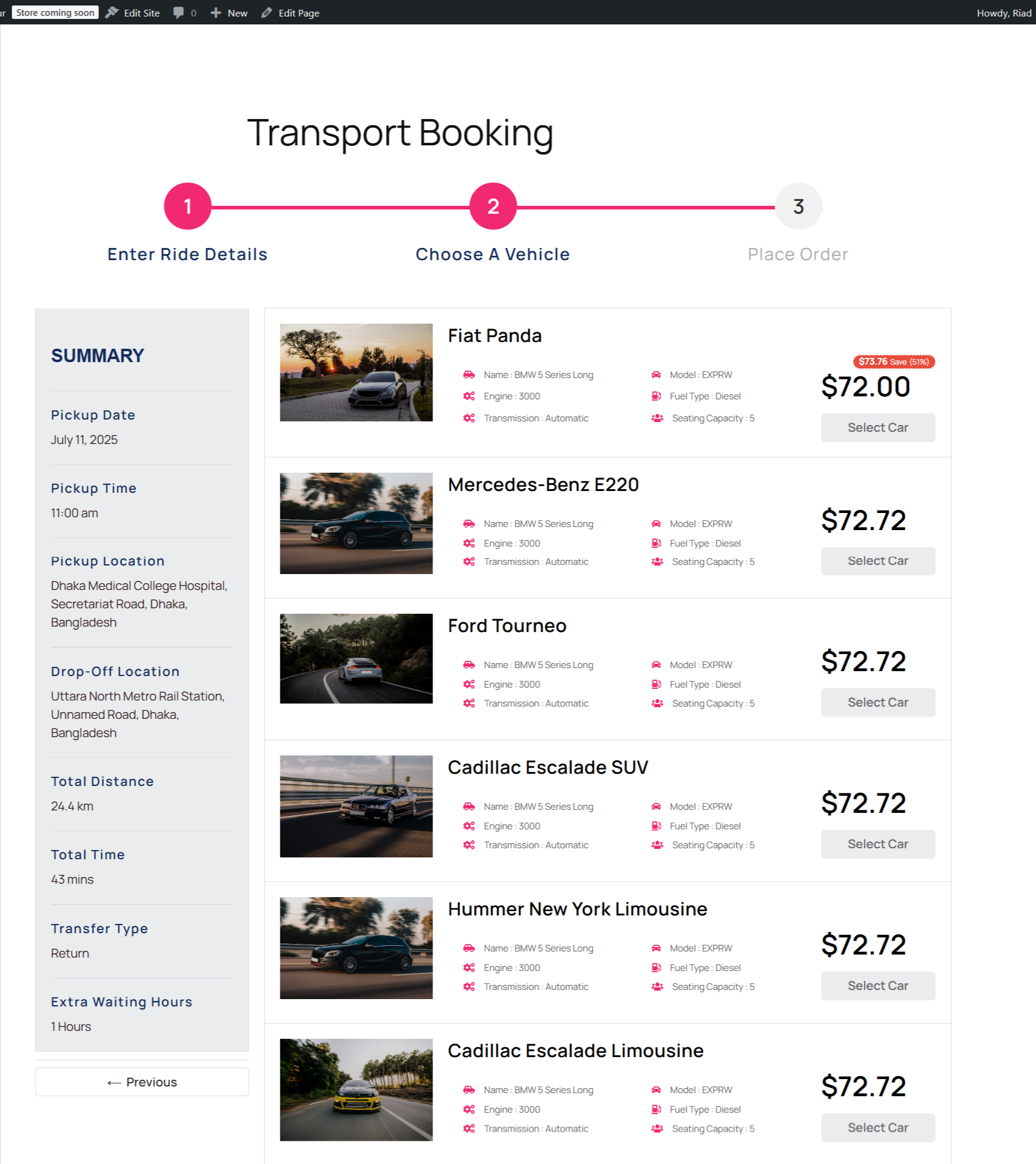
Distance + Duration as Google Maps
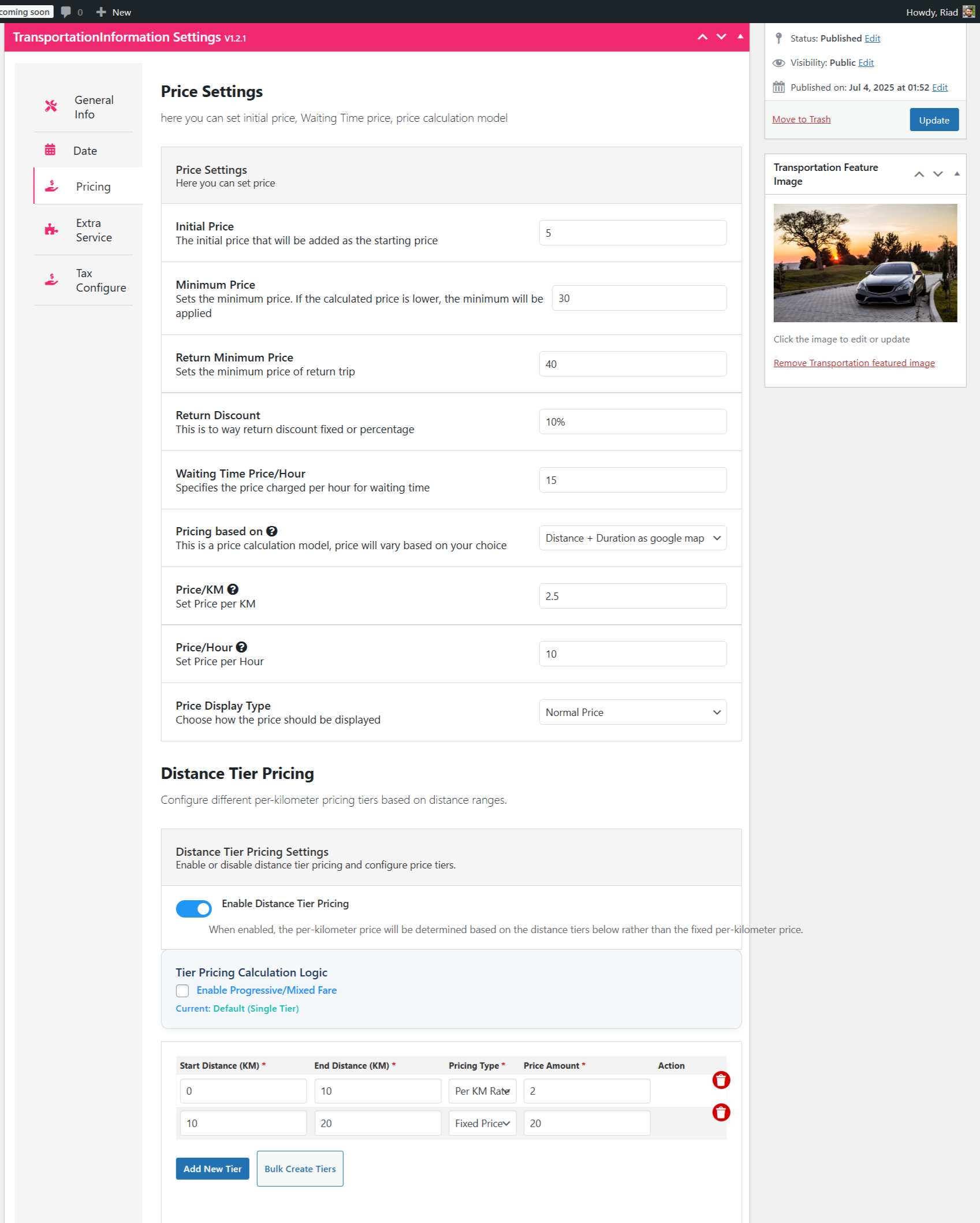
- Distance cost: $20
- Duration cost: 43/60 x $10 = $7.16
- Initial price: +$5 = $32.16
- Waiting time: +$15 = $47.16
- Return fare: $47.16 x 2 = $94.32; return discount $9.43; total $84.89
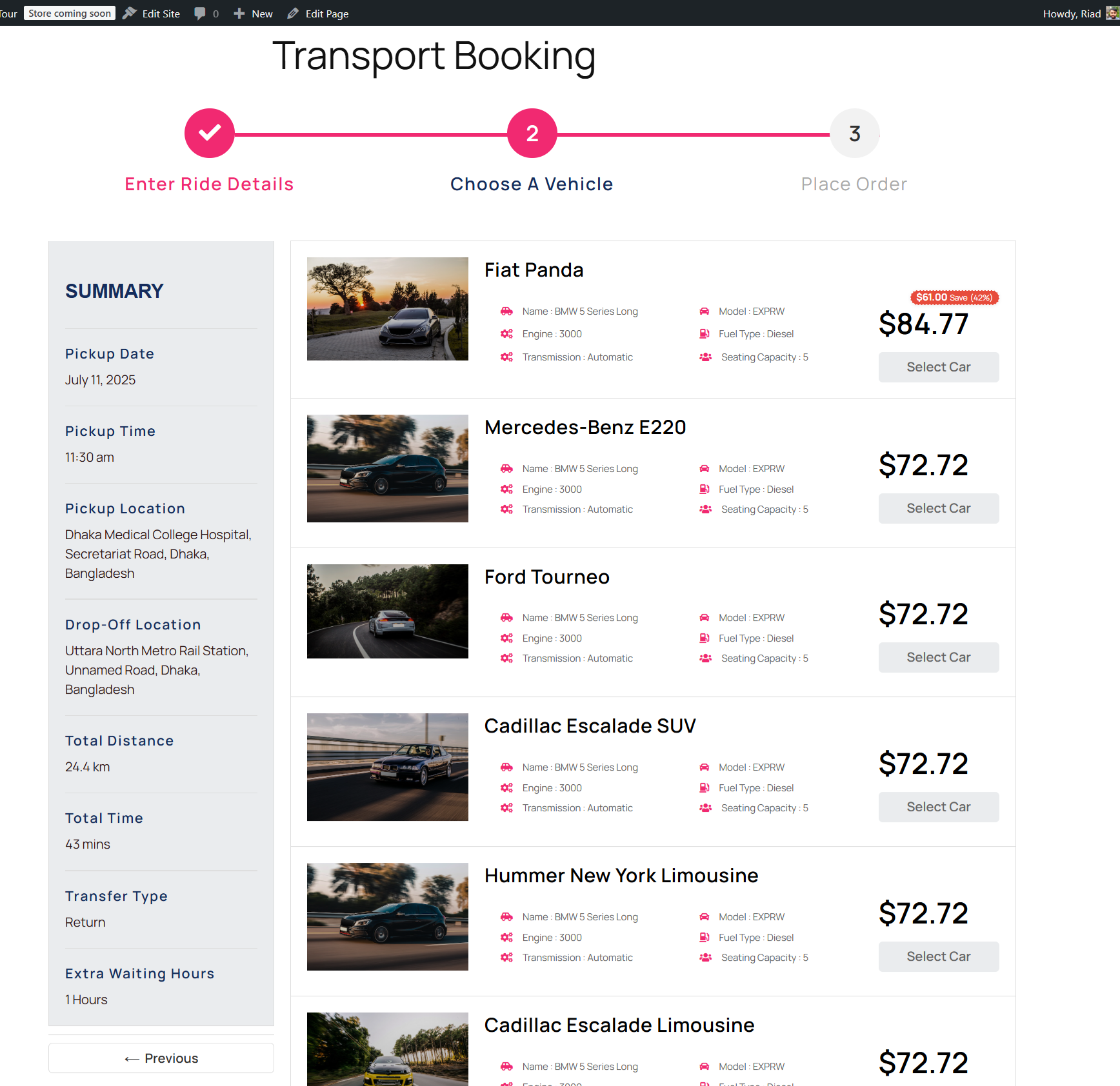
Under Inclusive Pricing the duration component is treated the same way as in Distance + Duration, so expect the same figure as the Distance + Duration result above.
Progressive / Mixed Tier Pricing
Distance as Google Maps
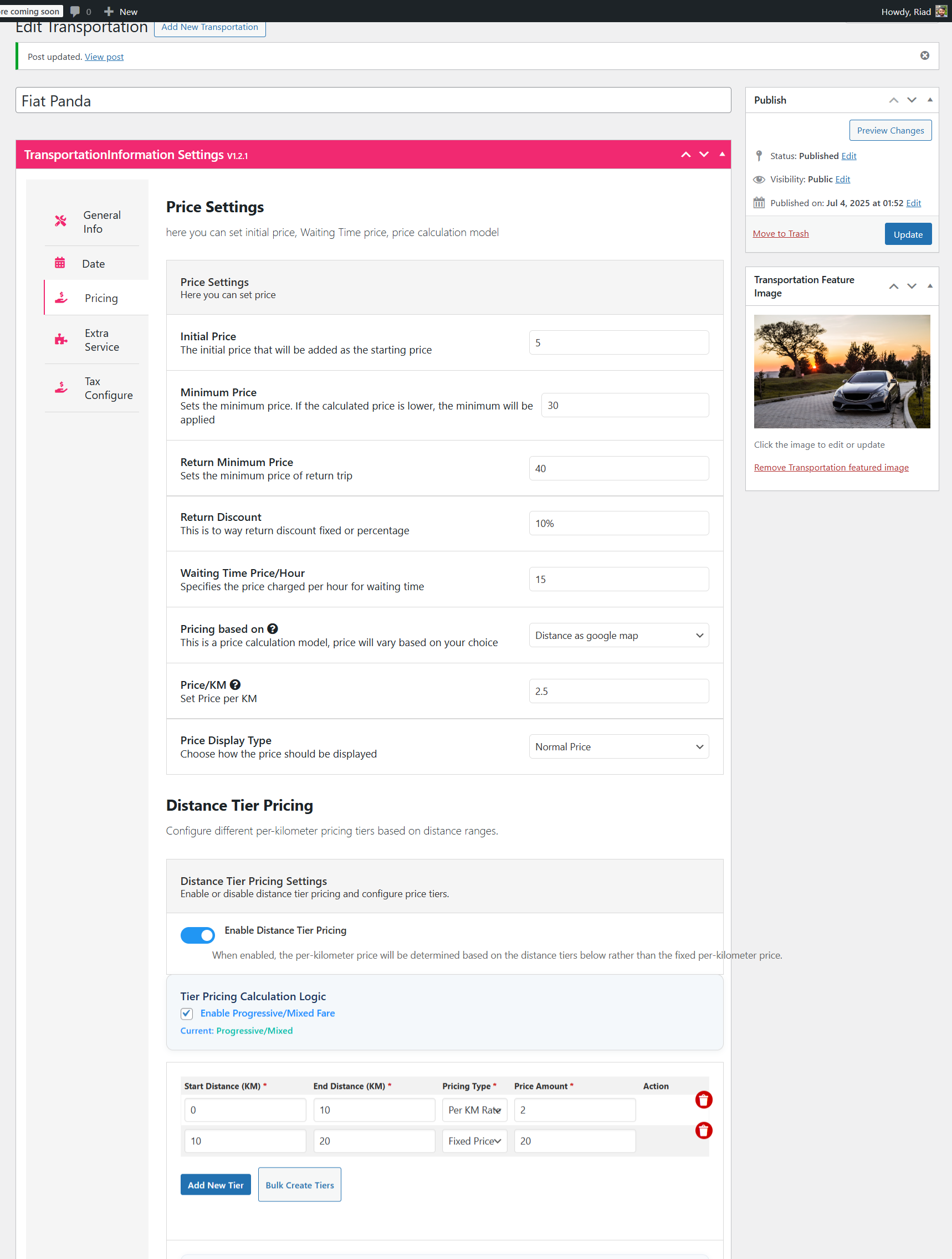
- First tier (0-10 km): 10 km x $2/km = $20
- Second tier (10-20 km): $20 fixed
- Remaining (20-24.4 km): 4.4 km x the default price per kilometre ($2.50 in this example) = $11
- Distance cost: $20 + $20 + $11 = $51
- Initial price: +$5 = $56
- Waiting time: +$15 = $71
- Return fare: $71 x 2 = $142; return discount $14.20; total $127.80
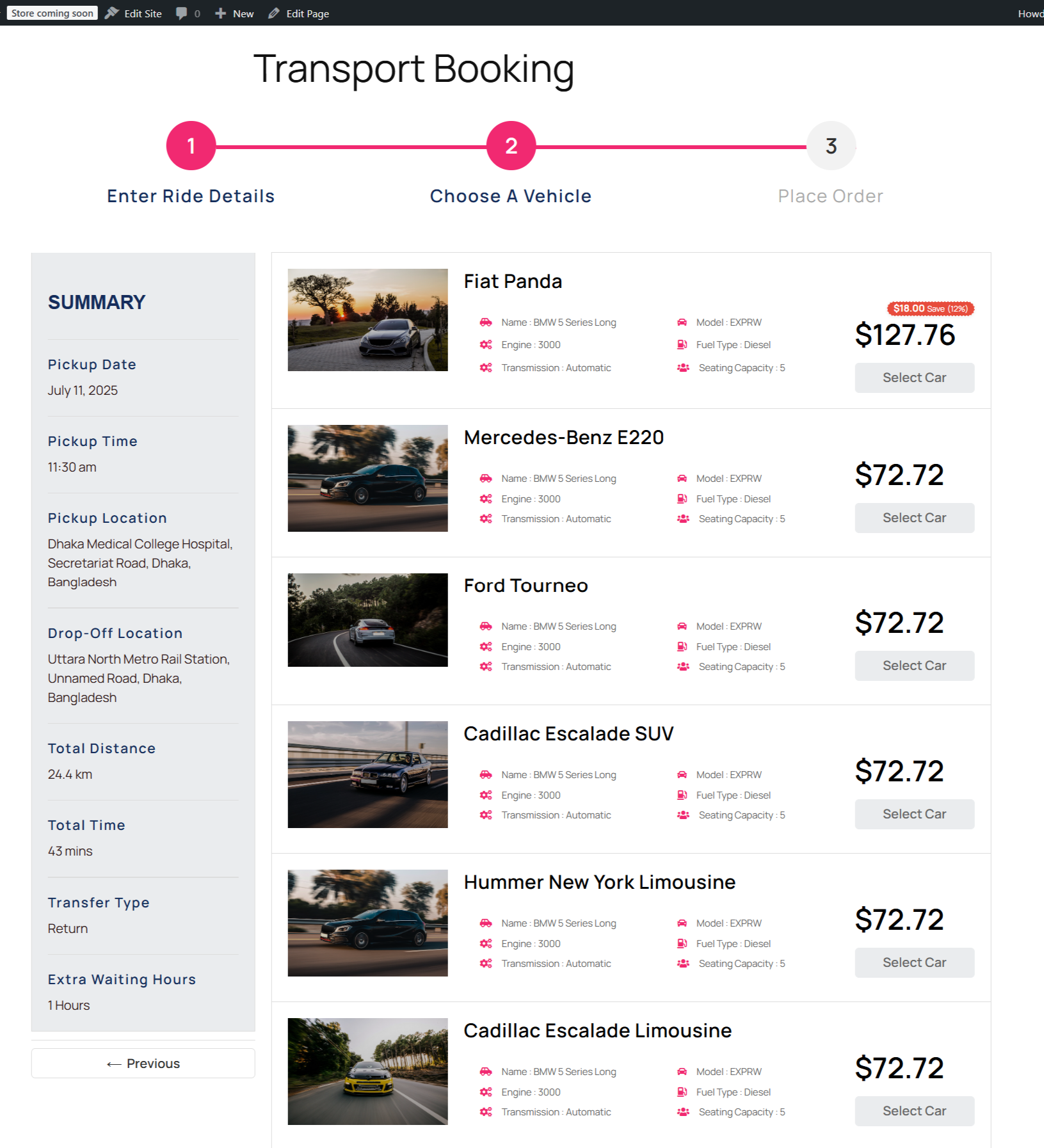
Distance + Duration as Google Maps
- Distance cost: $51
- Duration cost: 43/60 x $10 = $7.16
- Initial price: +$5 = $63.16
- Waiting time: +$15 = $78.16
- Return fare: $78.16 x 2 = $156.32; return discount $15.63; total $140.69
Comparison: Which Pricing Logic Fits Which Business
Both logics are configured on the same screen with the same tier rows, so the comparison below is about behaviour rather than separate features. All figures are illustrative examples from the scenarios above at a 24.4 km return trip – not published prices.
| Pricing logic | How the tier rate is applied | Result on a 24.4 km return trip (Scenario Set 2) | Additional parameters supported | Compatible pricing modes |
|---|---|---|---|---|
| Single tier – Distance as Google Maps | One tier rule applied to the whole distance (last tier if beyond range) | $72.00 | Initial price, minimum price, return discount, waiting time, return minimum | Distance as Google Maps |
| Single tier – Distance + Duration | One tier rule plus an hourly duration charge | $84.89 | As above, plus price per hour | Distance + Duration, Inclusive Pricing |
| Progressive – Distance as Google Maps | Each tier applies to its own range; default per-km rate beyond the last tier | $127.80 | Initial price, minimum price, return discount, waiting time, return minimum | Distance as Google Maps |
| Progressive – Distance + Duration | Each tier applies to its own range plus an hourly duration charge | $140.69 | As above, plus price per hour | Distance + Duration, Inclusive Pricing |
| Compatibility | Requires eCab Taxi Booking Manager installed and the addon activated on the vehicle | Google Maps API key needed for distance and duration data | Plans: check current pricing and licence terms on the product page | Not compatible with flat or fixed zone pricing modes |
Where Distance Tier Pricing Is Not the Right Fit
Distance tiers are a strong default, but they are not universal, and we would rather say so plainly than let you buy the addon for a job it does not do:
- Airport and hotel transfers with fixed prices. If your selling point is a guaranteed flat fare between two points, tier pricing will produce a variable quote. Use fixed zone pricing instead.
- Hourly or chauffeur hire. When a customer books a car and driver by the hour rather than by destination, distance tiers add complexity without improving accuracy – a duration-led model is simpler.
- Operators who need surge, not tiers. If your problem is filling capacity at 6 pm rather than pricing distance fairly, a peak-hour surcharge solves it. Distance tiers can coexist with a surcharge, but they do not replace one.
- Very short city hops priced by a single flat rate. If every journey in your market is under 5 km and priced identically, a single rate is easier to communicate than a tier table.
- Sites without a Google Maps API key. Distance and duration data come from Google Maps, so the addon cannot calculate reliably until the API key is configured.
Tips for Optimising Your Pricing Strategy
- Test configurations before going live. Build the 24.4 km example above with your own rates and confirm the quoted fare matches what you would charge manually.
- Use return discounts with a floor. A 10% return discount encourages round trips, and the return minimum price stops it being exploited on very short journeys.
- Decide upfront whether the last tier is a fixed rate. Scenario Set 2 shows how much the total changes when the highest tier is fixed and the trip runs past it.
- Charge waiting time where trips include stops. Driver downtime is otherwise absorbed entirely by you.
- Keep the Google Maps API key active. Expired keys break distance and duration lookups.
- Note the rounding. The plugin rounds duration, which shifts totals by a few cents between otherwise identical setups – expect it, and don’t chase it.
Frequently Asked Questions
What is distance tier pricing in the eCab taxi booking plugin?
It is a fare system where different distance ranges carry different pricing rules. The Distance Based Tier Pricing addon for eCab lets you define tiers by start and end distance, choose price per kilometre or a fixed rate for each, and apply them using either single tier or progressive pricing logic.
What is the difference between single tier and progressive tier pricing?
Single tier pricing applies one tier’s rule to the entire trip distance, choosing the tier that matches the total distance or the last tier if the trip is longer than every range. Progressive (mixed) tier pricing applies each tier’s rule only to its own distance range, then charges the default price per kilometre for anything beyond the last tier. On the same 24.4 km trip, the two can produce very different totals.
Which pricing modes does the Distance Tier Pricing addon work with?
It works with Distance as Google Maps, Distance + Duration as Google Maps, and Inclusive Pricing. It does not apply to flat-rate or fixed zone pricing, so a vehicle set up for zone fares will not use tier rules.
Can I add a base fare and a minimum fare alongside distance tiers?
Yes. Initial price adds a fixed amount to every fare, minimum price sets a floor for one-way trips, and return minimum price does the same for return trips after the return discount is applied. Waiting time can also be charged per hour. All of these are added on top of the tier calculation rather than replacing it.
Does distance tier pricing work for return journeys?
Yes. When return is selected, the one-way fare is doubled and the return discount – fixed amount or percentage – is subtracted from that total. The return minimum price then ensures the result does not fall below your floor. In the examples in this guide the calculated return fares were well above the return minimum, so no adjustment was triggered.
Why is my calculated fare slightly different from my manual calculation?
Most small differences come from rounding. Trip duration is rounded by the plugin before the hourly rate is applied, so a 43-minute trip may be treated as 0.709 hours in one mode and a fractionally different value in another. Google Maps distance data can also differ slightly from the route you tested by hand.
Conclusion
Distance tier pricing in the eCab taxi booking WordPress plugin is configured in three moves: activate the addon, choose a pricing mode on the vehicle’s pricing tab, and define your tier rows. From there, the two logics – single tier and progressive/mixed tier – decide whether one rate covers the whole trip or each range is priced on its own, and the additional parameters (initial price, minimum price, return discount, waiting time, return minimum price) sit on top of either.
Work through the 24.4 km scenario above with your own numbers before you publish, because the gap between single tier and progressive pricing is widest exactly when your top tier is a fixed rate and your trips run past it. If you need a flat guaranteed fare instead, use zone pricing; if you need to fill quiet capacity, look at peak-hour surcharges.
Ready to configure it? Activate the addon via the Distance Based Tier Pricing for eCab page, set your tiers, and test a booking end to end. If a fare does not match your expectation, contact the MagePeople support desk with your vehicle settings and the route you tested, and the team can check the configuration.
