

A complete event registration plugin for WordPress is one that handles the whole job, not just a booking form: it publishes your event, sells tickets through WooCommerce, collects attendee details, prints PDF tickets, and lets you check people in at the door. This guide explains what that feature set actually looks like and walks through how WooCommerce Event Manager delivers each piece, so you can judge whether it fits your event website before you install anything.
What Makes an Event Registration Plugin “Complete”?
Plenty of plugins can take a registration. Far fewer can run an event from announcement to badge scan. A plugin earns the word “complete” when it covers four layers at once:
- Publishing — event name, description, featured image, start and end dates, venue details, FAQs and day-wise schedule.
- Selling — multiple ticket types, categories and prices, handled by a payment system you already trust.
- Collecting — attendee registration fields, so you know who is coming and what they need.
- Admitting — tickets people can actually present, plus tools to verify them at the entrance.
Plugins that stop after layer two leave you stitching the rest together with separate form or check-in tools, which is where most event sites start leaking time and data.
WooCommerce Event Manager covers all four layers in the core plugin and extends them through addons. Each addon targets a specific job rather than padding out a feature list — a QR code addon prints unique codes on tickets, a waitlist addon captures people when a session sells out, and others handle recurring events, related events, coupons, event calendars and backend order management.
If you are still weighing platforms rather than specific features, the earlier comparison of the best WordPress event booking plugins is the better starting point than this feature walkthrough.
Customer Reviews and Download Numbers
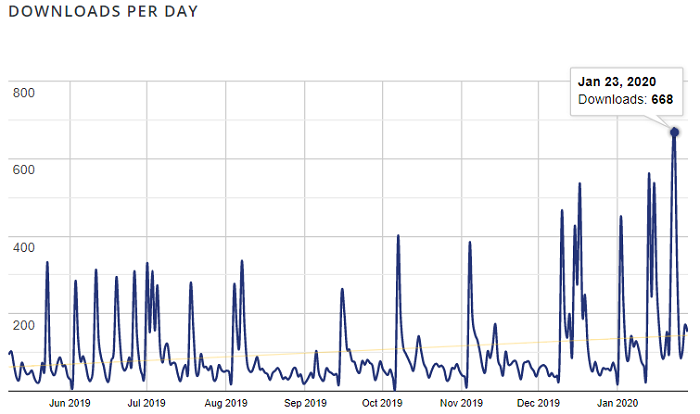
Adoption is a reasonable sanity check on a plugin you plan to build a business on. WooCommerce Event Manager has passed 45,000 downloads from the WordPress repository, and its highest single-day download count so far was 668, recorded on 23 January 2020. The download graph below shows how the curve has moved since.
Numbers only tell you people are trying it. What matters more is whether they stay, and the user reviews collected on the plugin page suggest they do. The screenshot below shows a sample of that feedback.

Features in the Core Event Registration Plugin
The plugin ships in a free version on the WordPress repository and a paid version available from the Mage People website. The free version is a genuinely usable registration system; the paid version adds the two pieces most organisers need once attendees start paying — PDF event tickets and the attendee registration form.
Core features present out of the box:
- Payments through WooCommerce, so you inherit its gateways, tax handling and order records.
- Unlimited events on any WordPress site, with no cap on how many you publish.
- Translation support for running events in more than one language.
- Responsive, customizable output that adapts to your theme.
- Shortcode-based embedding, so events can sit on a page, post or landing page.
- Search-friendly markup for event pages.
Being shortcode-powered matters more than it sounds. It means the booking form is a component you place, not a page template you inherit, so you can build an event landing page, a venue-specific page or a single-event microsite around it without fighting the plugin.
What You Can Manage Inside Each Event
Once an event is created, the plugin exposes the fields and settings organisers actually use day to day:
- Event name, description and featured image.
- Start and end date for each event.
- Ticket types, categories and individual prices.
- Location set visually with Google Maps.
- Full address fields — place, street, country, area code and similar.
- Event FAQs and day-wise schedule details.
Ticket types and categories are where the flexibility pays off. A conference can sell Early Bird, Standard and VIP tiers as separate ticket types with their own prices, while a workshop series can use categories to group related sessions — and both feed into the same WooCommerce checkout.
For an end-to-end walkthrough of publishing and configuring an event, including the exact screens involved, see how to install and create an event with the plugin.
Extending the Plugin With Addons
The addons are what move this from a solid registration plugin to a complete one, because you only buy the capability your event type needs. Common ones include:
- QR Code addon — prints a unique code on each ticket for fast door check-in.
- Attendee registration form — collects dietary requirements, session choices and similar details at checkout.
- PDF event tickets — delivers a printable ticket buyers can bring or show on a phone.
- Waitlist addon — captures interest when a ticket type sells out instead of losing the lead.
- Recurring events addon — for weekly classes, monthly meetups and repeating programmes.
- Coupon codes — for promo pricing, partner discounts and early-access links.
- Event calendar and related events — to surface the rest of your programme.
- Backend order management — to handle registrations that arrive by phone, invoice or walk-in.
Adding them is not an all-or-nothing decision. A single-venue meetup might need nothing beyond the core plugin and QR check-in, while a multi-day conference typically wants PDF tickets, the attendee form, coupons and recurring sessions together.
If your registration flow needs to hand data to tools outside WordPress — CRM, marketing automation, project boards — the write-up on connecting Zapier to your WordPress event site covers how to wire that up.
Getting Started: A Practical Sequence
- Install and activate the plugin, then create the event categories you will actually use rather than inventing a taxonomy you never revisit.
- Publish your first event with dates, venue, description, featured image and FAQs — the information attendees look for before they decide.
- Set up ticket types with honest names and prices, and confirm they map correctly to WooCommerce products.
- Test a real checkout end to end, in sandbox mode if your gateway supports it, before you announce the event publicly.
- Add the order flow — confirmation email, PDF ticket and QR code — so a buyer receives everything without you intervening.
- Go live, then promote the event page and watch registration numbers, not just page views.
Steps five and six are where most DIY setups fall down. A registration that takes the money but never delivers the ticket creates support tickets on the day of the event, which is the worst possible time to be troubleshooting.
Once the basics work, it is worth reading the broader online booking system guide for using the same setup across other bookable services on the site.
Where the Plugin Does Not Cover You
Honest boundaries are more useful than a feature list. This plugin handles registration and ticketing, not everything an event business needs:
- Marketing automation and drip campaigns are not built in; you connect your existing tools.
- On-site logistics — seating layouts, badge printing hardware, staffing — sit outside the plugin.
- Analytics beyond WooCommerce order data require your own reporting stack.
- Heavily customised registration logic may need developer time rather than a settings toggle.
The Mage People team offers customization work for the plugin itself, so unusual requirements are a conversation rather than a dead end.
Frequently Asked Questions
What does the paid version cost?
The paid version is sold exclusively from the Mage People website, and pricing changes over time. Check current pricing on the official product page rather than relying on a figure quoted in an older article.
Are the addons free or paid?
The core addons are paid extensions, and each is priced individually rather than as a bundle. Prices vary by addon, so check current pricing for the specific ones your event needs.
How many event registration systems can I run with one licence?
There is no limit on the number of events you can create. You can build an unlimited number of events on your own website, and run the same plugin on multiple WordPress sites within the terms of your licence.
Do I need WooCommerce installed first?
Yes. Payments run through WooCommerce, so install and configure it before you start selling tickets — that also means you should decide your currency, tax settings and gateway before the first event goes live.
Can I sell different ticket tiers for the same event?
Yes. Ticket types and categories let you price tiers such as Early Bird, Standard and VIP separately while keeping everything in one event page and one checkout.
The Verdict
If you want a single plugin that publishes events, sells tickets through WooCommerce, collects attendee information and admits people at the door, WooCommerce Event Manager does that without extra tooling. The free version proves the workflow on one event; the paid version and addons are what you add as your registration needs grow. Start with one real event, run the full sequence end to end, and scale the addons from there.
Ready to compare versions and addons? See the event registration plugin plans and addons on the Mage People site.
