 Get BlackFriday 25% for Limited Time on Lifetime & 35% for Bundle Deal



Searching for bus booking software usually means one of two things: you run a bus company and need to sell seats without chaos at the counter, or you are building a site for operators and need a platform that can handle routes, schedules and seat maps properly. This guide walks through the decisions that matter before you buy – booking model, inventory control, operator tooling, integrations and cost structure – so you can shortlist two or three platforms with confidence instead of signing up for the first demo you see.
- What Bus Booking Software Actually Does
- Who Is Buying, and Why It Changes the Shortlist
- Seven Questions That Separate Serious Platforms From Demos
- Booking Models: One-Way, Round Trip and Multi-Leg
- Seat Selection and the Customer Experience
- Operator Side: The Dashboard Is Half the Product
- Payments, Notifications and Integrations
- Cost Structure: What You Are Actually Paying For
- Build, Buy or Extend?
- Implementation: A Realistic Timeline
- Red Flags During a Demo
- Frequently Asked Questions
- Where to Go Next
- The Short Version
What Bus Booking Software Actually Does
At its core, bus booking software is the layer that turns a schedule into a bookable seat. Everything else – dashboards, reports, notifications – exists to support that transaction.
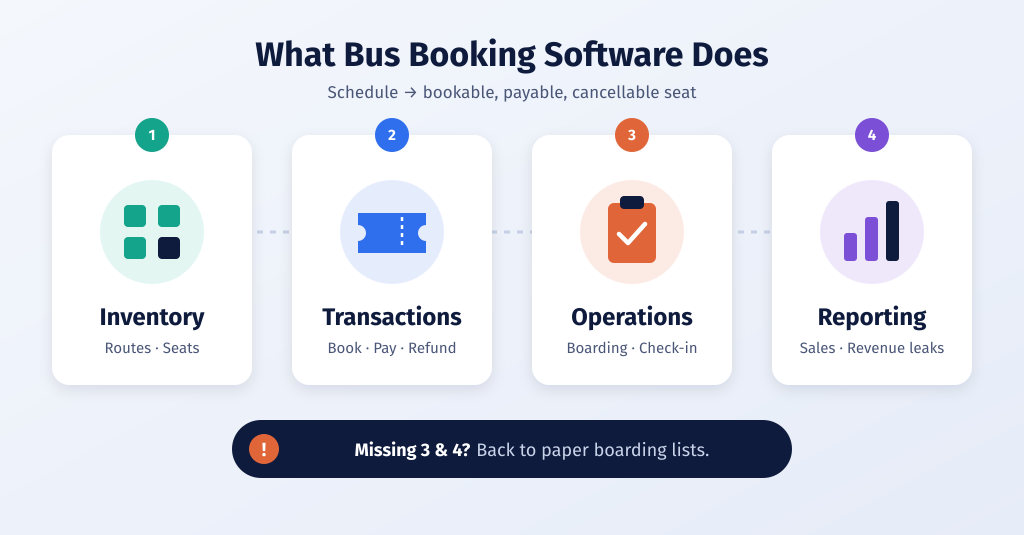
A complete platform handles four jobs:
- Inventory – routes, schedules, vehicle types and the individual seats attached to each departure.
- Transactions – seat selection, passenger details, payment, ticketing and refunds.
- Operations – boarding manifests, check-in, partial-cancellation handling and day-to-day schedule changes.
- Reporting – which routes sell, which departures run half empty, and where revenue leaks.
If a platform only does the first two well, you will feel the gap within a month of going live: staff will still be reconciling boarding lists on paper.
Who Is Buying, and Why It Changes the Shortlist
Small fleets usually need bus booking software that handles counter sales as well as online ones.
Single operators and small fleets
You own the buses. Your pain is counter congestion, phone bookings that never get recorded, and no-shows you cannot track. You want a booking flow your counter staff can learn in an afternoon, plus a manifest that prints or opens on a phone.
Aggregators and travel agencies
You resell seats across multiple operators. Your requirement is multi-operator inventory, commission handling and a booking flow that does not force customers through a single company’s branding.
Digital agencies and web developers
You are delivering a booking site for a client. Your requirements are different again: licensing that transfers cleanly, a platform the client can maintain without you, and a payment gateway that already works in the client’s market.
Write down which of these three you are before you evaluate anything. Most disappointing software purchases are the result of buying for the wrong one.
Seven Questions That Separate Serious Platforms From Demos
Ask every bus booking software vendor these seven questions before a demo.
- How is the seat map modelled? Look for per-seat state (available, held, booked, blocked) that survives a page refresh and a second browser tab. Two travellers must never be sold seat 14A.
- Can seats be released after a timeout? Abandoned checkouts should not hold inventory forever. Ask how long a hold lasts and whether you can change it.
- Does it support boarding points and dropping points? Long-distance coaches rarely pick up from one terminal, and pricing often varies by boarding point.
- What happens on partial cancellation? A family of four cancelling two seats should not cancel the whole booking. This is a surprisingly common gap.
- Are taxes, levies and service charges configurable? Bus pricing in most markets includes government levies that change without warning.
- Can an operator see only their own inventory? If you are running a multi-operator setup, role-based access is a security requirement, not a nice-to-have.
- What does cancellation and refund policy configuration look like? You need tiered rules – refund percentage by hours before departure – not a single toggle.
These seven questions map closely to the functional checklists used when evaluating any reservation platform, so they are a reasonable way to compare unlike products on common ground.
Booking Models: One-Way, Round Trip and Multi-Leg
Most small operators start with one-way search and add complexity later. That is fine, as long as the platform can grow with you.
- One-way – the baseline. Single origin, single destination, one departure.
- Round trip – two linked one-way legs. The tricky part is pricing and cancellation when the customer cancels only the return.
- Multi-city or multi-leg – common for tour operators running point-to-point itineraries rather than scheduled routes.
If your business is tour-based rather than schedule-based, the search-and-book flow you need is closer to a tour product than a bus ticketing system, because pricing is per package rather than per seat. Recognising that early saves you from forcing a scheduled-route tool into an itinerary business.
Seat Selection and the Customer Experience
Good bus booking software shows a live seat map, so two passengers can never book the same seat. Seat selection is where bus booking software earns or loses trust. Customers judge the whole platform on whether the seat map behaves the way they expect.
What good looks like:
- A visual layout that matches the actual coach – including sleeper, semi-sleeper and double-decker configurations where relevant.
- Clear distinction between available, selected and already-booked seats, with no reliance on colour alone for accessibility.
- Price shown per seat, updated live as selection changes.
- A time-limited hold so a hesitant customer does not block a seat indefinitely.
The detail work behind a seat map is deeper than most buyers expect, and it is worth understanding before you commit to a layout approach.
You can see how the seat map works for passengers in our bus booking software demo.
Operator Side: The Dashboard Is Half the Product
The dashboard is where bus booking software earns its money day to day. Every platform demo shows the customer-facing search box. Fewer show the back office, which is where your staff will spend their working day.
Check that the admin side gives you:
- Bulk schedule creation – setting up a route that runs daily for three months should not mean 90 manual entries.
- Manual booking entry for walk-in and phone customers, seated correctly in the same inventory.
- Boarding manifests by departure, ideally exportable or printable.
- Vehicle and driver records, so you can trace which bus ran which trip.
- Refund workflow with an audit trail – who approved it and when.
If you plan to let agents or franchisees sell on your behalf, an agent panel with its own login and commission view is effectively a requirement.
Payments, Notifications and Integrations
Check which payment gateways the bus booking software supports in your country. Booking software is rarely used on its own. Budget time for integration and check each one before buying.
Payments. Confirm which gateways are natively supported in your market, and whether you can offer pay-at-counter or partial advance payment. Many bus businesses live on advances rather than full online payment.
Notifications. SMS and email confirmations with the ticket attached are the minimum. WhatsApp or similar messaging is increasingly expected in South Asian and Middle Eastern markets.
Accounting and exports. Revenue reconciliation should not require manual re-typing. CSV export to your accounting tool is the practical baseline.
Analytics. At minimum you want load factor per departure and revenue per route, because those two numbers drive fleet decisions.
Cost Structure: What You Are Actually Paying For
Most bus booking software pricing is a licence, a per-ticket fee or a subscription. Bus booking software is usually priced in one of four ways, and the model matters more than the headline number.
| Pricing model | How it works | Watch out for |
|---|---|---|
| One-time licence | Pay once, host and maintain it yourself | You own updates, security patches and hosting |
| Annual subscription | Recurring fee, usually includes support | Renewal price increases and per-seat limits |
| Commission per ticket | Percentage of each sale | Cheap at low volume, expensive once you scale |
| Custom development | Built to specification | Ongoing maintenance cost is often underestimated |
Two line items get forgotten in almost every evaluation: payment gateway transaction fees, which are outside the software vendor’s control, and the staff time to migrate existing bookings and customers. Check current pricing with each vendor rather than relying on a figure from a review written a year ago.
Self-hosted licensing is often the cheapest option at scale, but only if you have someone who can manage hosting, SSL renewals and plugin updates. If you do not, the apparent saving disappears quickly.
Build, Buy or Extend?
For WordPress sites, extending a bus booking software plugin is usually faster than building one. There are three realistic paths.
Buy a dedicated bus ticketing platform when seat-level inventory, boarding points and operator panels are central to your business. This is the right answer for scheduled intercity operators.
Extend a general booking system when bus seats are one product among several – for example a travel company selling bus tickets alongside tours and hotel transfers. A unified system saves you from running two customer databases.
Build custom only when you have genuinely unusual requirements, such as proprietary pricing logic or deep integration with an existing ERP. Budget for maintenance, not just build.
For WordPress-based businesses, the practical middle path is a dedicated plugin: you get seat-level inventory and a ticket-based flow without commissioning custom code. The trade-off is that you are responsible for hosting, performance and plugin updates yourself.
Implementation: A Realistic Timeline
A realistic bus booking software rollout takes two to six weeks. Most bus businesses underestimate the setup phase. A workable sequence:
- Data preparation – routes, stops, timings, vehicle types, fare tables. This is almost always the longest step.
- Configuration – seat layouts per vehicle type, taxes, cancellation rules, notification templates.
- Payment integration – sandbox testing, then a live test transaction, then a refund test.
- Staff training – counter staff on manual bookings, management on reports and refunds.
- Soft launch – run the new system alongside your old process for one or two weeks on a limited set of routes.
Soft launch matters. Trying to flip an entire operation to new software on a Friday night before a holiday weekend is how teams lose confidence in a system that was actually working fine.
Red Flags During a Demo
- Seat availability that only updates on page reload.
- No answer to “what happens if two people book the same seat at once?”
- Cancellation handled only as all-or-nothing.
- Reporting that shows totals but not load factor per departure.
- A pricing page that omits transaction fees, hosting or support renewal costs.
- No export of your own booking data.
Ask for a sandbox account and try to break it. Vendors who hesitate to give one are telling you something.
Frequently Asked Questions
Is bus booking software different from a general booking plugin?
Yes. General booking tools model a slot or a resource. Bus ticketing needs per-seat inventory, boarding and dropping points, and typically a boarding manifest. The overlap is in payments and notifications; the inventory model is where they diverge.
Can I start with one route and expand later?
That is the sensible approach, provided route and vehicle structures are not hard-coded. Confirm you can add vehicle types and seat layouts after launch without a rebuild.
How much should I budget?
It depends entirely on the pricing model you choose, not the feature list. A commission-based platform can look free until you are selling thousands of tickets a month. Get written quotes under your expected volume and check current pricing before deciding.
Do I need a mobile app?
A responsive website covers most bookings. A native app makes sense once repeat customers and push notifications become a meaningful part of your revenue.
Where to Go Next
If your next question is money, the cost breakdown between free and paid routes is worth reading before you shortlist. If you already know you want a focused bus product, the operator-tested shortlist covers platforms built specifically for ticket sales rather than generic reservations.
- If you need the budget comparison rather than a selection framework, see the free vs paid cost breakdown.
- If you want named platforms reviewed rather than a buying framework, see the shortlist of bus booking software for all bus types.
The Short Version
Bus booking software is chosen on inventory modelling, not on feature checklists. Get the seat map, hold logic, boarding points and partial-cancellation rules right, and the rest is configuration. Get them wrong, and no amount of dashboard polish will fix a counter full of confused passengers.
Start by writing down whether you are an operator, an aggregator or an agency delivering for a client. That single decision narrows a crowded market to a handful of realistic options – and makes the demos far more useful.