 Get Halloween 15% for Limited Time on Lifetime & Bundle Deal

Asking for the full amount up front is one of the fastest ways to lose a high-ticket sale. A deposit lets the customer reserve the product, service, or booking with a smaller payment today and settle the balance later. In this guide, you will learn how to configure percentage-based or fixed deposit payments in WooCommerce step by step, set a storewide default, override the rule on individual products, and test both deposit types at checkout.
- What You Need Before You Start
- Fixed vs. Percentage Deposits: Which Should You Configure?
- Step 1: Install and Activate the Deposit Plugin
- Step 2: Set Your Storewide Deposit Default
- Step 3: Test the Fixed Deposit at Checkout
- Step 4: Test the Percentage Deposit at Checkout
- Step 5: Override the Deposit on Individual Products
- Fixed vs. Percentage Deposits Compared
- Handling Taxes, Shipping, and the Balance
- Troubleshooting Common Deposit Setup Issues
- Frequently Asked Questions
- Wrapping Up
What You Need Before You Start
Deposit configuration sits on top of your normal WooCommerce setup, so confirm the basics first:
- WooCommerce installed and active, with at least one product and one working payment gateway.
- A deposit or partial payment plugin. WooCommerce has no native deposit field, so you need an extension that adds one. This walkthrough uses Advanced Deposit & Partial Payment for WooCommerce (WpDepositly), which supports both fixed and percentage deposits.
- Payment gateways suited to split payments – for example Stripe or PayPal. Gateways that authorize on one payment only can behave differently on the balance charge.
- A test order. Place one real order in test mode before you enable deposits for live customers.
Fixed vs. Percentage Deposits: Which Should You Configure?
Both deposit types do the same job, but they fit different catalogues.
- Fixed amount deposit: A flat fee, such as $50, regardless of the order total. Best for events, appointments, consultations, and rentals where the reservation itself has a set value.
- Percentage-based deposit: A share of the order total, such as 30%, that rises and falls with the cart. Best for high-value retail, custom work, luxury tours, and anything with a wide price range.
A practical rule of thumb: if your products cluster around one price, a fixed deposit is simpler to explain. If prices vary widely, a percentage deposit keeps the deposit proportionate and protects you from under-collecting on expensive orders.
If you are still deciding whether deposits belong in your store at all, read our overview of why every WooCommerce store should offer deposit and installment payments before you configure anything.
Step 1: Install and Activate the Deposit Plugin
Start by adding the plugin that will handle the deposit logic.
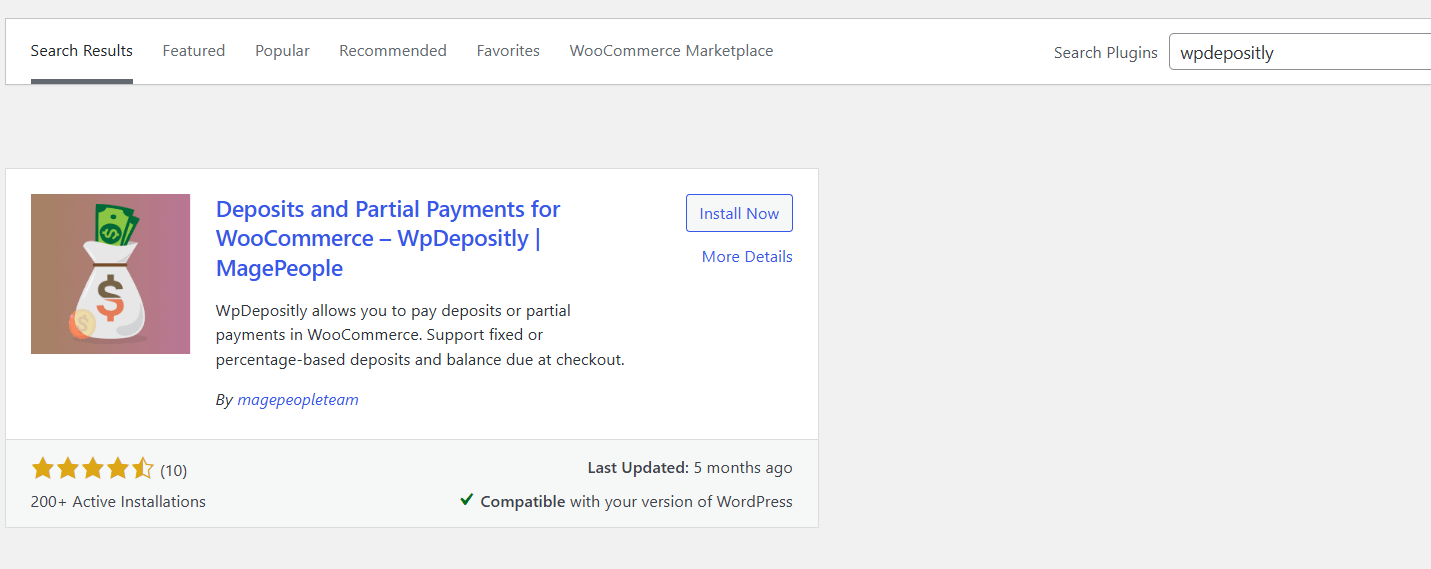
- In your WordPress dashboard, go to Plugins → Add New Plugin.
- Search for “WpDepositly” and click Install Now.
- Click Activate. A new Partial Payment menu appears in your sidebar.
Step 2: Set Your Storewide Deposit Default
To apply one rule across your whole catalogue, open Partial Payment → Settings → Deposit Storewide Values. This screen controls the behaviour that every product inherits unless you override it.
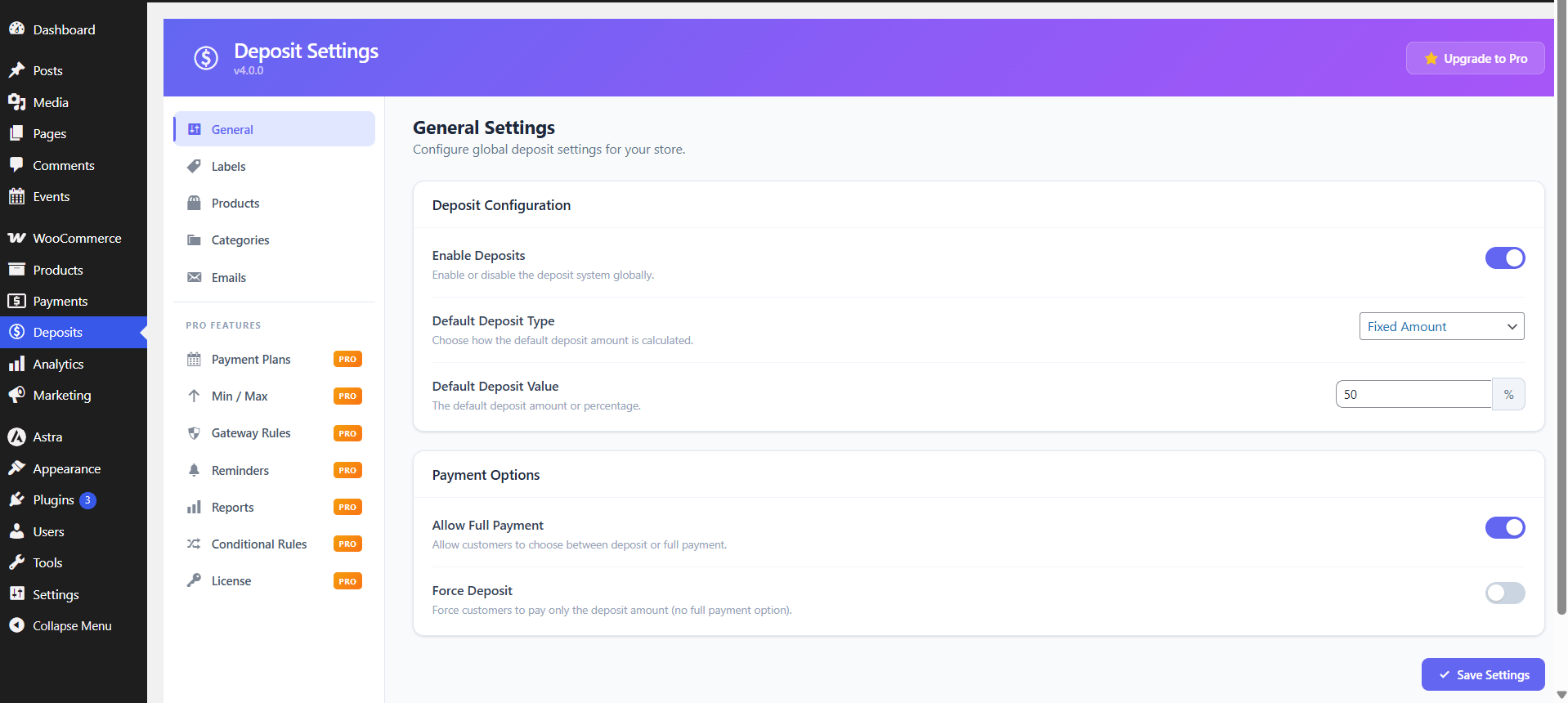
Work through the settings in this order:
- Enable deposit by default: set to Yes to switch the feature on storewide.
- Choose deposit type: select Fixed value for a flat fee or Percentage of price for a calculated share of the total.
- Enter the amount: the number you type means a currency value or a percentage depending on the type you picked. Entering
50gives you either $50 or 50%, so double-check the type before saving. - Mandatory vs. optional: the force-deposit setting decides whether customers must pay a deposit or can still choose to pay in full.
If you want to see what else this approach can do for conversion and cash flow, our guide to the benefits of a partial payment plugin covers the practical upside.
Set the Balance Payment Window
A deposit only works if the balance arrives on time. In the same settings area, decide how long a customer has to clear the outstanding amount and what happens when that window closes. Two common approaches:
- Collect before fulfilment: the balance is due before you ship or before the booking date. Safest for physical goods.
- Collect after the deposit, on a deadline: you set a due date and follow up. Works for services, but you need reminders so orders do not stall.
Step 3: Test the Fixed Deposit at Checkout
Switch the storewide type to Fixed value, save, then add a product to the cart and go to checkout. With a $50 fixed deposit configured, the customer sees two options: pay $50 now, or pay the full amount.
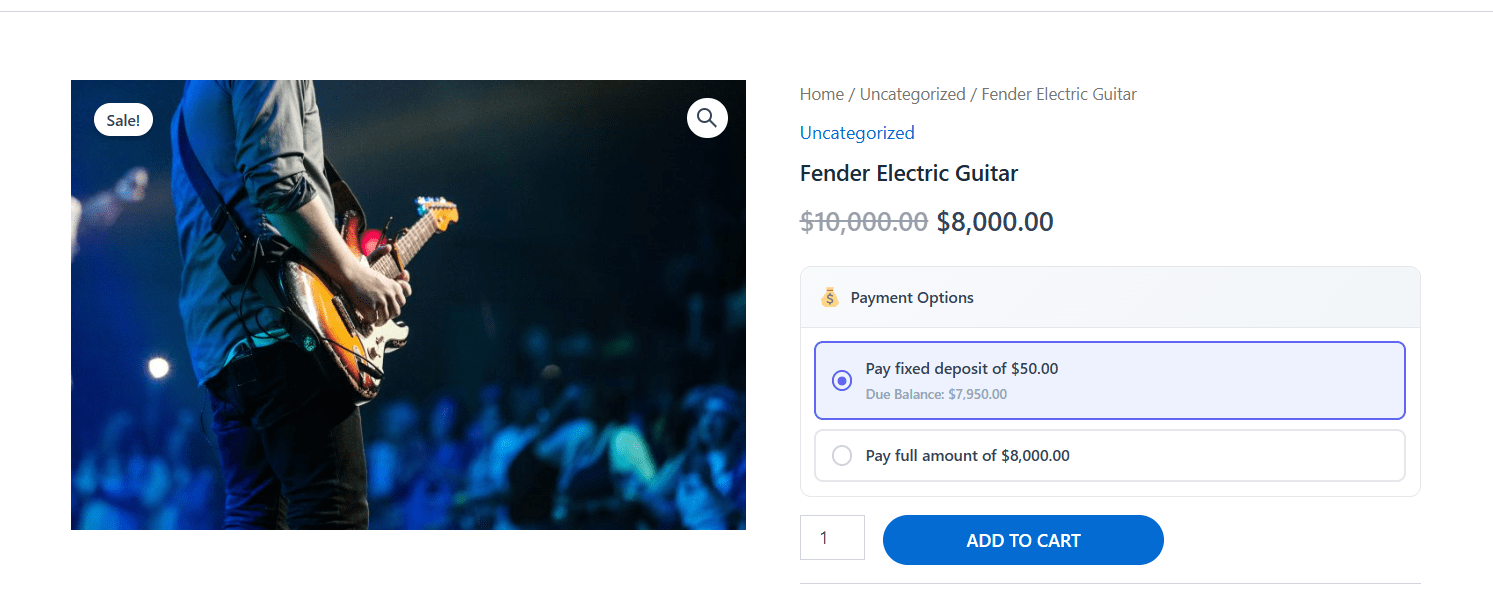
Confirm on screen that the deposit line, the amount due today, and the remaining balance all show the figures you expect. This is the moment to catch a wrong currency symbol or a deposit that accidentally exceeds the product price.
Step 4: Test the Percentage Deposit at Checkout
Now switch the type to Percentage of price, save, and repeat the checkout test. A 50% deposit on the same product should offer a pay-half-now option alongside the pay-in-full option.
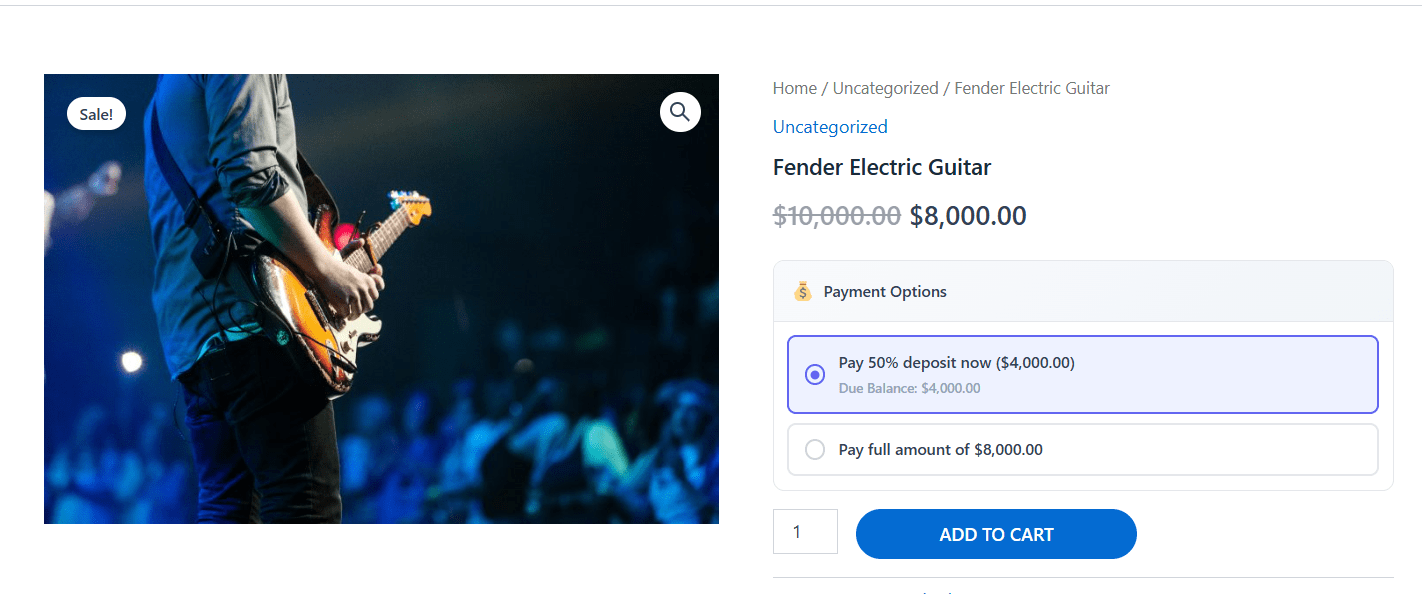
Test percentage deposits on at least one variable product too. The deposit should recalculate against the selected variation’s price rather than the parent product’s, and it should update when the customer changes variation.
Step 5: Override the Deposit on Individual Products
You rarely want one rule for the entire catalogue. To give a product its own deposit terms:
- Edit the product and open the Deposit tab inside the Product Data section.
- Enable the deposit for that item and choose the type and amount – for example, a flat $50 consultation fee.
- Save the product and repeat for anything that needs different terms.
Because overrides work per product, you can run a $50 fixed deposit on a booking and a 25% deposit on a made-to-order item at the same time, without touching the storewide default.
Fixed vs. Percentage Deposits Compared
| Feature | Fixed Amount | Percentage-Based |
|---|---|---|
| Deposit value | One flat amount, e.g. $50 | A share of the total, e.g. 30% |
| Best use case | Events, appointments, consultations, rentals | High-value retail, custom orders, tours |
| Amount collected | Identical on every order | Rises and falls with order value |
| Setup effort | One number to enter | One number to enter, but validate across price ranges |
| Variable products | Same amount on every variation | Scales to each variation’s price |
| Risk on expensive orders | Deposit may be too small a share | Stays proportionate automatically |
Handling Taxes, Shipping, and the Balance
Two configuration areas trip people up more than the deposit amount itself.
Tax and shipping on split orders
Under Settings → Calculation & Structure you choose how tax and shipping are treated. The usual options:
- Collect everything with the deposit – simplest for accounting, but a larger first payment.
- Split tax and shipping by the deposit percentage – proportional, and the customer pays tax on each part.
- Defer tax and shipping to the final payment – smaller deposit, more work at the end.
Whatever you choose, tell the customer clearly at checkout what the first payment covers. Ambiguity here drives disputes and refund requests.
Collecting the outstanding balance
Customers can pay the rest from their own account. They log in, open the partially paid order on the My Account page, and pay the outstanding amount with any available gateway.
If a customer never pays, the order stays in a partially paid state. You can track outstanding balances from the Partial Order List and follow up manually. Automated balance reminders are part of the paid version, so decide whether that convenience is worth it for your order volume. Check current pricing on the plugin page before you commit.
Troubleshooting Common Deposit Setup Issues
- No deposit option appears at checkout: the storewide toggle is off, the product is excluded, or a caching plugin is serving a cached cart. Clear caches and retest.
- The deposit looks like the wrong value: the type is set to percentage when you meant fixed, or the reverse. Check the type field, not just the number.
- Deposit amount exceeds the product price: a fixed deposit larger than a cheap product’s price. Use percentage deposits on lower-priced ranges, or set a minimum order value.
- Balance payment fails: some gateways handle a second charge poorly. Confirm your gateway supports split or follow-up payments before going live.
- Test orders behave correctly but live orders do not: you tested in sandbox mode with different gateway credentials. Repeat the test with live keys on a low-value product.
Frequently Asked Questions
Can customers pay the balance from their account?
Yes. Customers log into their WooCommerce account, view their partial orders, and pay the remaining balance from the My Account page using any available payment gateway.
What happens if a customer does not pay the remaining balance?
The order stays in a partially paid status. You track these from the Partial Order List. Automated email reminders are available in the paid version of the plugin.
Does the free version support both deposit types?
Yes. Both fixed amount and percentage-based deposits are available in the free version, along with the per-product override.
How are taxes and shipping handled on a deposit order?
Under Settings → Calculation & Structure you can collect the full tax and shipping with the deposit, split them by the deposit percentage, or defer them entirely to the final payment.
Can I mix fixed and percentage deposits in one store?
Yes. Set whichever type you use most often as the storewide default, then override individual products with the other type.
Wrapping Up
Configuring deposit payments in WooCommerce comes down to three moves: choose fixed or percentage as your storewide default, override the products that need different terms, and test both paths at checkout before switching deposits on for live customers. Do that, and you lower the barrier to buying expensive items without giving up control of your cash flow.
If you would prefer a comparison of the available extensions before settling on one, see our roundup of WooCommerce partial payment and deposit plugins, or read the guide to integrating a deposit and partial payment system if you need the wider setup context.
