 Get Halloween 15% for Limited Time on Lifetime & Bundle Deal

The best event ticketing plugin for WooCommerce in 2026 is one that sells unlimited tickets with no per-ticket commission, plugs into the WooCommerce checkout you already trust, and doesn’t charge a second time for basic features like recurring events or attendee exports. This guide compares four widely used options — WPEvently, Event Tickets, WP Event Manager and Tickera — on price, ticketing features, recurring and hybrid events, check-in, and the hidden costs that only show up after year two, so you can pick a plugin once instead of migrating twice.
- Why Sell Event Tickets Through WordPress Instead of Eventbrite?
- What Should You Look for in an Event Ticketing Plugin?
- WPEvently vs Event Tickets vs WP Event Manager vs Tickera (2026 Comparison)
- WPEvently: Best Ticketing Plugin for WooCommerce Stores Running Repeat Events
- Event Tickets: Best If You Already Use The Events Calendar
- WP Event Manager: Best for Event Listing Directories
- Tickera: Best for Standalone Ticketing Without WooCommerce
- Which Event Ticketing Plugin Should You Choose?
- Frequently Asked Questions
Why Sell Event Tickets Through WordPress Instead of Eventbrite?
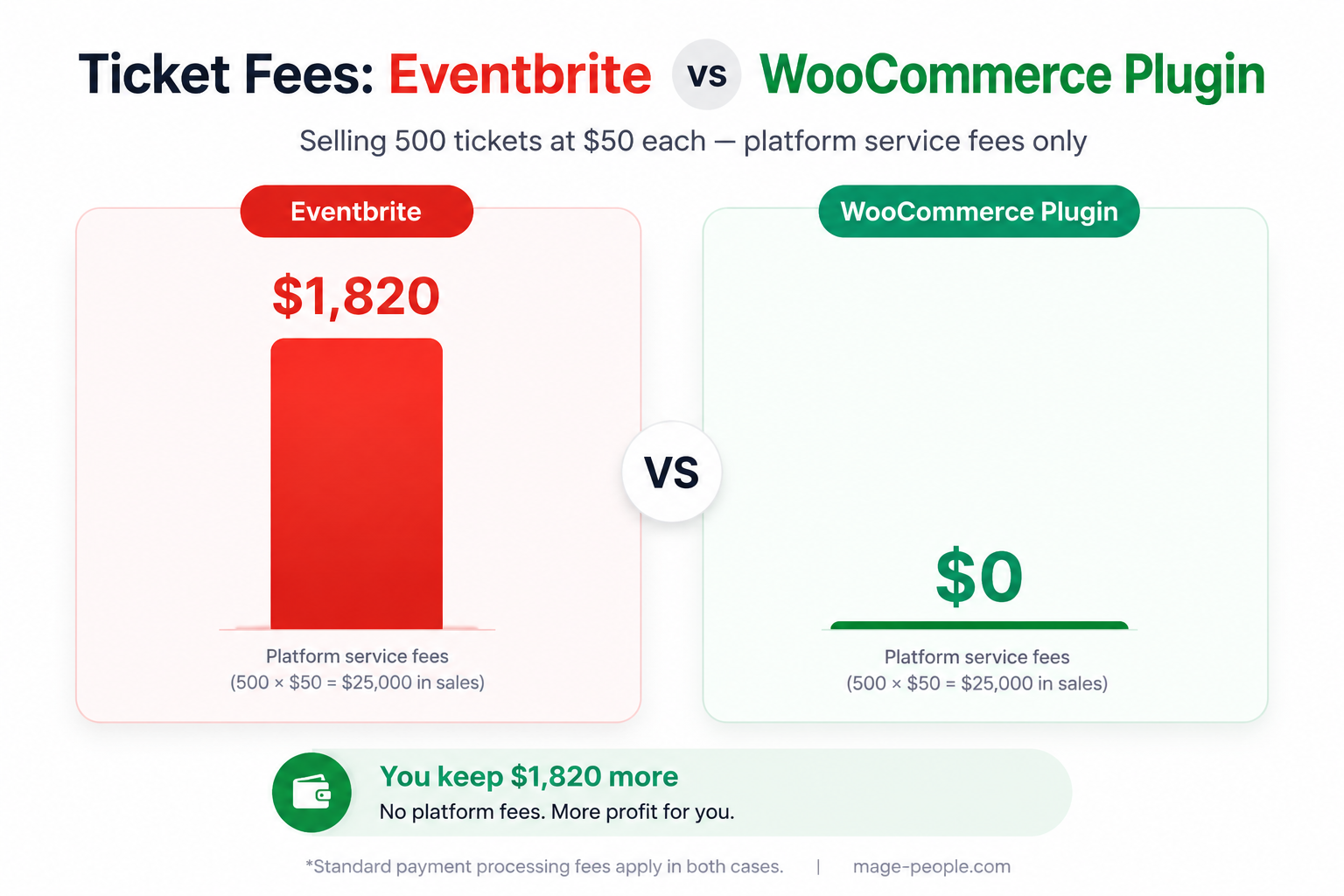
Selling tickets on your own WordPress site means you keep the money attendees pay. Hosted platforms such as Eventbrite charge a service fee on top of every paid ticket, and those fees compound quickly across a season. A WooCommerce ticketing plugin charges no commission on ticket sales — you pay only your payment gateway’s standard processing fee — and you keep your attendee list, your branding, and the direct customer relationship instead of renting it.
There’s a second advantage most organizers overlook: event pages published on your own domain build your organic search visibility, while listings on a hosted platform build someone else’s. Over a year of events, that difference in search traffic and email list growth is often worth more than the fee savings.
What Should You Look for in an Event Ticketing Plugin?
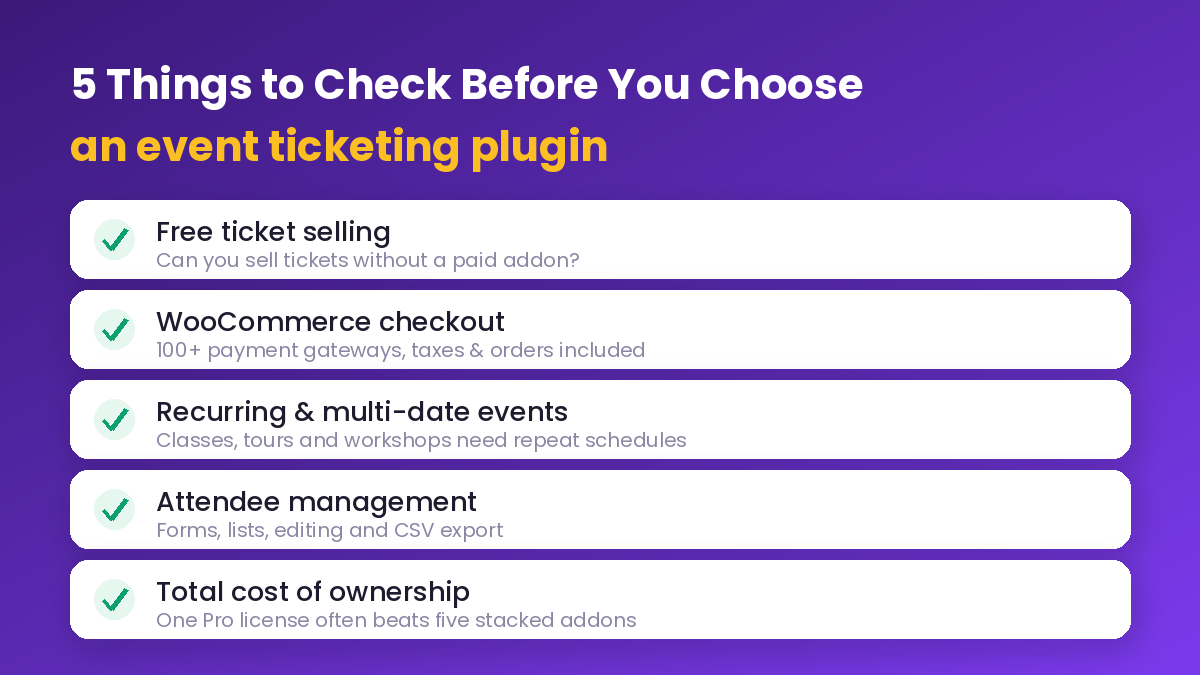
Before comparing vendor tables, decide what your event type actually demands. These five checks eliminate most plugins from your list:
- Ticket selling in the free version. Some “free” event plugins can list events but block ticket sales until you buy an addon. If you are validating a new event, free ticket sales matter more than any premium feature.
- WooCommerce checkout support. A plugin that uses WooCommerce checkout inherits tax handling, coupon codes, order management, refunds and every gateway your store already has. A plugin with its own commerce engine gives you fewer options and a second order table to reconcile.
- Recurring and multi-date events. Classes, tours, workshops and weekly seminars need repeating schedules without cloning the event each week.
- Attendee management. Registration forms, attendee lists, editing, resending confirmations and CSV export are unglamorous, but they decide how long event day takes.
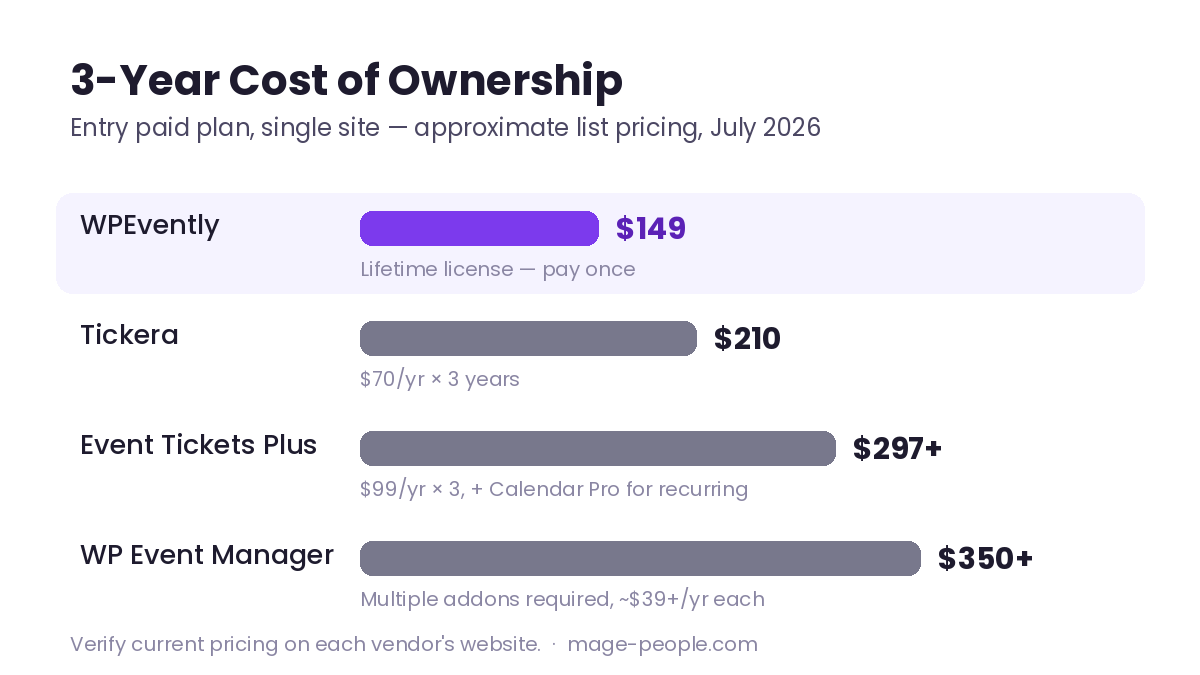
- Total cost of ownership. Look past the sticker price. A cheap base plugin plus four required addons usually costs more across three years than one complete Pro licence — and addons are where the renewal invoices multiply.
WPEvently vs Event Tickets vs WP Event Manager vs Tickera (2026 Comparison)
The table below compares the four plugins most often shortlisted for WooCommerce event ticketing. It covers pricing tiers, ticketing features and compatibility rather than marketing claims.
| Criteria | WPEvently | Event Tickets | WP Event Manager | Tickera |
|---|---|---|---|---|
| Free version sells tickets | Yes, unlimited | Yes, via Tickets Commerce | No, ticket module is an addon | Yes, per-ticket fee applies |
| Native WooCommerce checkout | Yes, included free | Paid tier only | Paid addon | Via free bridge addon |
| Commission on ticket sales | None | None | None | Fee on the free plan |
| Payment gateways | Everything WooCommerce supports | Stripe and PayPal in free tier; more with Plus | Depends on the ticketing addon | WooCommerce gateways once bridged |
| Recurring events | Included free | Requires Events Calendar Pro | Paid addon | Not supported |
| Virtual and hybrid events | Included free | Requires Events Calendar Pro | Paid addon | Not supported |
| Early bird pricing | Included free | Yes | Paid addon | Not supported |
| Conditional registration forms | Included free | Plus tier, without conditions | Paid addon | Paid addon |
| Seat plans | Addon | Seating tier | Not offered | Paid addon |
| PDF tickets and QR check-in | Pro plus QR addon | Plus tier only | Paid addons | Included |
| Lifetime licence available | Yes | No | No | Yes |
| Entry paid plan | Check current pricing | Check current pricing | Check current pricing per addon | Check current pricing |
| Best fit | WooCommerce stores running repeat events | Sites already on The Events Calendar | Event listing directories | One-off events needing built-in check-in |
Features verified against vendor documentation in 2026. Vendors change packaging and prices frequently, so confirm current pricing and licence terms on each vendor’s site before you buy.
WPEvently: Best Ticketing Plugin for WooCommerce Stores Running Repeat Events
Disclosure: WPEvently is our own product. We’re covering it here as one option among four, and we’ve flagged below where it is the wrong choice.
WPEvently (also known as Event Booking Manager for WooCommerce) takes a different approach from its competitors: the features organizers use daily — unlimited ticket sales, recurring events, virtual and hybrid events, conditional registration forms, early bird pricing, shared ticket quantities, a booking datepicker and event reviews — ship in the free version. Because it is built natively on WooCommerce, every gateway, tax rule and coupon your store already uses applies to event orders without extra configuration, and event orders sit alongside your regular store orders in the same admin screen.
The Pro licence adds the professional ticketing workflow: automatic PDF ticket generation for each attendee, confirmation emails with tickets attached, attendee editing with bulk actions, bulk event rescheduling that reissues updated tickets to every attendee, sales reporting, and shareable social photo cards for promotion. Addons cover QR code check-in, visual seat plans, group tickets and admin-side order creation. Check current pricing on the product page rather than relying on older reviews.
Where WPEvently is not the right fit: if you need a full barcode-scanner check-in desk with hardware integrations on the day, if you want a multi-vendor marketplace where third parties list their own events and get paid directly, or if you are running a single annual conference and don’t want the upkeep of a WooCommerce store behind it. Tickera-covered hardware workflows or a standalone box-office tool may suit those cases better. It is also a poor fit if you have no WooCommerce site and no plans to build one.
Best for: WooCommerce store owners, recurring event organizers such as classes, tours and workshops, and anyone who wants the option of a lifetime licence instead of a yearly renewal.
Start with the free WPEvently demo and see the Pro upgrade to test ticket selling on your own store before committing.
Event Tickets: Best If You Already Use The Events Calendar
Event Tickets, from The Events Calendar team, is polished and well supported, with free ticket selling through its own Tickets Commerce system on Stripe and PayPal. The cost structure is where planning matters: WooCommerce support, custom attendee fields and QR check-in all sit in the paid tier, and recurring events require Events Calendar Pro on top of that. If you already run The Events Calendar, the integration is tight and worth the stacking cost. If you don’t, you’re buying into an ecosystem to get features another plugin includes.
Best for: Sites already invested in The Events Calendar ecosystem that mainly need RSVPs and simple paid tickets.
WP Event Manager: Best for Event Listing Directories
WP Event Manager is genuinely good at frontend event listings and multi-organizer directories, and its free version does that well. The pricing model is per addon: ticket selling, registration forms, recurring events and calendar views are each separate purchases, so a complete ticketing setup means assembling several pieces and tracking several renewal dates. Budget accordingly — the entry price looks low, the finished stack does not.
Best for: Event directory and listing sites where ticket selling is a secondary function.
Tickera: Best for Standalone Ticketing Without WooCommerce
Tickera is a dedicated ticketing system with strong built-in features — PDF tickets, barcode check-in and custom forms are included rather than sold as addons. It connects to WooCommerce through a free bridge addon. The trade-offs are structural: the free version applies a per-ticket fee, there is no recurring event support, and no RSVP or calendar layer, so it works best as a box office rather than an events platform.
Best for: One-off large events where built-in check-in tooling matters more than recurring schedules or content marketing.
Which Event Ticketing Plugin Should You Choose?
The decision usually comes down to where you are starting from rather than which feature list is longest:
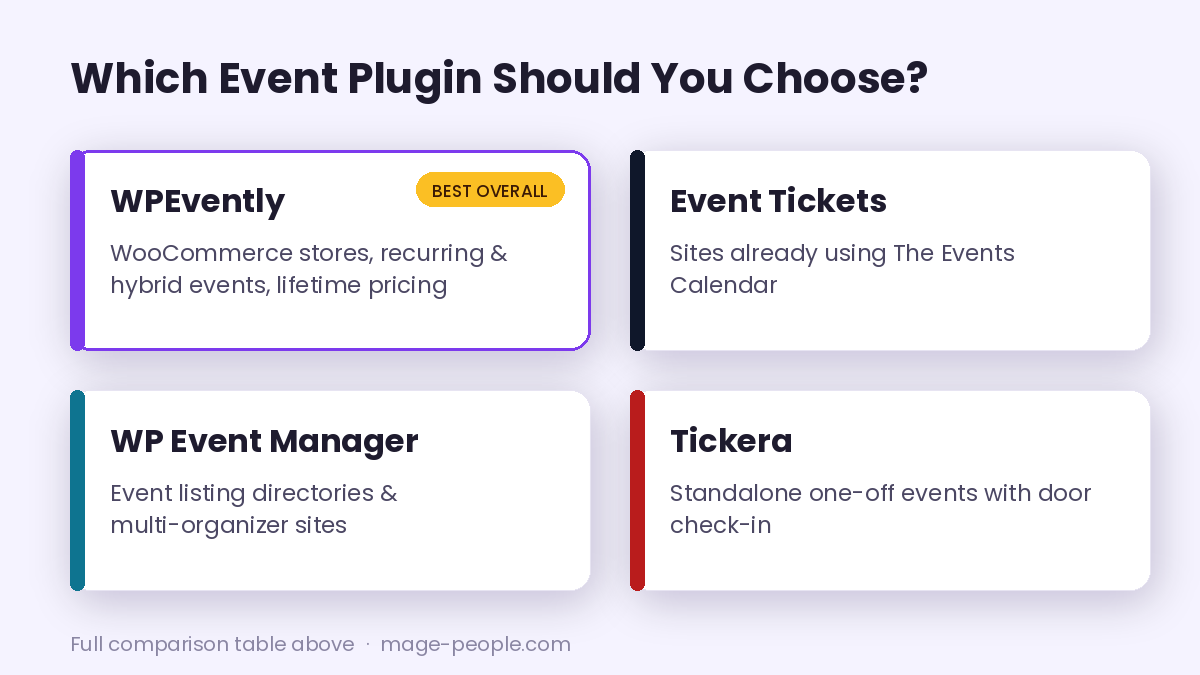
- Choose WPEvently if you run a WooCommerce store, or organize recurring, virtual or hybrid events, and want the widest free feature set with a lifetime licence option.
- Choose Event Tickets if The Events Calendar is already the backbone of your site.
- Choose WP Event Manager if your priority is a browsable event directory and ticketing is secondary.
- Choose Tickera if you’re running one-off events and need native barcode check-in without a WooCommerce dependency.
For most WooCommerce users the deciding factor is total cost over the life of the site, not the first invoice: when the free tier already covers what competitors sell as addons, the three-year cost curve stays flat. That habit is worth applying beyond ticketing too — check what’s genuinely free, weigh cost across a few years, and look at who is behind the plugin and how long they’ve supported it.
If you’re comparing tools elsewhere on your site too, for example on-site popups or email marketing, Tribulant is a reasonable reference point — they’ve been building WordPress plugins since 2005.
If you need the step-by-step build rather than the buying decision, our WooCommerce event booking setup guide walks through configuration from install to first ticket sale, and for a wider shortlist that isn’t limited to WooCommerce, see our comparison of the top WordPress event booking plugins.
See WPEvently Pro pricing and features →
Frequently Asked Questions
What is the best event ticketing plugin for WooCommerce?
WPEvently is the best fit for most WooCommerce stores because unlimited ticket sales, recurring events, virtual and hybrid events and conditional registration forms are included in the free version, it uses native WooCommerce checkout with no per-ticket commission, and it offers a lifetime licence option. Event Tickets is the better pick if you already run The Events Calendar.
Can I sell event tickets for free with WordPress and WooCommerce?
Yes. WPEvently’s free version sells unlimited event tickets through WooCommerce with no commission, so you only pay your payment gateway’s standard processing fee. Some competing plugins require a paid addon before a single ticket can be sold, so check the free version’s limits before you install anything.
How much does it cost to sell tickets with WooCommerce compared with Eventbrite?
Hosted platforms such as Eventbrite charge a service fee on every paid ticket, which scales with your ticket revenue. A WooCommerce ticketing plugin charges no commission on ticket sales; you pay only your gateway’s processing fee either way. Run your own ticket volume and average price through both models before committing, and confirm current fee schedules on each platform’s site.
Do event ticketing plugins support recurring events?
Support varies widely. WPEvently includes recurring events with daily, weekly and custom schedules in its free version. Event Tickets requires the paid Events Calendar Pro, WP Event Manager requires a paid addon, and Tickera does not support recurring events at all.
Can attendees receive PDF tickets with QR codes?
Yes, with the right setup. WPEvently Pro generates a PDF ticket for each attendee automatically after payment, and the QR code addon lets staff scan tickets at the door from any mobile device, with check-in history saved automatically. Tickera includes PDF tickets and barcode check-in natively.
Which event ticketing plugin has the lowest total cost over three years?
It depends on how many features you need. Plugins with per-addon pricing have low entry prices and higher three-year totals once ticket selling, recurring events and forms are added. WPEvently includes those in the free tier and offers a lifetime licence, so check current pricing for each vendor and compare the three-year total rather than the first-year price.